
Invoice processing is a crucial business function that forms the lifeline of any organization. However, handling invoices manually can be an arduous, error-prone process. Optical character recognition (OCR) software has emerged as an invaluable tool to automate invoice processing through intelligent data capture and extraction.
In this comprehensive blog post, we will discuss the significance of OCR technology in streamlining invoice workflows. We will overview the must-have capabilities in OCR software solutions for invoice processing and provide factors to consider when selecting the right tool.
The highlight, however, is an in-depth look at Kudra – an AI-powered document processing platform with unparalleled accuracy and customization capabilities. We will cover Kudra’s standout features, advantages in invoice digitization, and overall value proposition for modern businesses.
By the end, you will have a firm understanding of the invoice processing challenges solved by OCR software and how Kudra’s next-gen solution is revolutionizing this critical business function.
Understanding OCR Software and Its Importance in Invoice Processing
OCR or Optical Character Recognition refers to technology that can identify text and characters within images and documents and convert them into machine-readable formats. In layman terms, OCR software can “read” text from scans, PDFs, images, and even handwritten notes.
The recognized text can then be edited or exported to other digital environments. This enables the automation of mundane and repetitive data entry while eliminating human errors.
When it comes to business invoices, OCR technology plays an invaluable role in streamlining workflows. By extracting text and critical data points from paper or digital invoices, OCR solutions help organizations:
• Reduce manual data entry and validation – Taking a manual approach to invoice processing requires teams to manually type or cross-verify hundreds of invoices. OCR solutions capture data accurately without human intervention.
• Accelerate approval and payment cycles – Digitized invoice data can be quickly exported to ERPs and accounting software, enabling faster processing and payments.
• Minimize errors and exceptions – Manual data entry often leads to typos, incorrect values, and lost invoices. Intelligent OCR ensures complete and accurate e-invoice digitization.
• Unlock insights from invoice data – With a centralized e-invoice data repository, businesses can derive rich insights through custom reporting.
• Achieve compliance with ease – Electronic invoices meet regulatory compliance needs like those mandated by VAT and GST norms.
By eliminating slow and clumsy manual processes, OCR software becomes a high-ROI tool for streamlining accounts payable and receivable.
When integrated with procurement and payment systems, it creates an end-to-end, digital invoice processing ecosystem. Leading enterprises are already leveraging OCR technology to process over 100,000 invoices annually with minimal human involvement.
Key Features in OCR Software
While evaluating OCR solutions for invoice digitization, there are a few must-have capabilities to look for:
Multi-format import – The software should allow bulk uploading of paper and digital invoices in formats like PDF, JPEG, Excel, Word documents, emails containing invoices as attachments, scanned images of printed invoices, etc.
AI-based recognition – The OCR engine at the core should leverage AI and machine learning for contextual analysis and data extraction from complex invoice layouts. It should accurately process tables, checkboxes, signature areas, logos, and other intricate details.
Template management – One should be able to save data extraction workflows as templates for efficient processing of future invoices of the same layouts. For instance, purchase order invoices from Vendor A should have an associated template.
Custom workflow builder – This allows creating flexible data capture workflows without coding to extract invoice data and route it to specified endpoints. One should also be able to set rules, validations, and exceptions handling within these workflows.
Tax data recognition – The software should be adept at identifying and capturing tax-related information like VAT, GSTIN numbers, HSN codes, etc. from invoice documents.
Integration capabilities – There should be support for API/webhooks-based integration with surrounding finance systems like ERPs, accounting software, bank payment platforms, etc.
Scalability – It should be able to handle both low and high invoice volumes with equal and consistent accuracy. Load-balancing and auto-scaling capabilities are vital for large enterprises.
Data export options – Recognized invoice data should be easily exportable to business systems or storage environments like Dropbox, Google Drive, databases, cloud storage, QuickBooks, Xero, etc.
Multilingual support – For global companies, the software should be able to process invoices in different languages based on the source country.
Data security – Robust security protections like encryption, access control, and data privacy should be implemented to safeguard invoice data.

How to Choose the Right OCR Software
With a wide variety of OCR tools in the market, selecting the right solution for your unique needs is vital for success. Here are key considerations when investing in OCR software:
● Precision – The software accuracy in data recognition and extraction provides the foundation for streamlined invoice processing. Evaluate accuracy metrics across invoice formats.
● Software integration – The OCR tool should seamlessly integrate with surrounding finance systems to digitize end-to-end invoice workflows.
● Customization – The solution should provide easy workflow customization for your distinct business use cases without complex coding.
● Scalability – It should easily scale across geographies to ingest high invoice volumes to meet current and future needs.
● Ease of use – The solution should have an intuitive UI allowing business users to create data capture workflows without IT help.
● Support quality – Timely and dependable customer support is vital when rolling out a business-critical application like OCR.
● Pricing – Opt for a solution that provides complete value aligned with your budget – avoid steep upfront licensing fees.
By evaluating solutions against these parameters, you can make the right OCR software choice for automating your invoice processing.
Introductions to Ten Best OCR Software
Now let’s briefly discuss the ten leading options for OCR-driven invoice digitization:
1. Kofax Power PDF Advanced – Offers precise OCR capabilities but better suited for low volumes. Pricing starts at $200 per license.
2. ABBYY FineReader – Recognizes texts & tables from PDFs and scans. Struggles with handwritten notes. Costs around $119 for a perpetual license.
3. Microsoft Azure Computer Vision – Cloud API for OCR processing but lacks workflow customization abilities. Pay per usage pricing.
4. Rossum – Specialized for invoice processing with good accuracy but limited language support. Pricing undisclosed.
5. HyperScience – Enterprise-grade performance but expensive at $0.05 per invoice scanned.
6. DocParser – User-friendly with solid features but data extraction accuracy needs improvement. Starts at $29 per month.
7. Amazon Textract – Serverless OCR from AWS but error-prone on complex tables and calculations. Pay as you go model.
8. UiPath Document Understanding – Powerful automation but steep learning curve for non-developers. Pricing not available.
9. FileFacets ID2ID – Specialized for ID card recognition. Invoice processing capabilities limited. Starts at $99 per month.
10. DocDigitizer – Affordable SaaS but very basic in terms of features. $12 a month per user.
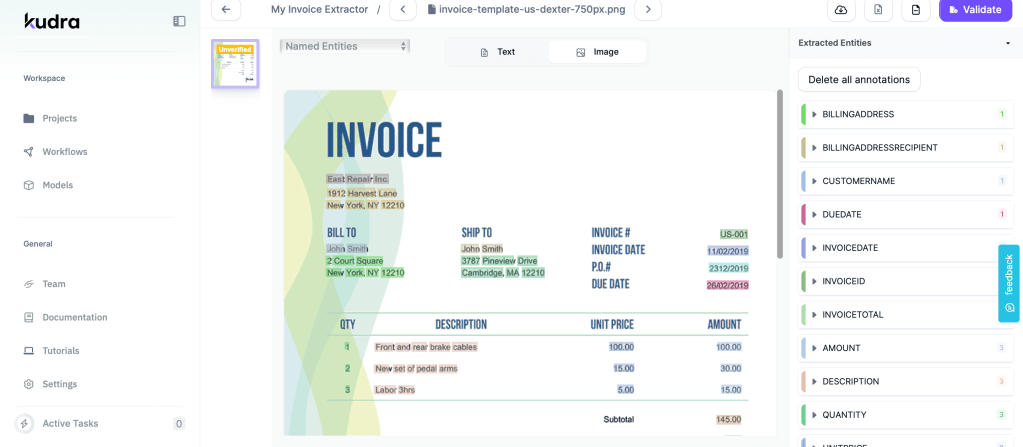
Extracting data from invoices with Kudra
Kudra: Intelligent Document Processing Solution
Now let’s focus on Kudra, which stands apart as an enterprise-ready AI platform for document digitization and data extraction. With advanced OCR capabilities tailored for business documents, Kudra adeptly handles diverse invoice layouts and complexity.
It comes packed with purpose-built features for streamlining invoice processing workflows:
● Import Capabilities: Kudra allows fast bulk uploading of invoice documents in all formats – PDFs, Word docs, Excel sheets, email attachments, scanned images, etc.
● AI-based Recognition: The OCR engine leverages machine learning for context-aware data extraction from tables, checkboxes, and other intricate details within invoice documents.
● Custom Workflow Builder: Kudra equips business users to create tailored data capture workflows and set validations without any coding. You can build workflows from scratch or use pre-made templates.
● Tax Data Recognition: It accurately extracts tax details like VAT numbers, GSTIN, HSN codes from supplier invoices for compliance and reporting.
● Integration: Kudra supports API-based integrations with surrounding systems like ERPs, bank payment platforms, and accounting tools.
● Multilingual Support: It can ingest and process invoices in languages like English, French, Spanish, Italian, Portuguese, Chinese, and Japanese.
● Data Security: Kudra stores all extracted invoice data on secure cloud servers with encryption, access control, and data privacy.
● Templates for Popular Documents: It provides pre-trained AI templates tailored to extract information from invoices, purchase orders, remittance advice, receipts, ID.
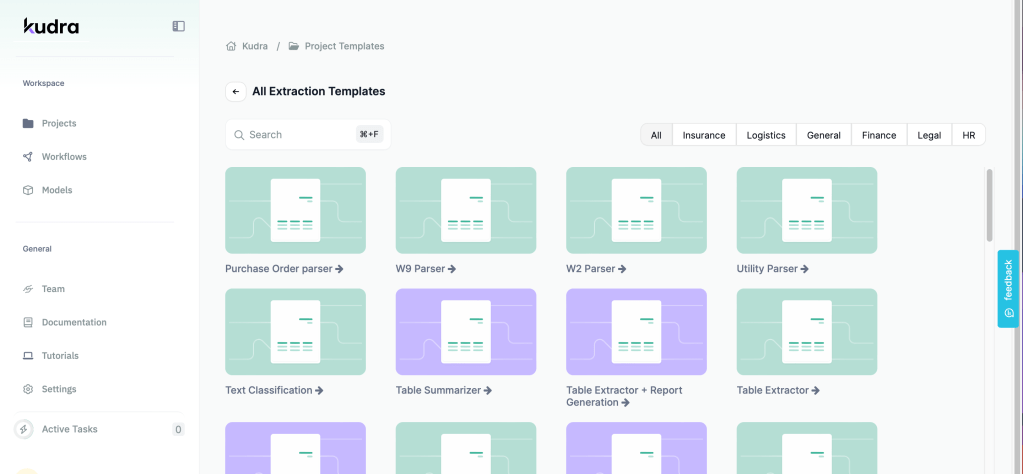
Kudra’s dashboard
Conclusion
In conclusion, Kudra.ai stands out as the premier choice for document processing due to its superior functionalities. With its advanced AI-driven capabilities, Kudra.ai not only enhances efficiency but also ensures accuracy and reliability in handling diverse document types. Whether it’s automating workflows, extracting crucial data, or streamlining document management, Kudra.ai consistently proves its effectiveness and innovation in the field. For anyone seeking top-tier document processing solutions, Kudra.ai remains unrivaled in its commitment to delivering excellence.


