In today’s fast-paced business environment, manual processes like invoice reconciliation can easily become bottlenecks that slow operations, drain resources, and lead to costly errors. The invoice reconciliation process involves comparing invoices with purchase orders, receipts, and payment records to ensure everything is accurate before processing payments. Done manually, this can be time-consuming, error-prone, and stressful for financial departments. But what if there were a way to streamline this process? That’s where automated invoice reconciliation and invoice matching automation come into play.
This article will delve into how businesses can use automation to simplify and accelerate their invoice reconciliation process.
What is the Invoice Reconciliation Process?
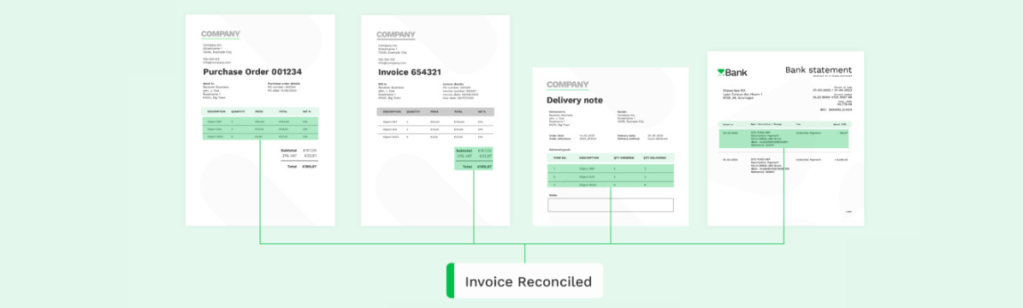
Invoice reconciliation is about matching a company’s internal records—such as purchase orders, goods receipts, and vendor invoices—to ensure that all transactions align before approving payment. This process ensures no discrepancies exist between what was ordered, what was delivered, and what was billed.
The Traditional Steps in Invoice Reconciliation:
- Collecting Documents: Businesses must gather purchase orders, delivery receipts, and invoices from suppliers.
- Matching Documents: This step involves checking if the invoice amounts, quantities, and prices match the corresponding purchase orders and delivery receipts.
- Identifying Discrepancies: Discrepancies can occur if incorrect quantities or prices are invoiced or if goods are not received.
- Resolving Discrepancies: This requires investigating any inconsistencies and contacting suppliers for corrections or updates.
- Recording Transactions: The invoice is logged in the accounting system for payment once reconciled.
While these steps sound straightforward, manually reconciling invoices for businesses dealing with large volumes of transactions becomes incredibly complex. This is where automated invoice reconciliation steps in to save the day.
The Benefits of Automated Invoice Reconciliation
Automation transforms the traditional invoice reconciliation process by leveraging technology to reduce human error, reduce processing times, and eliminate redundant work. Let’s explore the key benefits of automated invoice reconciliation.
1. Time Savings
Manual reconciliation requires countless hours of data entry and verification. Automation significantly reduces processing time by matching invoices to purchase orders and receipts automatically, freeing up time for your finance team to focus on higher-value tasks.
2. Improved Accuracy
Human errors, such as incorrect data entries or overlooked discrepancies, are common in manual reconciliation processes. Invoice matching automation eliminates these risks by ensuring that all relevant data is cross-checked with high precision.
3. Better Cash Flow Management
Automating the invoice reconciliation process enables businesses to pay invoices on time or even early to take advantage of early payment discounts. Better cash flow visibility allows for more accurate forecasting and financial planning.
4. Enhanced Fraud Prevention
Automated systems can flag irregularities, such as duplicate invoices or unapproved purchases, reducing the risk of fraud. Any suspicious activity is automatically flagged for review, allowing businesses to catch fraudulent transactions before they cause damage.
5. Scalability
As your business grows, manual reconciliation becomes unmanageable. Automated invoice matching can scale with your organization, handling an increased volume of invoices without the need for additional human resources.
How Automated Invoice Reconciliation Works
Automated invoice reconciliation relies on sophisticated algorithms and technology to compare and match invoices against purchase orders and receipts. Let’s break down how the automation process works.
1. Data Capture with OCR for Invoices
Automation tools use technologies like Optical Character Recognition (OCR) to extract relevant data from invoices, purchase orders, and delivery receipts. These systems convert printed or scanned documents into machine-readable text for easy processing.

2. Invoice Matching Automation
The system cross-references invoices with purchase orders and receipts, flagging any discrepancies for review. Different matching techniques can be employed, including:
- Two-Way Matching: Compares the invoice with the purchase order.
- Three-Way Matching: Matches the invoice with the purchase order and delivery receipt.
- Four-Way Matching: Adds inspection or quality assurance documents to the matching process.

3. Exception Handling
If the system detects a mismatch, it flags the exception and routes it for manual review. For example, if the invoice amount exceeds the purchase order, an alert will notify the team to resolve the issue.
4. Automated Approvals
Once invoices are matched and no discrepancies are found, the system can automatically approve them for payment, reducing the need for manual intervention.
5. Integration with Accounting Systems
Automated reconciliation tools integrate with Enterprise Resource Planning (ERP) systems, ensuring that all reconciled data is updated in real-time. This seamless integration ensures that your financial records are always accurate and audit-ready.
The Role of Artificial Intelligence in Invoice Matching Automation
Artificial intelligence (AI) takes invoice matching automation to the next level by learning from historical data and making predictions. AI-based systems can predict potential discrepancies before they arise, improving efficiency and reducing delays. These systems continuously improve through machine learning, becoming smarter and more accurate with each transaction processed.
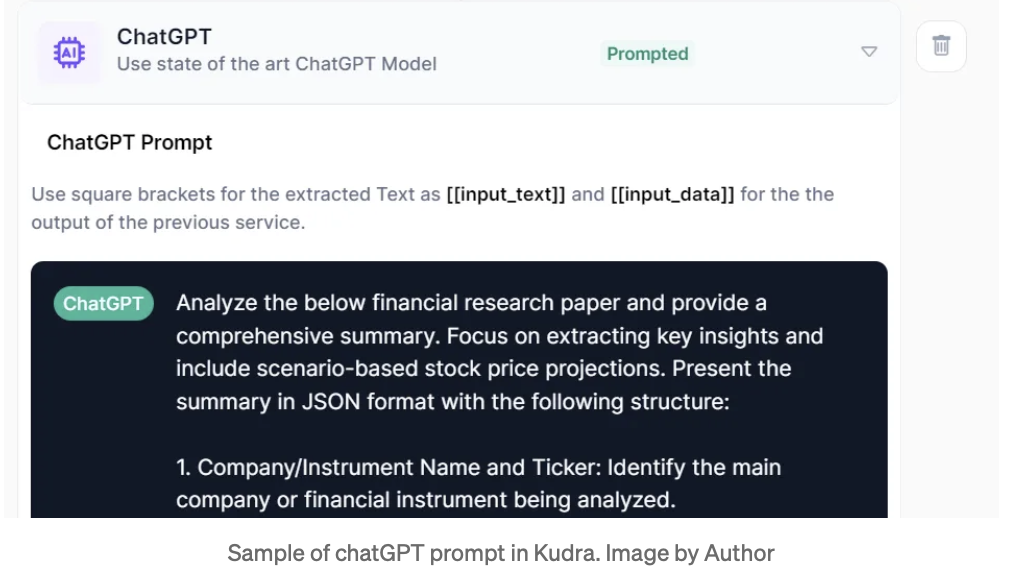
For businesses using Kudra, incorporating AI into their invoice reconciliation processes can dramatically increase efficiency and provide actionable insights into financial operations. The combination of automation and AI allows businesses to resolve discrepancies faster and with greater accuracy, setting them apart from competitors still relying on manual methods.
Best Practices for Implementing Automated Invoice Reconciliation
Automating the invoice reconciliation process is more than just adopting software—it requires strategic implementation to be successful. Here are some best practices to ensure a smooth transition.
1. Standardize Your Processes
Before implementing automation, ensure that your current processes are standardized. This includes establishing clear guidelines for invoice matching, exception handling, and approval workflows.
2. Choose the Right Technology
Select automation tools that align with your business needs. Look for solutions like Kudra.ai that integrate seamlessly with your existing ERP system and offer robust AI-powered automation.
3. Train Your Team
Automation is only as effective as the people who use it. Provide training to your finance and procurement teams so they can make the most of the new system. This helps ensure a smooth transition and prevents potential bottlenecks.
4. Monitor and Optimize
Once automation is implemented, continuously monitor the system to ensure it is functioning correctly. Use data analytics to identify patterns in discrepancies and optimize the process further.
Common Challenges in the Invoice Reconciliation Process
While automated invoice reconciliation simplifies the process, businesses still face common challenges that need to be addressed.
1. Data Quality Issues
Data quality, such as incorrect invoice details or outdated vendor information, can help automation. It is important to ensure that your data is clean and up-to-date before implementing automation.
2. Complex Matching Requirements
Businesses with complex supply chains may have more detailed matching requirements, such as four-way matching. Customizing your automation software to accommodate these complexities is essential.
3. Resistance to Change
Introducing automation can sometimes meet resistance from employees who are accustomed to manual processes. Effective communication and training are key to overcoming this challenge.
Why Kudra is Your Best Choice for Invoice Reconciliation
Kudra provides cutting-edge AI-powered automation solutions that make the invoice reconciliation process faster, more accurate, and scalable. With Kudra.ai’s technology, you can transform your financial operations, reducing manual effort and increasing productivity.
Key Features of Kudra.ai’s Invoice Reconciliation Solution:
• AI-Driven Invoice Matching: Advanced AI algorithms ensure faster and more accurate matching of invoices.
• Real-Time Integration with ERP Systems: Seamlessly integrates with your existing ERP platform for real-time updates and audit readiness.
• Customizable Workflows: Tailor the system to meet your specific needs, including two-way, three-way, or four-way matching.
• Comprehensive Analytics: Gain deeper insights into your financial operations with robust reporting features.
The Future of Invoice Reconciliation
In an increasingly competitive market, automating your invoice reconciliation process is no longer a luxury—it’s a necessity. By adopting automated invoice reconciliation with solutions like Kudra.ai, your business can increase efficiency, reduce costs, and stay ahead of the competition.


