
In the evolving landscape of document processing, AI-driven tools like Kudra and Ephesoft have become essential for businesses aiming to optimize their workflows. Both platforms offer advanced features tailored to various industry needs, from data extraction to document classification. This article provides a detailed comparison between Kudra and Ephesoft, focusing on their key features, integrations, and pricing, helping you choose the right solution for your document processing requirements.
Kudra Overview
Kudra is a cutting-edge AI-powered document processing tool designed to offer maximum customization and integration flexibility. It allows businesses to create tailored document workflows that fit specific needs, enhancing efficiency and accuracy. With its user-friendly interface and advanced AI features, Kudra is ideal for industries requiring precise data extraction and robust document classification. The platform supports a wide range of document types, making it versatile for various applications.
Ephesoft Overview
Ephesoft is a comprehensive document capture and data extraction platform designed to automate the processing of structured and unstructured content. Leveraging AI and machine learning, Ephesoft offers powerful features for document classification, data extraction, and workflow automation. It integrates seamlessly with various enterprise systems, making it a preferred choice for large organizations that need to process high volumes of documents with accuracy and speed. Ephesoft is particularly known for its flexibility in handling complex document types and delivering scalable solutions.
Kudra VS Ephesoft
Training custom Machine Learning Models
Data Extraction Without Training
Advanced Document Classification
Template-Free Processing
Human-in-the-Loop Reviews
Seamless Integration with LLMs
Custom Workflows
Kudra
Ephesoft
Kudra key features
1- Advanced Annotation Options:
Kudra excels in tasks like Named Entity Recognition (NER), relation extraction, and document classification. Its AI-powered tools ensure precise labeling of text data, making it easier to extract insights and streamline document processing workflows.

2- Ease of Use:
Kudra’s interface is designed for simplicity, allowing even non-technical users to navigate its features effortlessly. This user-centric approach reduces the learning curve, enabling teams to quickly adopt the platform.
3- Customized Intelligent Document Workflows:
Kudra enables the creation of custom workflows without coding, allowing businesses to automate document processing according to their specific needs. This feature reduces manual intervention, increasing efficiency.

4- Optical Character Recognition (OCR):
Kudra’s robust OCR capabilities allow for the accurate processing of various document types, including PDFs and scanned images. This is particularly valuable in industries like finance and legal where document integrity is crucial.

5- Collaboration Tools:
Kudra facilitates real-time collaboration, enabling multiple users to work on the same project. Features like commenting and review workflows enhance teamwork and ensure consistent document processing.
6- Quality Control Mechanisms:
Kudra includes built-in quality control tools, such as consensus-based labeling, to ensure accuracy in document processing. This leads to higher-quality data outputs and more reliable workflows.
7- Integration:
Kudra supports seamless integration with other platforms and tools, including large language models (LLMs) like GPT. This flexibility makes it adaptable to different business environments.

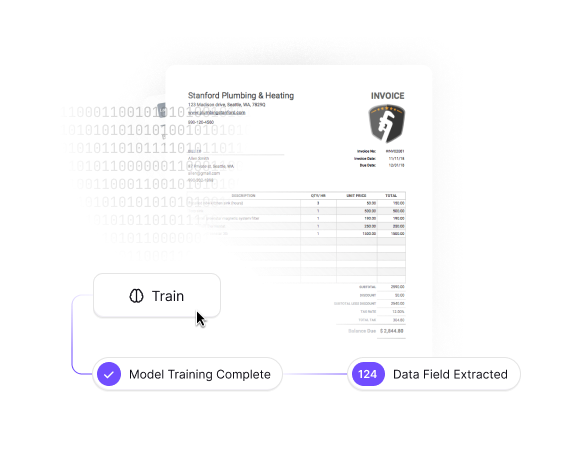
8- Custom Model Training:
Kudra allows businesses to train custom machine learning models tailored to their document types, even with minimal labeled samples. This feature is crucial for industries needing specialized models.
9- Continuous Learning:
Kudra’s models continuously improve by incorporating new data and user feedback, ensuring they remain accurate and efficient over time.
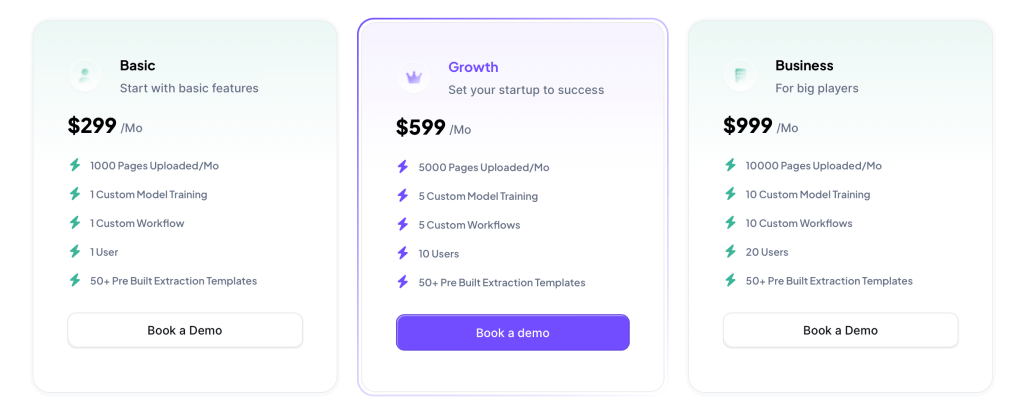
Kudra Pricing
Kudra offers a usage-based pricing model, providing flexibility for businesses to scale their operations without incurring large upfront costs. This pricing structure is particularly beneficial for companies with fluctuating document processing needs, allowing them to pay only for the features they use.
Ephesoft Key Features
1- Document Capture and Classification:
Ephesoft uses AI and machine learning to capture and classify documents, whether structured or unstructured. It can automatically recognize document types and route them to the appropriate workflows, reducing manual sorting and processing time.
2- Data Extraction:
Ephesoft excels in extracting data from a wide range of document formats, including invoices, forms, and contracts. Its extraction capabilities are enhanced by machine learning, which allows the platform to improve accuracy over time.
3- Integration with Enterprise Systems:
Ephesoft integrates seamlessly with existing enterprise systems such as ERP, CRM, and ECM platforms. This ensures that extracted data can be easily routed to the right systems for further processing or storage.
4- Scalability:
Ephesoft is designed to scale with your business, making it suitable for organizations of all sizes. Its cloud-based architecture allows it to handle large volumes of documents efficiently, making it ideal for enterprises with growing needs.
5- Security and Compliance:
Ephesoft provides robust security features to protect sensitive data. It ensures compliance with industry standards, making it a reliable choice for businesses in regulated industries such as finance and healthcare.
6- Continuous Improvement with Machine Learning:
Ephesoft’s machine learning models continuously improve as they process more documents, ensuring that the platform becomes more accurate and efficient over time.
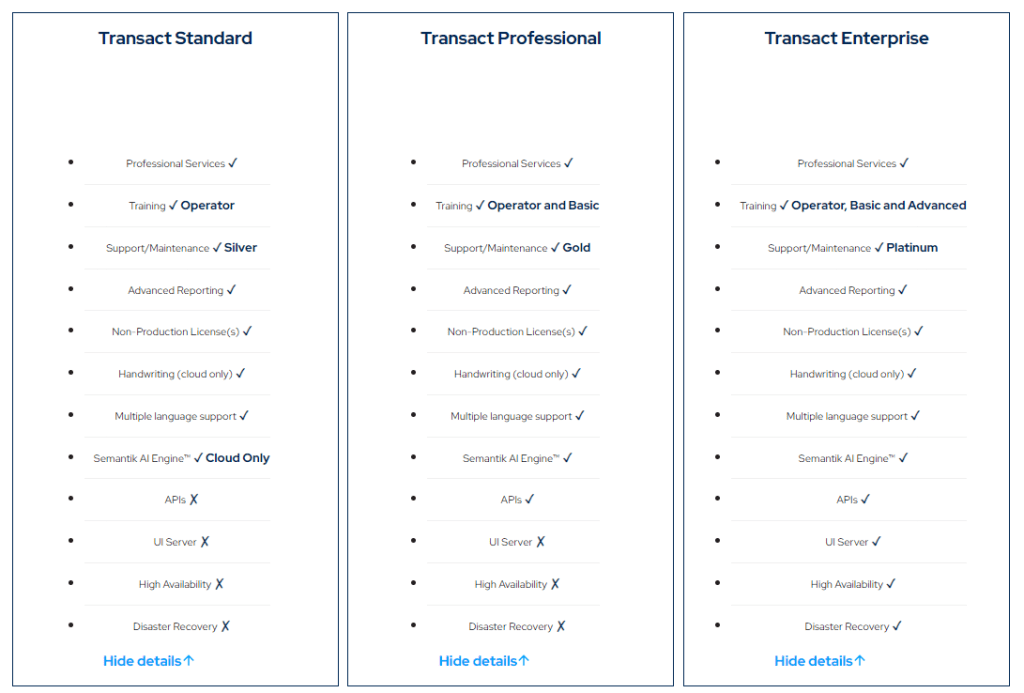
Ephesoft Pricing
Ephesoft’s pricing is typically based on the deployment model and the volume of documents processed. As a scalable solution, Ephesoft offers flexible pricing options that can be tailored to the specific needs of the organization, whether deployed on-premise or in the cloud. This flexibility ensures that businesses can choose a pricing structure that aligns with their budget and operational requirements.
Conclusion
Choosing between Kudra and Amazon Textract ultimately depends on your specific business needs. Kudra offers unparalleled customization and user-friendly features, making it ideal for businesses that require tailored document workflows and advanced annotation capabilities. Amazon Textract, with its deep integration into the AWS ecosystem and powerful OCR features, is better suited for enterprises needing scalable, high-volume document processing. Both platforms provide robust solutions, but understanding their unique offerings will guide you toward the best choice for optimizing your document processing tasks.


