In the fast-paced world of modern business, financial accuracy and efficiency are paramount. One crucial process that ensures these qualities is invoice reconciliation. This fundamental accounting practice involves comparing and matching invoice information with other financial documents to verify the accuracy of transactions, identify discrepancies, and maintain a clear financial record. As businesses grow and the volume of transactions increases, the importance of a streamlined invoice reconciliation process becomes even more critical.
Invoice reconciliation serves as a cornerstone of financial management, helping organizations maintain accurate books, prevent fraud, and ensure timely payments. It’s a process that touches various aspects of a business, from accounts payable and receivable to inventory management and cash flow forecasting. However, traditional methods of invoice reconciliation can be time-consuming, error-prone, and resource-intensive, often leading to delays, inaccuracies, and inefficiencies that can impact a company’s bottom line.
Enter Kudra, an innovative AI-powered platform designed to revolutionize document processing and analysis. Kudra’s intelligent document processing solution offers a game-changing approach to invoice reconciliation, leveraging cutting-edge technologies such as artificial intelligence, optical character recognition (OCR), and natural language processing to automate and streamline this critical financial process.
The purpose of this article is to delve deep into the world of invoice reconciliation, exploring its intricacies, challenges, and best practices. More importantly, we’ll showcase how Kudra’s intelligent document processing solution is transforming the landscape of invoice reconciliation, offering businesses a powerful tool to enhance accuracy, boost efficiency, and gain valuable insights from their financial data.
As we navigate through the complexities of invoice reconciliation and the innovative solutions provided by Kudra, we’ll explore how this AI-powered platform is not just a tool, but a strategic asset for businesses looking to optimize their financial processes. From analyzing and extracting data from various document types to leveraging pre-trained AI templates and custom workflows, Kudra offers a comprehensive solution that addresses the multifaceted challenges of invoice reconciliation.
Understanding the Process of Invoice Reconciliation and Methods
Invoice reconciliation is a critical accounting process that involves comparing and matching invoice information with other financial documents to ensure accuracy, identify discrepancies, and maintain a clear financial record. This process is essential for businesses of all sizes, as it helps prevent errors, detect fraud, and ensure that all financial transactions are properly accounted for.
The Process of Invoice Reconciliation
The process of invoice reconciliation typically involves the following steps:
- Gathering relevant documents: This includes invoices, purchase orders, receiving reports, and bank statements.
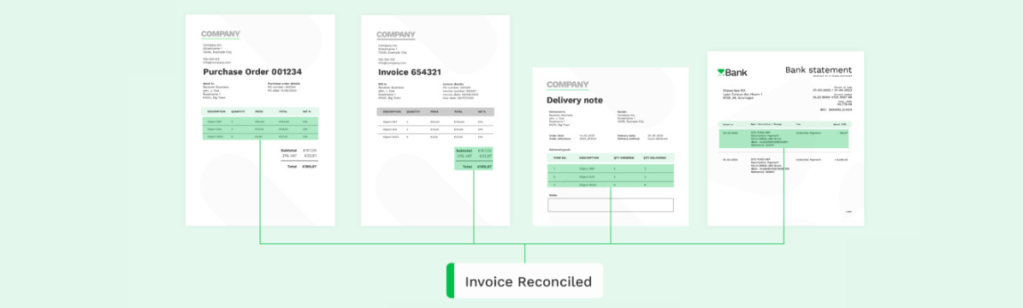
- Comparing information: The details on the invoice are compared with the corresponding purchase order and receiving report to ensure accuracy.
- Identifying discrepancies: Any differences in amounts, quantities, or other details are noted for further investigation.
- Resolving issues: Discrepancies are investigated and resolved, which may involve contacting vendors or internal departments for clarification.
- Updating records: Once all issues are resolved, the financial records are updated to reflect the correct information.
- Approval and payment: After reconciliation, the invoice is approved for payment if all details are correct.
The Methods of Invoice Reconciliation
There are several types of invoice reconciliation methods, each suited to different business needs and transaction volumes:
- Manual reconciliation: This traditional method involves manually comparing invoices with other documents. While it can be effective for small businesses with low transaction volumes, it’s time-consuming and prone to human error for larger operations.
- Spreadsheet-based reconciliation: This method uses spreadsheet software like Microsoft Excel to organize and compare invoice data. It’s more efficient than purely manual methods but still requires significant human input and can be error-prone.
- Automated reconciliation: This method uses specialized software to automatically match invoices with purchase orders and receiving documents. It’s faster and more accurate than manual methods, especially for businesses with high transaction volumes.
- Three-way matching: This process involves comparing the invoice with both the purchase order and the receiving report. It’s a thorough method that helps catch discrepancies in pricing, quantities, and delivery.
- Two-way matching: This simpler version compares only the invoice and purchase order. It’s faster than three-way matching but may miss discrepancies related to actual goods received.
- AI-powered reconciliation: The most advanced method, using artificial intelligence and machine learning to not only match documents but also learn from patterns and anomalies over time. This is where solutions like Kudra come into play, offering unprecedented accuracy and efficiency.
Benefits of an Effective Invoice Reconciliation Process
When implemented effectively, invoice reconciliation offers numerous benefits:
– Enhanced accuracy: By thoroughly comparing invoices with other financial documents, businesses can catch and correct errors before they impact financial statements or lead to overpayments.
– Fraud prevention: Regular reconciliation helps detect unusual patterns or discrepancies that could indicate fraudulent activity, protecting the company from financial losses.
– Improved cash flow management: Accurate reconciliation ensures that payments are made correctly and on time, helping to maintain good relationships with suppliers and manage cash flow more effectively.
– Better financial reporting: With reconciled invoices, financial reports become more accurate, providing a clearer picture of the company’s financial health and aiding in decision-making.
– Audit readiness: Regular reconciliation keeps financial records organized and accurate, making it easier to prepare for and pass audits.
– Cost savings: By catching and correcting errors early, businesses can avoid overpayments, late fees, and the costs associated with resolving financial discrepancies.
– Improved supplier relationships: Timely and accurate payments, facilitated by efficient reconciliation, help maintain good relationships with suppliers.
– Enhanced operational efficiency: Streamlining the reconciliation process frees up staff time for more strategic tasks, improving overall operational efficiency.
– Better compliance: Accurate invoice reconciliation helps businesses comply with accounting standards and regulatory requirements.
– Data-driven insights: The reconciliation process can reveal patterns and trends in spending, helping businesses make more informed financial decisions.
Challenges Faced in Invoice Reconciliation
Despite its importance, invoice reconciliation can be a complex and challenging process, especially for businesses dealing with high transaction volumes or complex supply chains. Here are some key challenges:
Volume of transactions: As businesses grow, the number of invoices they need to process increases exponentially. Managing and reconciling a large volume of invoices manually can be overwhelming and time-consuming.
Data entry errors: Manual data entry is prone to human errors. Typos, transposed numbers, or incorrect information can lead to discrepancies that complicate the reconciliation process.
Inconsistent data formats: Invoices from different vendors may come in various formats, making it challenging to standardize the reconciliation process.
Missing or incomplete information: Invoices or supporting documents may sometimes lack crucial information, making it difficult to match them accurately.
Timing differences: Discrepancies can arise when there’s a lag between when goods are received, when invoices are issued, and when payments are made.
Currency conversions: For businesses dealing with international transactions, currency fluctuations can complicate the reconciliation process.
Complex pricing structures: Some industries have intricate pricing models or frequent price changes, which can lead to discrepancies between purchase orders and invoices.

Decentralized purchasing: In organizations where multiple departments make purchases independently, tracking and reconciling all invoices can be challenging.
Limited visibility: Without a centralized system, it can be difficult to get a clear overview of all outstanding invoices and their status.
Resource intensity: Traditional reconciliation methods are often labor-intensive, requiring significant time and human resources.
Compliance requirements: Different industries and regions may have specific compliance requirements for invoice processing and record-keeping, adding another layer of complexity.
System integration issues: When different departments use separate systems for purchasing, receiving, and accounting, integrating data for reconciliation can be problematic.
Handling exceptions: Not all invoices will match perfectly with purchase orders or receiving documents. Managing and resolving these exceptions can be time-consuming.
Archiving and retrieval: Storing physical documents and retrieving them when needed for audits or dispute resolution can be cumbersome.
Vendor management: Dealing with a large number of vendors, each with their own invoicing practices, can complicate the reconciliation process.
Best Practices for Overcoming Invoice Reconciliation Challenges
To address these challenges, businesses can adopt several best practices:
Implement automation: Utilize automated reconciliation software or AI-powered solutions like Kudra to reduce manual work and increase accuracy.
Standardize processes: Establish clear, standardized procedures for invoice processing and reconciliation across the organization.
Centralize data: Use a centralized system to store all invoice-related information, making it easier to access and analyze data.
Adopt electronic invoicing: Encourage vendors to submit invoices electronically to reduce data entry errors and processing time.
Implement three-way matching: Compare invoices with purchase orders and receiving documents to ensure accuracy and catch discrepancies early.
Regular reconciliation: Perform reconciliations frequently (daily or weekly) to identify and resolve issues promptly.
Train staff: Provide comprehensive training to staff involved in the reconciliation process to ensure they understand the importance of accuracy and follow best practices.
Use data analytics: Leverage data analytics tools to identify patterns, anomalies, and potential areas for improvement in the reconciliation process.
Establish clear communication channels: Maintain open lines of communication between accounts payable, purchasing, and receiving departments to resolve discrepancies quickly.
Implement vendor portals: Use vendor portals to allow suppliers to submit and track invoices, reducing manual data entry and improving transparency.
The Role of Kudra's Intelligent Document Processing Solution in Invoice Reconciliation
How Kudra Can Analyze and Extract Data from Invoices
Kudra’s AI-powered platform is designed to analyze and extract information from a wide range of documents, including invoices. This capability is crucial for invoice reconciliation, as it eliminates the need for manual data entry and significantly reduces the risk of human error.
The process works as follows:
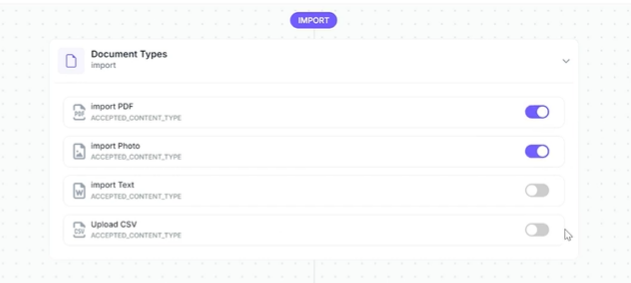
- Document ingestion: Kudra can ingest invoices in various formats, including PDFs, scanned images, and even handwritten documents.
- AI-powered analysis: The platform’s advanced AI algorithms analyze the structure and content of each invoice.
- Data extraction: Kudra identifies and extracts key information such as invoice numbers, dates, amounts, vendor details, and line items.
- Structured output: The extracted data is organized into a structured format, ready for further processing or integration with other systems.
This automated extraction process not only saves time but also ensures a high level of accuracy, addressing one of the primary challenges in invoice reconciliation.
The Visual Workflow Builder's Role in the Process

Kudra’s visual workflow builder is a powerful tool that allows businesses to create custom workflows tailored to their specific invoice reconciliation needs. This feature provides several benefits:
- Customization: Users can design workflows that match their unique reconciliation processes, ensuring that Kudra aligns perfectly with existing business practices.
- Flexibility: The visual interface makes it easy to modify workflows as business needs evolve, without requiring extensive technical knowledge.
- Process automation: Users can set up automated steps for tasks like data validation, matching, and exception handling.
- Integration: The workflow builder allows for seamless integration with other systems and databases, facilitating a smooth flow of information throughout the reconciliation process.
By using the visual workflow builder, businesses can create a streamlined, automated reconciliation process that significantly reduces manual intervention and improves overall efficiency.
Processing Various Types of Documents
While invoices are a critical component of the reconciliation process, they’re not the only documents involved. Kudra’s ability to process various types of documents makes it an invaluable tool for comprehensive reconciliation. The platform can handle:
- Purchase orders
- Receiving reports
- Bank statements
- Contracts
- Shipping manifests
- Payment records
This versatility allows for a more holistic approach to reconciliation. For example, Kudra can automatically match invoice data with corresponding purchase orders and receiving reports, facilitating three-way matching without manual intervention.
How OCR Engines in Kudra Help in Accurate Data Extraction
Optical Character Recognition (OCR) is a crucial technology in document processing, and Kudra offers a choice of OCR engines to ensure accurate data extraction from various document types. The benefits of Kudra’s OCR capabilities include:
- Handling diverse document formats: Kudra can accurately process structured documents like standardized invoices, as well as semi-structured or unstructured documents.
- Recognizing handwritten text: Advanced OCR engines can interpret handwritten notes, which is particularly useful for handling manual annotations on invoices or other documents.
- Table extraction: Kudra can accurately extract data from tables, which is crucial for processing complex invoices with multiple line items.
- Multi-language support: For businesses dealing with international vendors, Kudra’s OCR can handle documents in multiple languages.
- High accuracy: By offering a choice of OCR engines, Kudra ensures that businesses can select the most appropriate tool for their specific document types, maximizing accuracy.
The combination of advanced OCR with AI-powered analysis allows Kudra to extract data with a level of accuracy and speed that far surpasses manual methods, addressing the challenges of data entry errors and inconsistent data formats.
Conclusion
Invoice reconciliation is a critical process that directly impacts a company’s financial health, operational efficiency, and compliance. As businesses continue to scale, traditional reconciliation methods, plagued by errors, inefficiencies, and time consumption, are no longer sufficient. Kudra’s intelligent document processing solution offers a powerful and innovative approach to invoice reconciliation, combining AI, OCR, and machine learning to automate and optimize the entire process. By leveraging cutting-edge technology, Kudra helps businesses enhance accuracy, reduce manual workload, prevent fraud, and gain deeper insights into their financial data.


