Drowning in invoices? Spending countless hours on manual data entry? You’re not alone. Most businesses struggle with the tedious process of handling invoices by hand, watching valuable time and resources slip away with each paper trail.
Invoice automation transforms this pain point by using technology to handle the entire invoice lifecycle without human intervention. The software captures incoming invoices, extracts relevant data, validates information against purchase orders, routes documents for approval, and processes payments automatically. Think of it as having a dedicated assistant who never sleeps, never makes calculation errors, and processes invoices at lightning speed.
The benefits speak for themselves. Companies typically see efficiency gains of 70-80% in their accounts payable processes, while reducing processing costs by up to 60%. Manual data entry errors, which plague traditional invoice handling, virtually disappear when machines take over the repetitive work. Your financial data becomes more secure too, since fewer people handle sensitive information and digital systems create comprehensive audit trails.
Invoice automation also frees your team from mind-numbing data entry, allowing them to focus on strategic financial analysis and vendor relationship management. Payment cycles become predictable, vendor relationships improve through consistent processing times, and your finance department gains real-time visibility into cash flow and spending patterns.
This guide will provide a comprehensive overview of invoice automation solutions, helping you understand how they work, their benefits, and how to choose the right one for your business.
What is an Invoice Automation Solution?
An invoice automation solution is software that handles the entire invoice processing workflow without manual intervention. Think of it as a digital assistant that receives invoices, reads their contents, verifies the information, and processes payments—all automatically.
These systems work by capturing invoice data from various sources like email attachments, scanned documents, or electronic files. The software then extracts important details such as vendor names, amounts, due dates, and line items using optical character recognition (OCR) and artificial intelligence technologies.
Once the data is captured, the system validates the information against purchase orders, contracts, and company policies. It can flag discrepancies, route invoices through the appropriate approval workflows, and even schedule payments based on terms and cash flow requirements.
The automation extends beyond basic data entry. Modern solutions integrate with accounting systems, enterprise resource planning (ERP) platforms, and payment processors to create a complete end-to-end process. They can handle different invoice formats, multiple currencies, and various approval hierarchies depending on invoice amounts or departments.
What makes these solutions particularly valuable is their ability to learn and improve over time. As they process more invoices, they become better at recognizing patterns, reducing errors, and handling exceptions. This means businesses can process invoices faster, reduce manual errors, and free up their accounting teams to focus on more strategic financial activities rather than repetitive data entry tasks.
Core Components
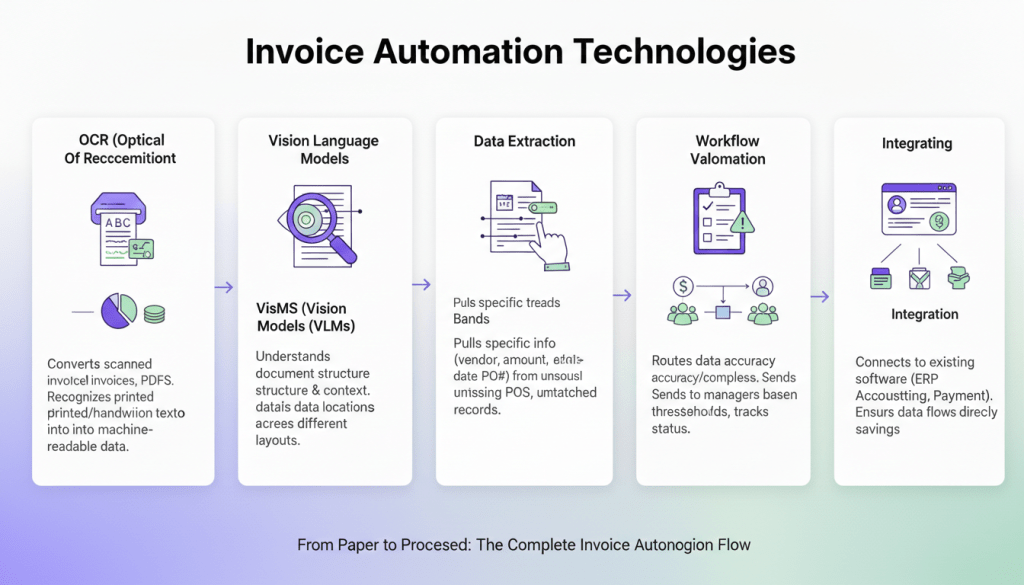
Invoice automation solutions combine several technologies to transform paper invoices into processed payments. Each component handles a specific part of this transformation.
- OCR (Optical Character Recognition) converts scanned invoices and PDFs into machine-readable text. This technology recognizes printed and handwritten characters, turning image-based documents into data that computers can process.
- Vision Language Models (VLMs) go beyond basic text recognition. These AI models understand document structure and context, identifying where invoice numbers appear versus line items, even when documents have different layouts.
- Data Extraction pulls specific information from invoices—vendor names, amounts, dates, purchase order numbers. This component knows what information businesses need and where to find it across various invoice formats.
- Intelligent Validation checks extracted data for accuracy and completeness. It flags unusual amounts, missing purchase orders, or vendor information that doesn’t match existing records. This component catches errors before they enter your accounting system.
- Workflow Automation routes invoices through approval processes automatically. It sends invoices to the right managers based on amount thresholds or department codes, tracks approval status, and handles exceptions.
- Integration connects the automation system to existing accounting software, ERP systems, and payment platforms. This ensures processed invoices flow directly into established business systems without manual data entry.
- Reporting provides visibility into invoice processing performance, showing metrics like processing times, approval bottlenecks, and cost savings achieved through automation.
Benefits of Implementing an Invoice Automation Solution
Increased Efficiency
Invoice automation transforms how businesses handle their billing processes by dramatically speeding up operations that once consumed hours of manual work. Traditional invoice processing involves multiple steps: receiving documents, data entry, verification, approval routing, and filing. Each stage requires human intervention, creating bottlenecks and delays. Automated systems eliminate most of these manual touchpoints.
Processing times drop from days to minutes when software handles data extraction and validation automatically. Instead of employees manually typing invoice details into accounting systems, optical character recognition technology captures information instantly from digital or scanned documents. This shift frees up staff to focus on higher-value activities like analyzing spending patterns or building vendor relationships.
Reduced Costs
The financial impact of switching from manual to automated invoice processing is substantial and measurable. Manual invoice processing costs average $15 to $16 per invoice, according to industry data. This expense includes staff time for data entry, verification, approval routing, and filing—activities that consume hours of employee productivity each month.
Automation transforms these economics dramatically. AP automation slashes the cost of a single invoice by 80% or more. For companies that process around 500 invoices each month, this means an annual savings of between $60,000 and $70,000. These savings compound quickly as invoice volumes increase.
The cost reduction comes from several sources. Automated systems eliminate the need for manual data entry by extracting information directly from invoices using optical character recognition and machine learning. This removes hours of clerical work while reducing human error rates that often require costly corrections.
Improved Accuracy
Manual invoice processing creates countless opportunities for human error. When employees type numbers, dates, and vendor information by hand, mistakes happen. A single misplaced decimal point can turn a $100 invoice into a $1,000 payment, while incorrect vendor codes can send money to the wrong supplier.
Invoice automation systems eliminate these data entry errors through optical character recognition (OCR) and intelligent document processing. The software reads invoices directly, extracting information without human intervention. This removes the risk of typos, transposed numbers, and misread handwriting that plague manual processes.
Kudra AI and Invoice Automation
Kudra AI operates as an intelligent document processing platform that transforms how businesses handle invoice automation. The system uses artificial intelligence to read, understand, and process invoices automatically, removing the need for manual data entry and reducing human error.
The platform works by scanning incoming invoices and extracting relevant information such as vendor details, amounts, dates, and line items. What sets Kudra AI apart is its ability to learn from your specific business processes and adapt to different invoice formats over time.
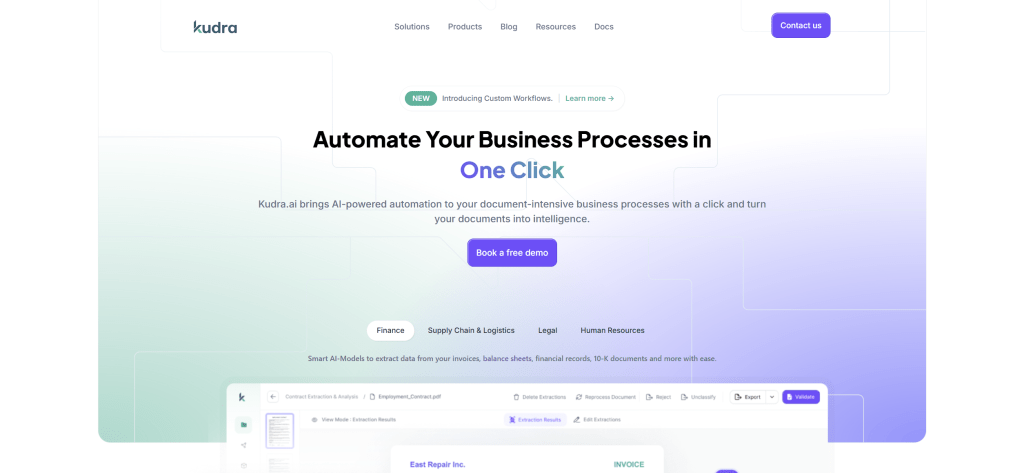
Let’s walk through how this actually works in practice, using a real implementation framework that you can adapt to your organization’s specific needs. Kudra’s flexibility means you can design workflows that match your exact requirements rather than forcing your finance processes into rigid software limitations.
1) Designing the Intelligence Layer
The first step is creating a workflow that handles automatic data extraction and validation before any human sees the invoice. This is where you define what happens to every invoice the moment it enters your system.
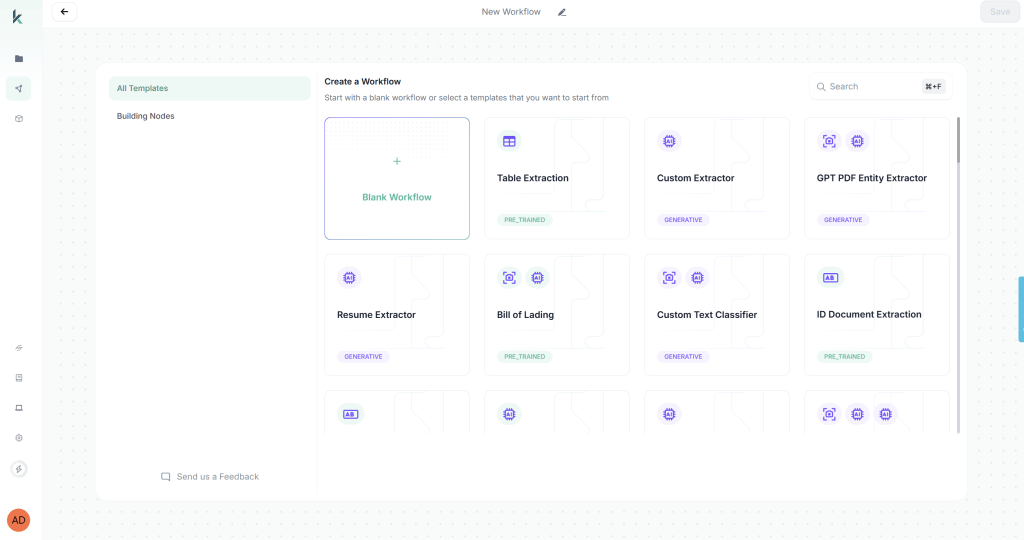
When you first access Kudra’s workflow builder, you’ll be prompted to create a new workflow. You have two options: start from a blank workflow or use a predefined template. For invoice approval automation, we’ll start with a blank workflow to demonstrate the full customization capabilities.
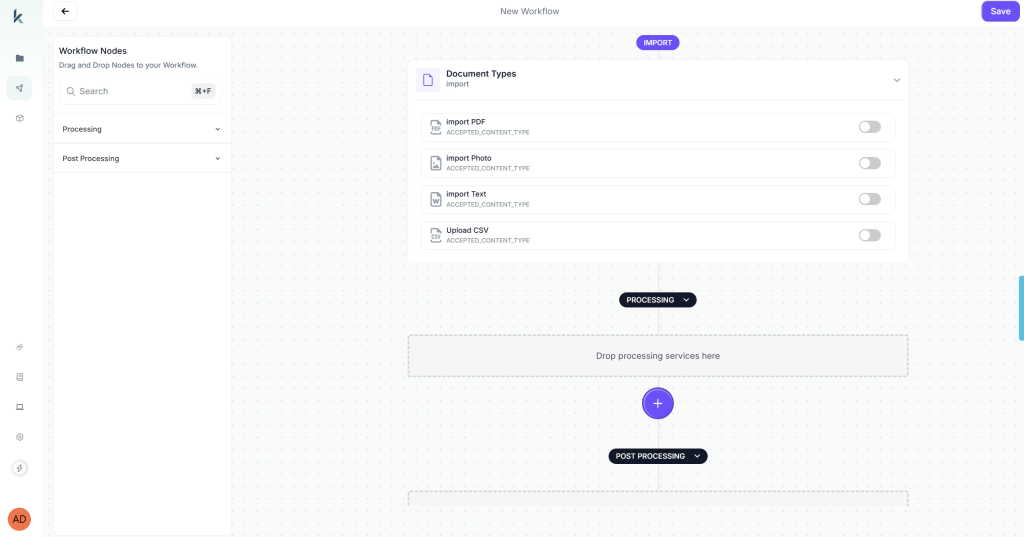
Start with comprehensive data extraction. You want the system to pull every relevant field from the invoice automatically: vendor name and ID, invoice number and date, line items with descriptions and amounts, subtotals and tax calculations, payment terms, purchase order references if present, shipping costs, and any special instructions or notes.
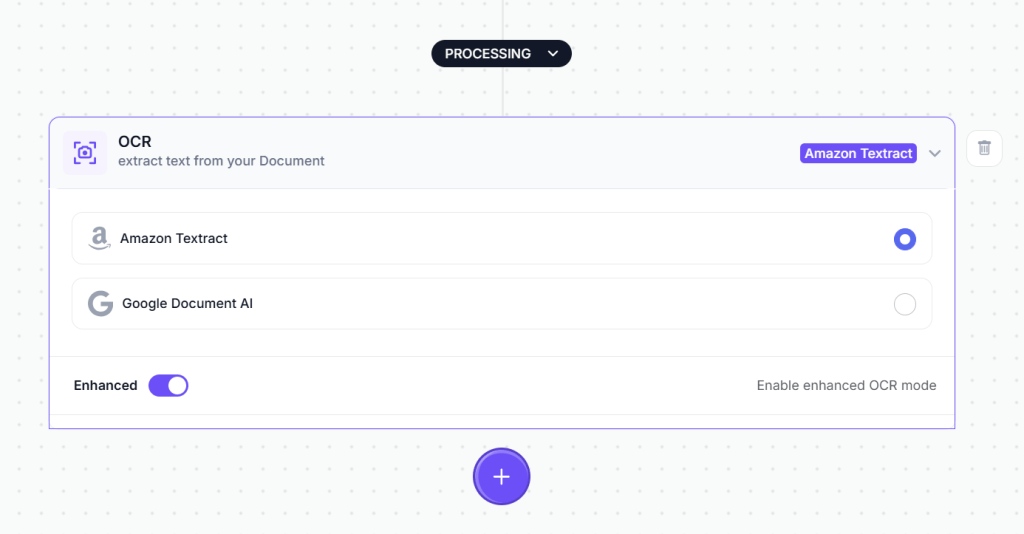
The first component you’ll drag into your workflow to do this is the OCR module. This is the engine that reads text from your invoice documents. Simply drag the OCR component from the component library onto your workflow canvas.
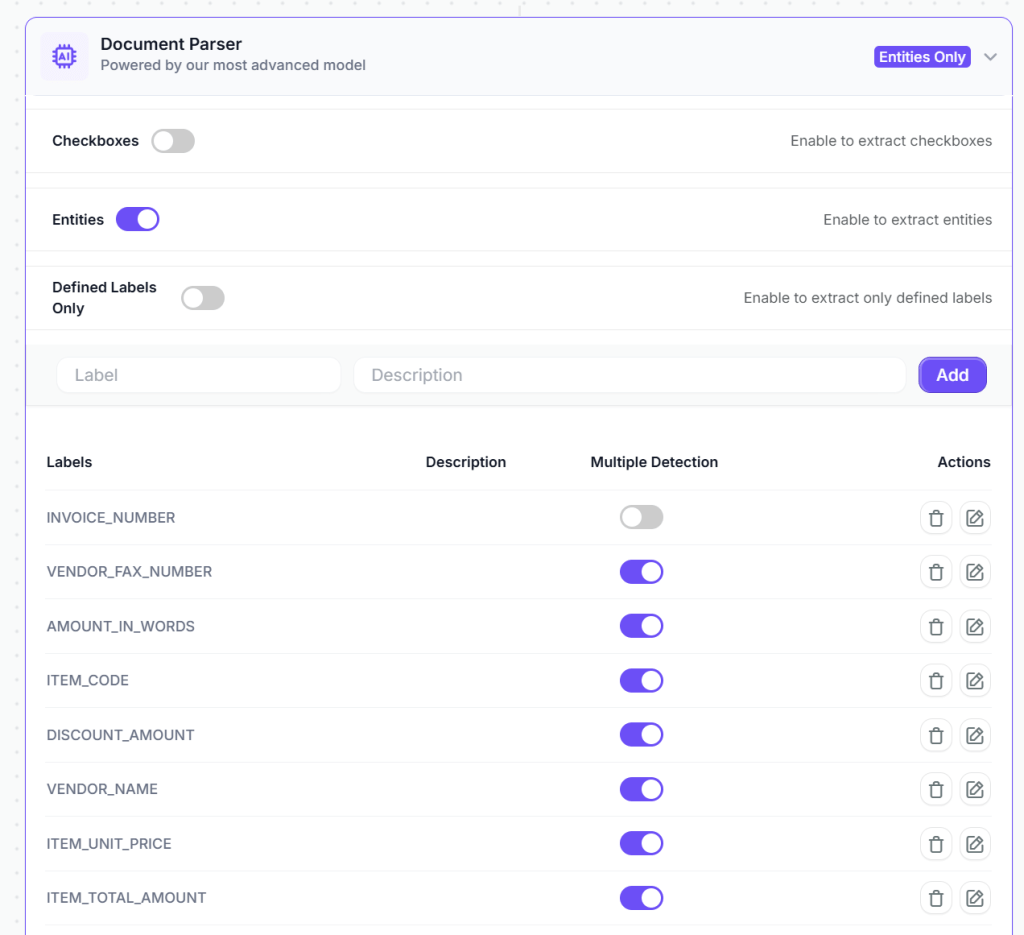
After OCR extracts the raw text, the next step is intelligent field extraction. This is where you add a Vision Language Model (VLM) component to your workflow. The VLM component is more sophisticated than basic OCR, it understands document structure and context. You configure it to extract specific fields from invoices.
Next, layer in intelligent validation rules that automatically verify invoice accuracy. These aren’t simple threshold checks, they’re contextual validations that understand your business logic.
Configure the system to verify mathematical accuracy: do line items sum to the stated subtotal? Does the subtotal plus tax equal the total amount? Are tax percentages correct for the vendor’s location? These seem like basic checks, but they catch a surprising number of errors before anyone invests time in review.
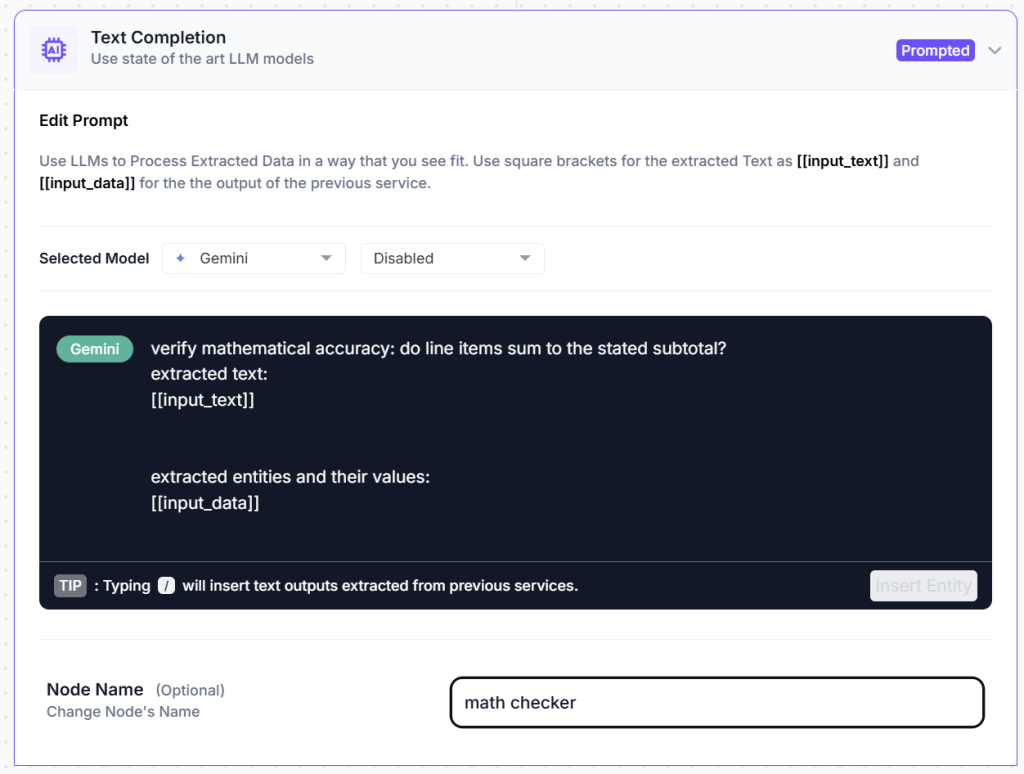
In kudra you just add a text generation component that automatically detects potential issues with the invoice before it enters the approval workflow. All you have to do is prompt it to do the task you need then it analyzes the extracted data and flags problems that would otherwise cause delays or errors.
2) Optional Post-Processing Components

Kudra offers a range of post-processing components that can further refine your extracted data:
Find and Replace: Useful for standardizing vendor names or account code formats. For example, if some invoices show “ABC Corp” and others show “ABC Corporation,” you can automatically standardize to your preferred format.
Format Date: Invoices from international vendors use different date formats (DD/MM/YYYY vs MM/DD/YYYY). This component converts all extracted dates to match your accounting system’s required format.
Text Transformation: Convert account codes to uppercase, standardize currency formatting, or apply other transformations that ensure data consistency.
Data Validation: Apply additional regex patterns or custom validation rules specific to your business needs.
For basic invoice processing, the VLM and text generation components typically provide clean, structured data that’s ready to use without additional post-processing.
3) Configuring Export Options

The final step in workflow design is deciding what happens to your extracted data. Kudra offers multiple export options that you can enable based on your operational needs.
Once the data is extracted and validated, you can automatically send it to the tools you already use, whether that’s Google Sheets for quick visibility, QuickBooks for accounting, or any other system in your existing stack.
No new frameworks to learn. No manual copy-pasting.
Your documents turn into clean, structured, and organized data that flows directly into your workflows, ready to be reviewed, analyzed, or processed further.
4) Processing Invoices at Scale
With your workflow designed and rules configured, you’re ready to process actual invoices. This is where the operational efficiency becomes tangible.
Click “Create New Project” in Kudra’s project dashboard. Give your project a descriptive name—for example, “January 2026 Operating Expenses” or “Q1 Vendor Invoices” or “Marketing Department Invoices.”
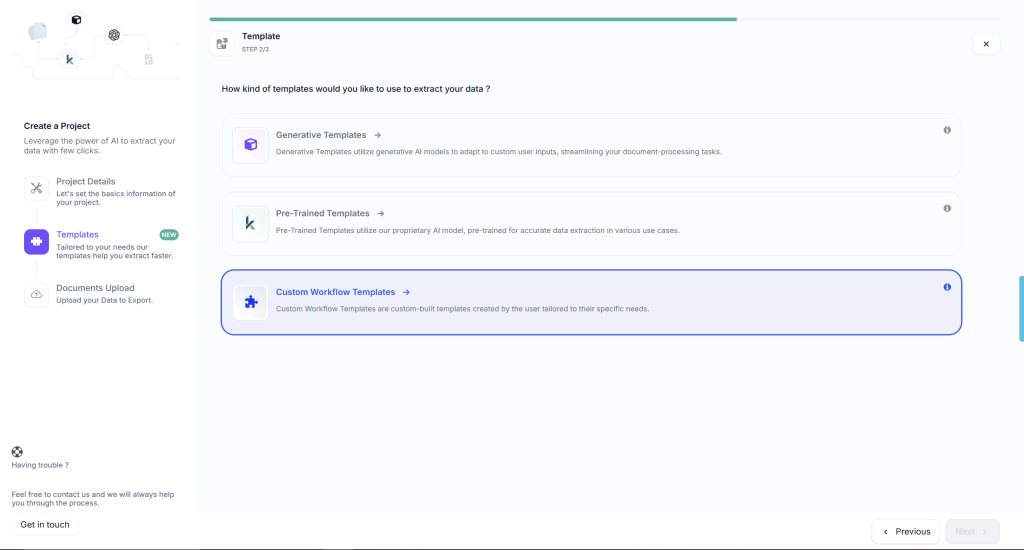
During project creation, you’ll select the workflow you just built from a dropdown menu. This links your invoice approval workflow to this specific project, meaning every document uploaded to this project will automatically be processed according to the rules you’ve defined.
Projects in Kudra can be organized however makes sense for your finance operations. You might create separate projects for:
- Different departments or cost centers
- Different time periods (monthly or quarterly batches)
- Different invoice categories (recurring vendors, one-time purchases, reimbursements)
- Different processing priorities (urgent, standard, scheduled)
Each project maintains its own document history, extracted data archive, and processing logs. This organizational structure makes it easy to track which invoices have been processed, review extraction results from previous periods, and maintain clear audit trails for compliance purposes.
Once you upload all the documents you need to process, Kudra automatically applies your workflow to each invoice. The entire process typically takes 15-30 seconds per invoice, depending on file size and complexity. While processing runs, you can continue uploading more documents or working on other tasks—Kudra handles everything in the background.

This bulk processing capability is particularly valuable during month-end or when catching up on a backlog. Instead of processing invoices one by one, you can upload dozens or hundreds at once and let Kudra work through them all automatically.
What To Do Now?
Invoice automation delivers tangible benefits that transform how businesses handle their financial operations. You’ll reduce processing time from days to minutes, eliminate human errors that cost money, and free your team to focus on strategic work instead of data entry. The cost savings add up quickly—fewer late payment fees, better early payment discounts, and reduced staffing needs for manual tasks.
Choosing the right solution matters more than rushing into any system. Your business has unique needs, whether you’re a small company processing dozens of invoices monthly or an enterprise handling thousands. The best automation tool fits your current volume, integrates with your existing accounting software, and scales as you grow. Take time to evaluate features, pricing, and support options before making your decision.
Don’t wait for invoice processing headaches to multiply. The technology exists today to streamline your accounts payable operations and improve cash flow visibility. Research available solutions, request demos, and talk to vendors about your specific requirements. Your future self will thank you for taking action now.
As Tilman J. Fertitta, Chairman and CEO of Landry’s Inc., wisely notes: “Never take your eyes off the cash flow because it’s the lifeblood of business.” Invoice automation gives you the clear visibility and control you need to protect that lifeblood.


