
Performing data retrieval from PDFs and other document formats is a ubiquitous challenge faced by businesses worldwide. Whether processing stacks of supplier invoices, analyzing logistics manifests, or parsing lengthy contracts, professionals routinely grapple with unstructured data trapped within PDFs and image files. Manual data retrieval is tedious, error-prone, and time-intensive. Even when organizations attempt to automate such document processing, inconsistencies in layouts and formats often thwart success.
This article discusses how an AI-based intelligent document processing solution called Kudra helps organizations with accurate data retrieval from PDFs, Word documents, images, and more effortlessly. We’ll explore the capabilities powering Kudra’s precision, speed and ease-of-use in data extraction.
Understanding the Problem of Data Retrieval from PDFs
PDFs and image documents present a complex challenge when it comes to data retrieval and extraction. Unlike datasets in consistent formats like CSVs, data in PDFs and images is entirely unstructured. Vital nuggets of information could be embedded within paragraphs of text, captured inside tables, or displayed as graphical elements.
For instance, critical details within an invoice PDF might include the invoice number shown visually, the supplier name and billing address mentioned in text, along line items tabulated in a table. Putting together organized information from messy PDFs manually is like trying to find tiny needles in a huge pile of hay.
Another complexity arises from the diversity of layouts and formats used across PDF documents. Invoices from different suppliers often follow entirely different structures and standards. A utility bill looks completely unlike a bank statement. And then there are intricacies like localized date formats which vary across geographies.
Humans possess the visual intelligence to quickly parse such documents and extract relevant details. Manual processing of high invoice volumes can be extremely tedious, slow, and error-prone. According to an EY survey, nearly 60% of large organizations still use manual data entry for invoice processing, resulting in high operational costs.
The Solution: PDF Document Extractor for Accurate Data Retrieval
This is where a PDF document extractor comes in – as an automated solution that can mimic human perception to ‘read’ and extract information from PDF files. A robust PDF document extractor would need to leverage AI and machine learning for effectively parsing documents just like humans.
By incorporating optical character recognition (OCR) and natural language processing, an intelligent PDF document extractor can identify textual and visual entities within PDFs. It can then transform unstructured data into structured outputs, exporting clean data ready for business use.
For instance, a purchase order PDF passed into the system would yield structured outputs including the PO number, supplier name, billing/shipping addresses, VAT details, line item descriptions, quantities, unit prices, and totals. The exported dataset could then be directly loaded into an ERP for streamlined order processing.
Unlike manual processing, an automated PDF extractor minimizes errors while enabling batch processing at scale. For businesses handling high volumes, it could process hundreds of document PDFs in a single run. Presenting extracted data separately for each file facilitates easy reconciliation while auditing.
PDF Document Extractor - Meet Kudra
Kudra is one such AI-based document processing platform built to deliver effortless data retrieval across file formats. While traditional PDF extractors are limited to fixed templates, Kudra comes integrated with machine learning to handle unpredictability.
Using computer vision and natural language processing, Kudra can analyze and extract information from not just PDFs but also complex file types like images, Word documents, Excel sheets, emails, and even handwritten notes. Its AI engine can parse tables, diagrams, and charts along with text in multiple languages.
Kudra provides pre-built AI assistant bots focused on critical business use cases like invoice processing, ID card parsing, and analyzing sales contracts. Users can also create custom bots tailored to their unique needs using an intuitive visual interface. These bots function like automated employees that can be deployed to extract data from documents at scale.
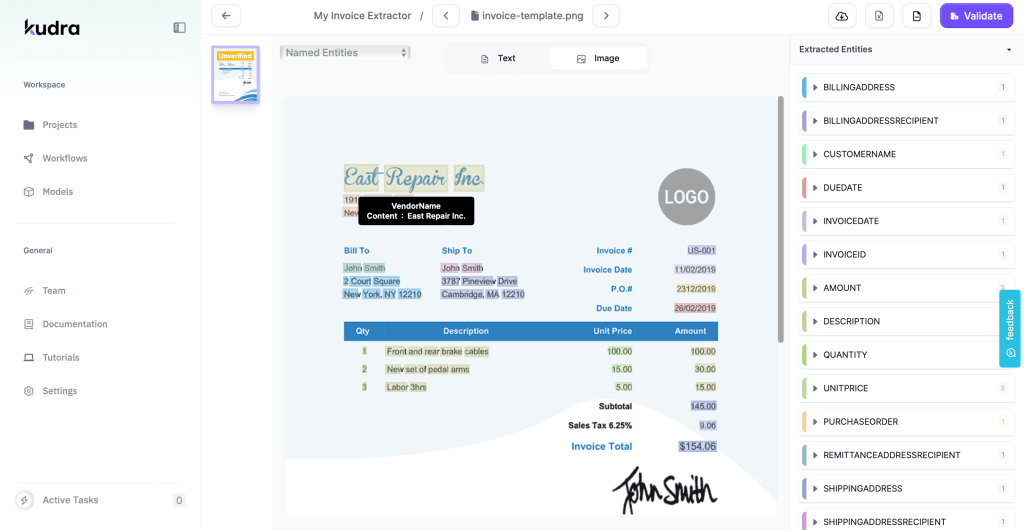
Extracting data from PDFs with Kudra
Kudra’s Capabilities
Let us now explore the key capabilities that make Kudra a versatile ally for effortless data retrieval.
Precision
Kudra facilitates precise information extraction from documents through:
- Customizable Workflows: Kudra’s visual workflow builder allows the creation of flexible document processing sequences without coding. Users can add steps like identifying keywords, extracting tables, capturing text snippets, invoking AI, and exporting output. These workflows can be tweaked iteratively to improve accuracy.
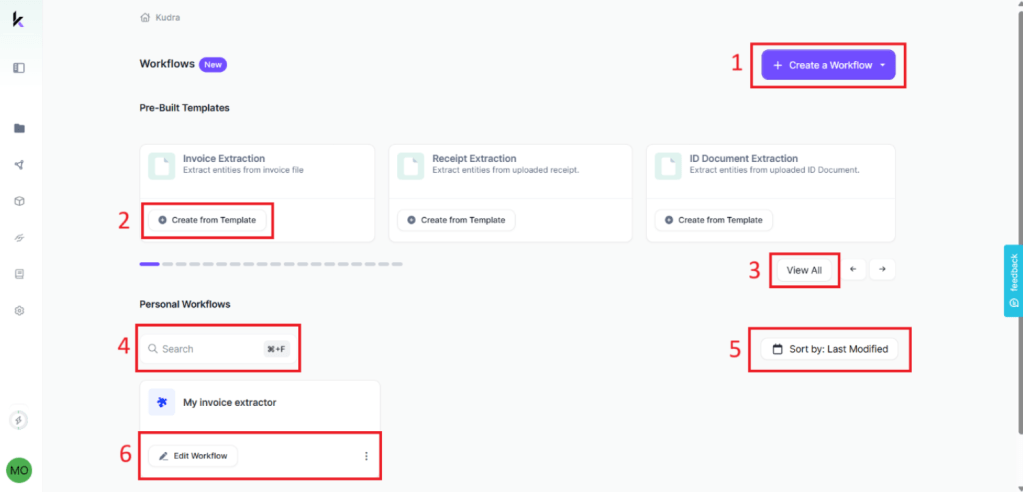
1- “create workflow” button is used to create a workflow from scratch or an existing template.
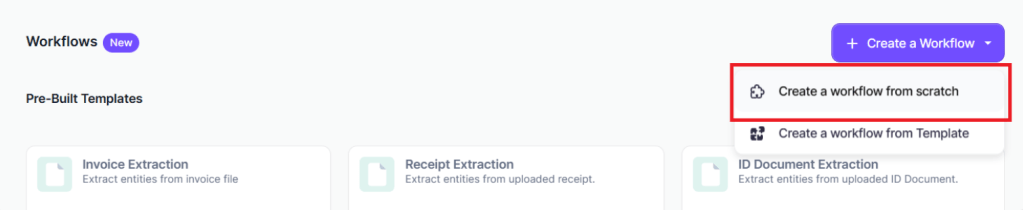
2- Click “+ Create a Workflow” à “Create a workflow from scratch”

3- Enter a name and a description if desired and click “Create Workflow”
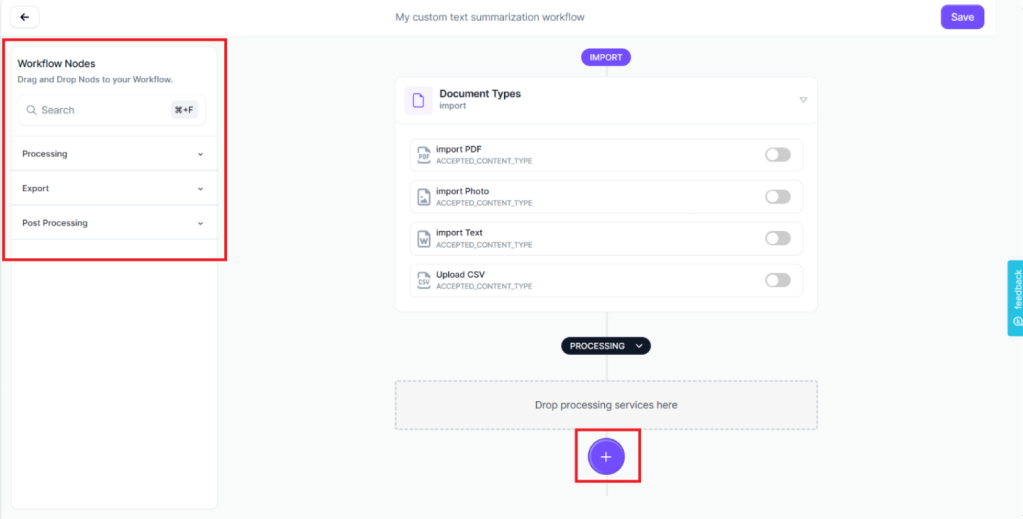
4- A “+” button that will automatically display the list of compatible services that can be added to the workflow.

4- Toggle the PDF and Photo import options on
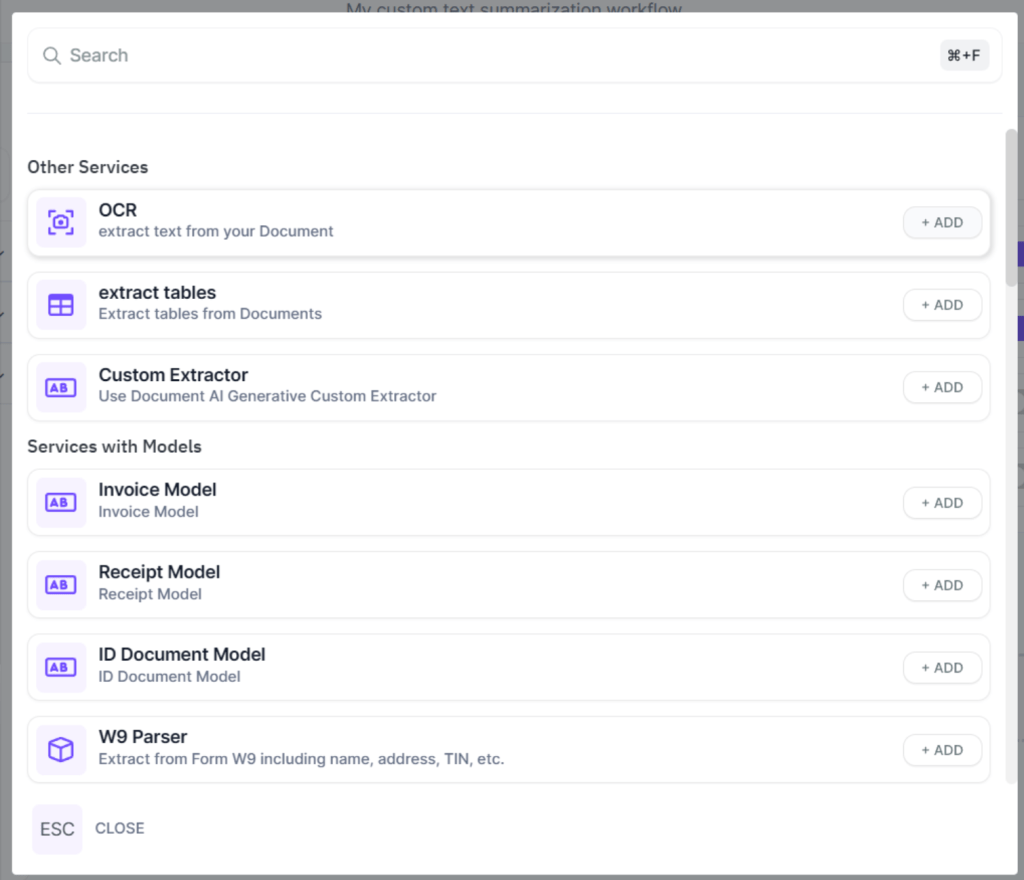
5- From the displayed list of processing services, choose “OCR”

6- Open the Processing panel on the left and choose the ChatGPT service.

7- Define the prompt as follows.
Note: You can click on [[input_text]] to add it directly to the textual prompt.
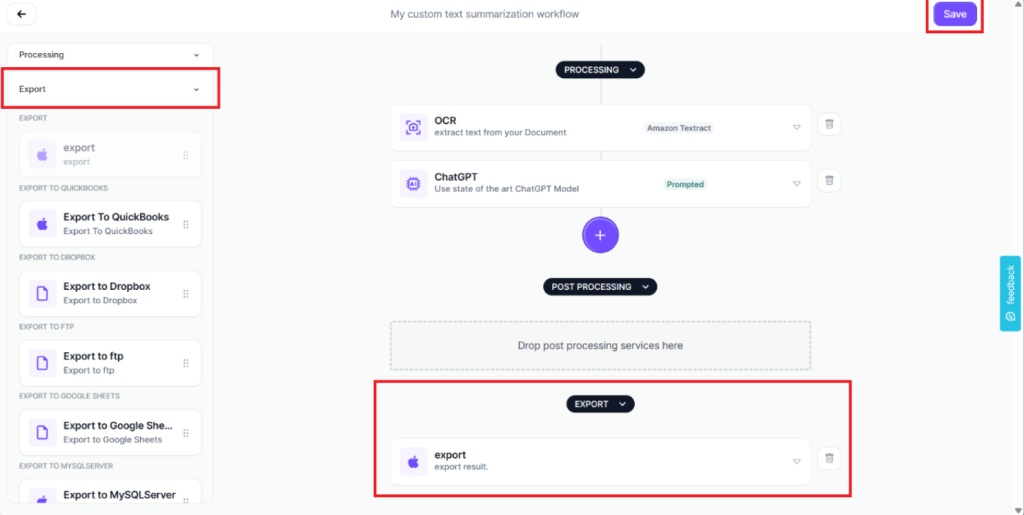
8- Open the Export panel and drag and drop the “export” service.
- Custom AI Models: For complex document types, Kudra users can train AI models on just 20 labeled examples. This customized model would then far outperform any generic extraction model. Users can thus tailor the AI to their unique needs.

9- Kudra’a AI models: Create a model from scratch or import a model
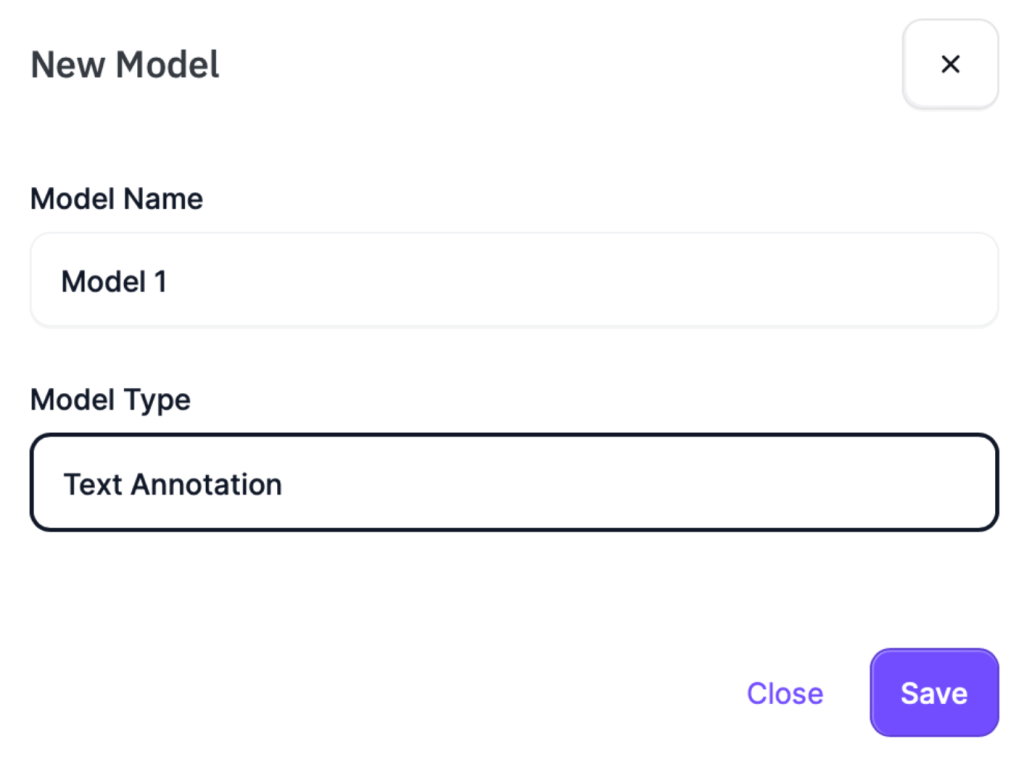
10- Kudra’a AI models: Create a model from scratch

11- Enter a name and choose a type. Note: If it’s a model from “huggingface”, you’ll be prompted to enter its API URL

12- Click the three dots on your new model and click “Train”.
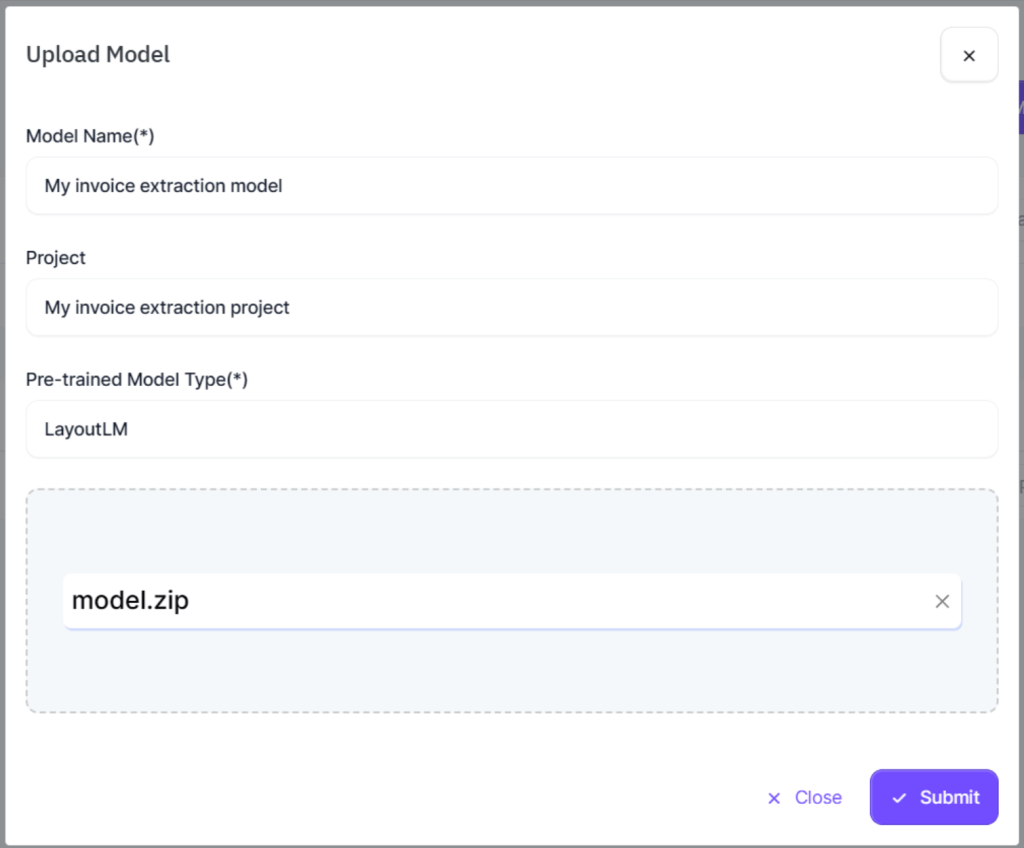
13- Click on the “Upload Model” button.

14- Fill in the required information, upload your model’s zip/tar package and finish by clicking the “Submit” button.
- ChatGPT Integration: Kudra seamlessly blends industrial-grade AI with the conversational prowess of ChatGPT. Users can leverage ChatGPT for advanced document analysis needs like summarization, intent identification and data validation via natural language instructions.
Speed
By leveraging cloud-based parallel processing, Kudra delivers blazing fast document digitization without needing any infrastructure investment. Enterprises can thus scale data extraction throughput rapidly to keep pace with business growth.
Specific speed-enhancing functionalities include:
- Batch Processing: Kudra facilitates bulk uploading of documents and extracts data from hundreds of files in a single run. The exported datasets preserve parent-child relationship with the source files for easier reconciliation.
- Multi-format Support: Kudra’s AI engine can digest diverse document types like scanned invoices, product spec sheets, clinical trial protocols etc. without needing any template customization. The unified platform handles it all.
- Cloud Infrastructure: Kudra runs on enterprise-grade cloud infrastructure optimized for security and scalability. By leveraging elastic compute, the system can be auto-scaled to handle processing spikes enabling future-proof capacity.
Ease of Use
Kudra simplifies document digitization through an intuitive web interface requiring no specialized skills. With capabilities like pre-trained AI and rapid template building, users can be up and running within minutes.
- Pre-trained AI: Kudra offers a model store with production-grade AI models built by experts for common needs like extracting vehicle registration details. Users can directly utilize these out-of-the-box models for specific use cases instead of training models from scratch.
- Rapid Template Building: For frequently processed document types like invoices, Kudra enables creating data extraction templates through its user-friendly wizard. Users can define fields for capturing key details from sample files. The wizard then auto-generates a reusable template for batch processing.
- Flexible Integration: Kudra enables accessing its AI capabilities through cloud APIs, allowing integration with business applications like RPA bots, ERPs and custom software. Users can also schedule automated document processing routines for hands-free operation.
The impact of Kudra’s Capabilities on Effortless Data Retrieval
Armed with this trifecta of precision, speed and ease-of-use, Kudra empowers enterprises to achieve new levels of productivity in document processing. Let’s examine two real-world scenarios to demonstrate Kudra’s business impact.
Logistics Leader Eliminates Backlogs, Cuts Costs
A European trucking giant struggled with over 10,000 unprocessed freight documents piled up every month. Manually extracting shipment details from these PDFs and images to update their TMS proved impossible due to the backlog volume. This resulted in account managers lacking visibility into delivery status, leading to poor customer service.
By implementing Kudra, the company automated the digitization of critical shipment documents like PODs, manifests and COOs. Kudra’s AI extracted essential details like dates and customer IDs into structured datasets. These fed directly into their TMS, providing real-time visibility.
Kudra helped the logistics leader clear long-pending backlogs within weeks. Automating document processing reduced operational costs by over 30% while improving customer service levels through proactive shipment tracking.
Global Bank Gains Real-time Insights, Avoids Risk
A leading European bank struggled with effectively monitoring all the commercial agreements governing their vendor partnerships. With 1000s of pages of contracts signed annually, manually reviewing them to map termination clauses, liability conditions etc. seemed impossible. Lack of real-time analysis prevented risk assessment.
Deploying Kudra’s AI, the bank automated the analysis of complex partnership contracts, proprietary agreements and master service agreements. Kudra reviewed the documents to highlight crucial clauses and presented easy-to-understand summaries with metrics. These provided executives with real-time insights into vendor partnerships, enabling data-driven decisions to mitigate risk.
By processing volumes of contractual paperwork within minutes, Kudra enabled unprecedented visibility. The bank could now proactively identify and resolve partnership issues through fact-based vendor management powered by Kudra’s AI.
Conclusion
As evident, Kudra revolutionizes the process by which intelligence is extracted from an array of critical business documents including contracts, invoices, shipping manifests, and beyond. Its streamlined approach not only ensures accuracy and precision but also drastically enhances efficiency, empowering organizations to derive actionable insights swiftly and effectively.


