
Errors in the invoice reconciliation process can lead to incorrect financial reporting, delays in payments, and potentially strained relationships with suppliers. Whether it’s due to manual data entry, human oversight, or misalignment between invoices and purchase orders, reconciliation mistakes can disrupt the flow of your business operations. Fortunately, automation has made it easier to mitigate these issues, helping finance teams avoid common pitfalls and maintain accurate financial records.
In this article, we’ll explore common errors encountered during the reconciliation process and how automated invoice reconciliation can help you avoid them.
Understanding the Invoice Reconciliation Process
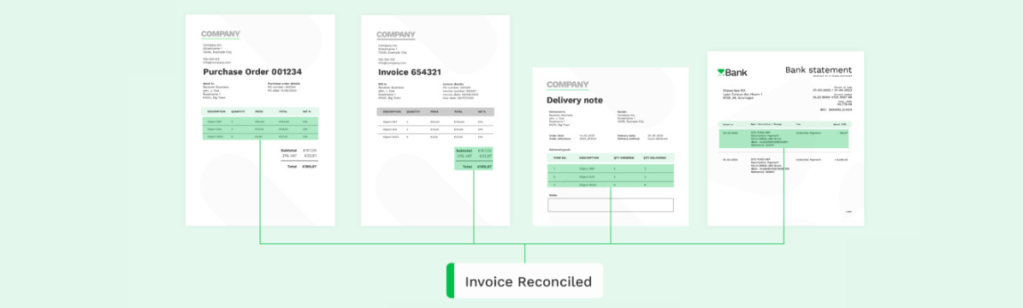
What is invoice reconciliation? The invoice reconciliation process involves comparing supplier invoices with purchase orders and receipts to verify the accuracy of each transaction. This ensures that payments are only made for goods or services that have been delivered as agreed. When done manually, this process is prone to several common errors, which can lead to financial mismanagement.
Manual Reconciliation Steps:
• Gathering documents: Invoices, purchase orders, and delivery receipts must be collected and verified.
• Comparing figures: Ensuring that the amounts, quantities, and terms on invoices match purchase orders and receipts.
• Flagging discrepancies: Identifying mismatches in data, such as incorrect pricing or missing items.
• Resolving errors: Investigating discrepancies and resolving issues with suppliers before approval for payment.
You can dive deeper with our guide: Master the Invoice Reconciliation Process: How Automation Can Save You Time and Money! Even though these steps seem straightforward, human error is inevitable, especially when managing hundreds or thousands of transactions. This is where automation becomes a game-changer.
Common Errors in the Invoice Reconciliation Process
Manual reconciliation is often riddled with errors, leading to financial discrepancies. Let’s take a closer look at the most common mistakes and how invoice matching automation can help prevent them.
1. Data Entry Errors
Manual entry of transaction data is one of the most frequent causes of errors. Entering incorrect amounts, supplier details, or invoice numbers can result in inaccurate financial statements and delayed payments.
How Automation Helps:
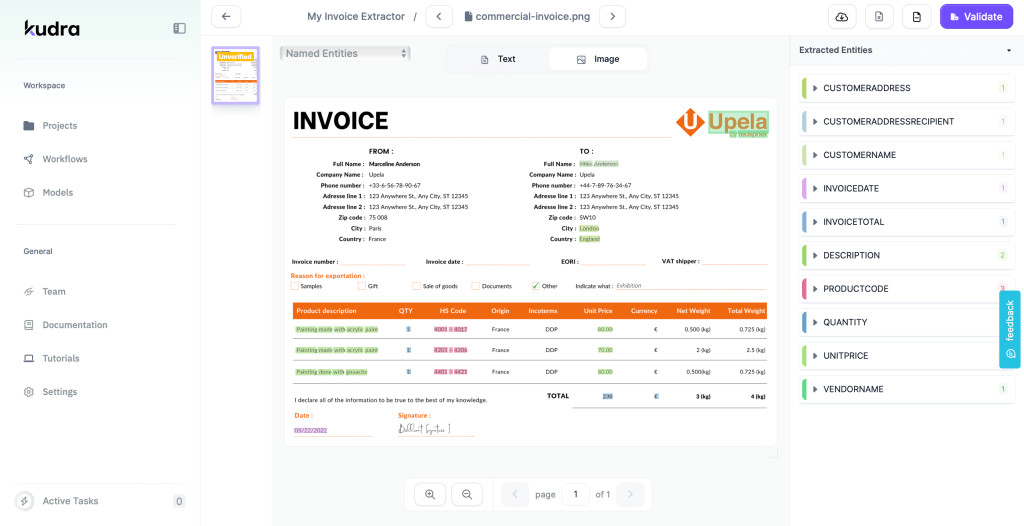
Automated invoice reconciliation software uses Optical Character Recognition (OCR) technology to automatically extract data from invoices, reducing the likelihood of human error. By eliminating manual data entry, finance teams can ensure data accuracy and minimize time spent correcting mistakes.

2. Invoice Duplication
Duplicate invoices often slip through the cracks, leading to overpayment. When multiple invoices are mistakenly processed for the same order, it can result in overpayments and strained supplier relationships.
How Automation Helps:
Invoice matching automation prevents duplicates by cross-referencing each invoice with purchase orders and delivery receipts. The system flags any duplicate invoices, ensuring that payments are only made once for each order.
3. Mismatched Invoice Details
Mismatches between invoices and purchase orders are common, especially when terms change after an order is placed. For instance, an invoice might reflect different prices, quantities, or delivery dates, leading to confusion during reconciliation.
How Automation Helps:
Automation ensures accurate invoice matching by comparing every detail of the invoice to the corresponding purchase order and receipt. If discrepancies arise, the system highlights them for review, ensuring nothing is overlooked.
4. Currency Conversion Errors
For businesses that deal with multiple currencies, reconciling payments in different currencies can introduce errors due to fluctuating exchange rates. Failing to account for these fluctuations may result in inaccurate reconciliation.
How Automation Helps:
Automated reconciliation tools can integrate real-time currency conversion rates, ensuring that all transactions are reconciled using the latest exchange rates. This helps businesses avoid costly conversion errors and maintain accurate records.
5. Delays Due to Approval Bottlenecks
Manual processes often slow down when waiting for invoice approval from various departments. This can cause delayed payments, missed discounts, and strained relationships with suppliers.
How Automation Helps:
Automated approval workflows route invoices to the right approvers based on pre-set criteria. By automating approvals, finance teams can ensure invoices are reviewed and approved in a timely manner, avoiding unnecessary delays.
How Automated Invoice Reconciliation Minimizes Errors
Automated invoice reconciliation solutions leverage machine learning and artificial intelligence (AI) to streamline the process and reduce errors. These tools are designed to match invoices to purchase orders and receipts with a high degree of accuracy, flagging potential discrepancies and eliminating human oversight.
Key Features of Automated Reconciliation:
• OCR and Data Capture: Extracts data from invoices and matches it against purchase orders and receipts, significantly reducing manual effort.
• Automated Exception Handling: Flags discrepancies and sends them for review, ensuring that only accurate invoices are approved for payment.
• Customizable Matching Rules: Allows businesses to set up custom rules for two-way, three-way, or four-way matching based on their unique needs.
• Real-Time Integration: Integrates with accounting and ERP systems to keep financial data updated in real-time, reducing the chance of missing or inaccurate information.
Best Practices for Avoiding Errors in Reconciliation
To maximize the benefits of automation and minimize errors, follow these best practices when implementing automated invoice reconciliation:
1. Standardize Your Data Inputs
Ensure that all data entries—such as purchase orders, delivery receipts, and invoices—follow a standard format. This will help your automation software accurately match the necessary documents and reduce the chance of errors.
2. Train Your Finance Team
While automation reduces human involvement, it’s important to train your team on how to use the software effectively. They should understand how the system flags discrepancies and the steps to resolve them efficiently.
3. Monitor and Adjust Automation Rules
Regularly review your automation rules to ensure they align with any changes in your business process. For instance, if your organization begins handling more complex transactions, adjusting the matching rules may be necessary.
4. Conduct Regular Audits
Even with automation, periodic audits are essential to ensure that the system is functioning as expected. Audits can help identify any gaps in your process and ensure that errors are caught early.
How Kudra Can Help Automate and Improve Your Invoice Reconciliation Process
Kudra offers a comprehensive, AI-powered solution that ensures accuracy, efficiency, and scalability in your invoice reconciliation process. By incorporating machine learning and advanced algorithms, Kudra.ai’s platform significantly reduces errors while optimizing your financial workflows.
Key Benefits of Kudra’s Automated Invoice Reconciliation:
• Seamless Integration: Easily integrates with your existing ERP or accounting system to ensure real-time updates and smooth operations.
• AI-Driven Insights: Provides actionable insights into your reconciliation process, allowing you to identify trends and optimize performance.
• Customizable Matching: Tailor the system to your business needs, whether it’s two-way, three-way, or four-way matching.
• Scalability: As your business grows, Kudra.ai scales with you, handling larger volumes of invoices with ease.

With Kudra’s automated invoice reconciliation, you can eliminate manual errors, streamline approval workflows, and maintain accurate financial records.
The Future of an Error-Free Invoice Reconciliation Process
Automating your invoice reconciliation process is essential to avoiding costly errors and improving the overall efficiency of your financial operations. With invoice matching automation, businesses can prevent common mistakes such as data entry errors, duplication, and mismatched details. Solutions like Kudra.ai offer powerful tools to ensure accurate, error-free reconciliation at scale, positioning your business for future success.


