
In the rapidly evolving landscape of finance and technology, artificial intelligence (AI) has emerged as a pivotal tool for transforming the way
investors, analysts, and business professionals understand and leverage financial investment reports.
An investment research report is a comprehensive document crafted by an analyst, offering guidance on whether to purchase, maintain, or offload a public company’s stock. It usually contains a wealth of detailed examination of the company’s operations, the sector it belongs to, its leadership, financial health, potential risks, and a projected stock price. Traditionally, an investor will manually read the research report to extract signals. This manual method can work on a few reports but when dealing with hundreds or thousands of reports at once it becomes an impossible task. In addition, the investor cannot perform an advanced search across multiple reports to find correlations and signals.
In this article, using AI we will show how to extract valuable insights such as analyst recommendations, bear case scenarios, bull case scenarios, base case scenarios, key financial metrics, investment thesis and more from financial research reports. Through practical examples and step-by-step instructions, you will learn how to harness the power of AI to navigate the vast sea of information contained in financial research reports, unlocking potential opportunities and gaining a competitive edge in the market.
What is an investment research report:
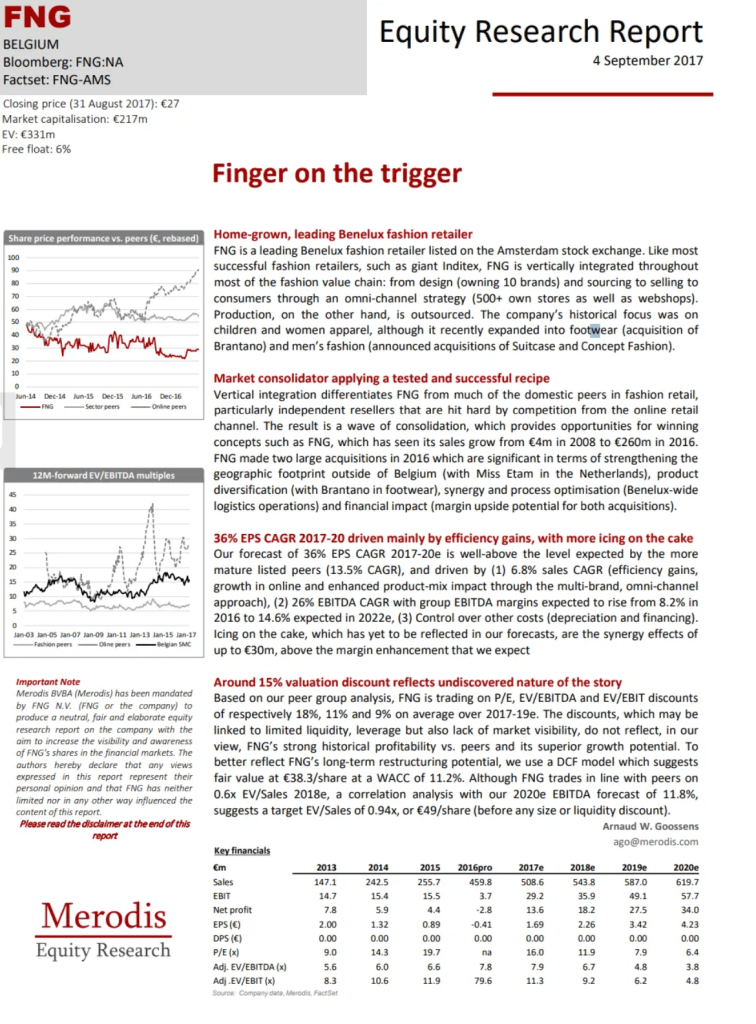
The investment reports typically contain:
Recommendation — Typically to either buy, sell, or hold shares in the company. This section also usually includes a target price (i.e., $47.00 in the next 12 months).
Company Update — Any recent information, new releases, quarterly or annual results, major contracts, management changes, or any other important information about the company.
Investment Thesis — A summary of why the analyst believes the stock will over or underperform and what will cause it to reach the share price target included in the recommendation. This is probably the most interesting part of the report.
Financial tables and metrics— A forecast of the company’s income statement, balance sheet, cash flow, and valuation. This section is often an output from a financial model built in Excel.
Risk & Disclaimers — An overview of the risks associated with investing in the stock. This is usually a laundry list that includes all conceivable risks, thus making it feel like a legal disclaimer. The reports also have extensive disclaimers in addition to the risk section.
Below is an example of an investment report:
Setup document AI workflow
Investment reports contain a variety of complex tables, unstructured texts, and charts, and in addition, they come in a variety of layouts which makes them extremely challenging to automatically analyze. Fortunately, with the development of deep learning models such as BERT and generative AI, we have witnessed a leap in the extraction and reasoning capabilities of AI models. However, creating an AI workflow that works in production has been quite challenging due to the need to create an ad-hoc Ai workflow which requires advanced coding and scripting that most companies simply n’t have.
In this article, we are going to use Kudra.ai to create a custom AI workflow to automatically extract and analyze the following information:
Company Name
Investment thesis: Key reasons supporting the investment perspective on this entity.
Bear Case Scenario: Potential risks and negative outcomes, including the projected stock price under this scenario.
Base Case Scenario: Expected or most likely outcomes and projections, including the expected stock price.
Bull Case Scenario: Explain the optimistic outcomes and best-case scenarios for growth and performance, along with the projected stock price.
Key Financial Metrics: List crucial financial metrics, such as EPS, P/E ratio, revenue growth, etc.
Challenges: Outline significant risks or challenges impacting the company or instrument.
Favorable Factors: List strengths or opportunities beneficial to the company or instrument.
Analyst’s Recommendations: Summarize the conclusions or recommendations made by the analyst.
Additional Insights: Include any other pertinent analysis or insights from the paper.
Date of Report: Note the publication or release date of the research paper.
Using Kudra, we are going to create a document workflow that contains:
A custom extractor model: Instead of using an LLM, which is susceptible to hallucination when dealing with numerical values, we use a custom extractor to effectively extract numerical financial entities such as EPS, P/E, bull_case_senario_return, etc. using Named Entity Recognition (NER).
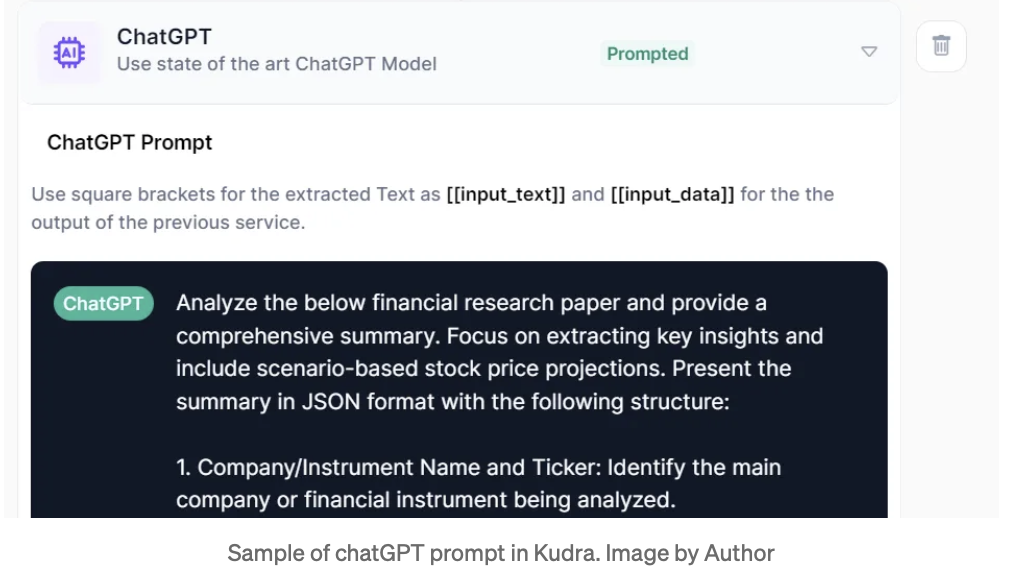
Large Language Model (LLM) chatGPT for text analysis: we leverage the reasoning capability of an LLM to identify passages discussing bear case scenarios, bull case scenarios, recommendations, etc.
A table extraction model to parse all numerical tables

Below is a sample of the prompt that has been used:
Custom extraction:
We are now ready to process our financial research reports. Below is the extracted data from 13 reports exported in csv from Kudra:
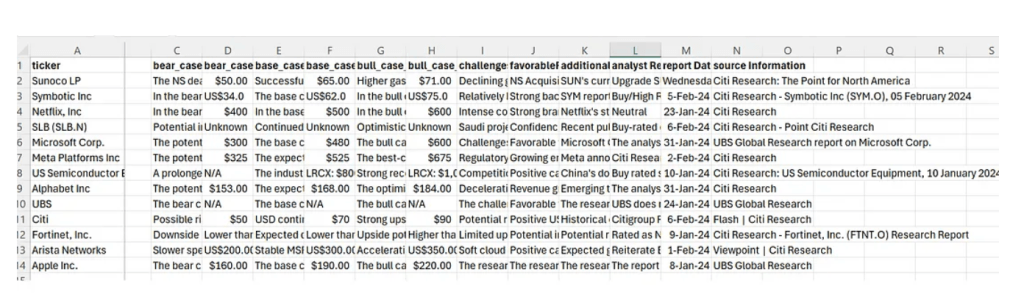
The structured data contains critical information such as financial metrics, analyst recommendations, bear case, and bull case scenarios, etc. that is ready to be analyzed. In the next step, we will load the extracted data into a SQL DB and run queries.
SQL Query with RAG:
For this step, we are going to use Retrieval Augmented Generation (RAG)to retrieve relevant information from our structured table and generate an answer using LLM. Following the steps of our previous article, we are going to:
1- Load the CSV file into an SQL DB
2- Ask a question in a natural language query
3- Convert the query into an SQL query using Langchain’s SQLDatabaseChain
4- Query the SQL DB to get an answer
5- Synthesize the answer using LLM (chatGPT)
Our first question is: “What are the pros and cons of investing in Apple Inc. ?”
db_agent.run("What are the pros and cons of investing in Apple Inc.?")
Below are the results of the converted SQL query and the LLM generation:
					> Entering new SQLDatabaseChain chain...
What are the pros and cons of investing in Apple Inc.?
SQLQuery:SELECT "bull_case_description", "bull_case_projected_stock_price", "
SQLResult: [('The bull case scenario foresees strong demand and higher-than-e
Answer:The pros of investing in Apple Inc. include potential strong demand an > Finished chain.
The pros of investing in Apple Inc. include potential strong demand and highe
As shown in the results, our natural language query “What are the pros and cons” was successfully converted to an accurate SQL query:
SQLQuery:SELECT “bull_case_description”, “bull_case_projected_stock_price”, “base_case_description”, “base_case_projected_stock_price”, “bear_case_description”, “bear_case_projected_stock_price” FROM People WHERE companyName = “Apple Inc.”
Below is the returned list of the SQL query:
[('The bull case scenario foresees strong demand and higher-than-expected unit p
Next, the returned list is sent back to an LLM to generate the following answer:
The pros of investing in Apple Inc. include potential strong demand and higher market share expansion for their Vision Pro spatial computer, leading to significant revenue growth. The cons include potential lower-than-expected unit production and demand for the Vision Pro spatial computer, resulting in a decline in revenue and market share.
The results are quite impressive! By leveraging the power of LLM to convert a natural language query into an SQL query, we have effectively queried our database and extracted accurate information based on our custom-extracted data.
That said, one of the limitations of this method is relying on the LLM to convert the natural language query into an SQL query. During our tests, we have noticed incomplete or inaccurate conversions to SQL queries in some cases suggesting the need for LLM fine-tuning or additional prompt engineering to get more accurate SQL queries.
Conclusion
In conclusion, starting from pages of unstructured research reports in PDF, we have successfully extracted critical information, that we have custom- defined, using Kudra. After extraction, we exported the data in a CSV format, which we then queried using natural language with the help of Langchain.
By leveraging advanced AI tools and techniques, such as the custom AI workflow built in Kudra.ai, analysts can now extract, analyze, and interpret vast amounts of data from investment research reports with unprecedented speed and accuracy. This not only enables a deeper understanding of complex financial documents but also opens up new opportunities for identifying investment signals and making informed decisions.
If you have a specific use case that you would like to discuss, feel free to schedule a demo here.


