
Every month, your accounts payable team processes hundreds (perhaps thousands) of invoices. Each one requires meticulous verification: matching purchase orders to goods receipts to invoices. Line by line. Number by number. Hour after hour.
And despite all this effort, errors still slip through. Duplicate payments. Overbilling. Incorrect quantities. Price discrepancies that cost your organization thousands of dollars annually.
The problem isn’t your team. The problem is the process.
A Finance Professional’s Daily Nightmare
If you’re in finance, you know this scenario all too well:
Your AP specialist receives an invoice for $47,832.50. Before approving payment, they must:
- Locate the corresponding Purchase Order – Searching through filing systems or ERP databases
- Find the Goods Receipt Note – Confirming what was actually delivered
- Compare all three documents – Verifying:
- PO numbers match across all documents
- Supplier names are consistent
- Quantities ordered = quantities received = quantities billed
- Unit prices on the invoice match PO prices
- Total amounts are calculated correctly
- No unauthorized charges have been added
This process takes 15-30 minutes per invoice for a skilled AP professional. For complex invoices with multiple line items, it can take over an hour.
Why Traditional Solutions Fall Short

You might be thinking: “We already have an ERP system. Doesn’t that handle this?”
Traditional ERP systems and basic OCR tools have significant limitations:
The ERP Limitation
Most ERP systems require manual data entry of invoices before they can perform matching. Your team still needs to:
- Manually key in invoice data (introducing transcription errors)
- Handle exceptions manually when formats don’t match
- Deal with invoices that arrive via email, mail, or supplier portals in various formats
The Basic OCR Problem
Standard OCR tools can read text from documents, but they:
- Lack contextual understanding – They can’t distinguish between a PO number and an invoice number
- Struggle with varied formats – Different suppliers use different layouts, and OCR accuracy plummets
- Can’t perform intelligent verification – They extract data but can’t analyze discrepancies or provide recommendations
- Require extensive manual configuration – Each new supplier format needs custom templates
The Spreadsheet Trap
Some teams resort to Excel-based tracking systems, which:
- Create version control nightmares
- Lack audit trails
- Don’t scale as invoice volume grows
- Still require manual data entry and comparison
These approaches still leave your team drowning in manual work, and errors continue to leak through.
The Solution: Agentic 3-Way Matching Automation

Imagine a system that works like your most experienced AP specialist—but processes invoices in seconds instead of minutes, never gets tired, and catches every discrepancy with mathematical precision.
That’s what agentic 3-way matching automation delivers.
What Makes It “Agentic”?
Unlike traditional automation that follows rigid rules, an agentic system uses artificial intelligence to:
- Understand context – Recognizes that “PO Number,” “Order ID,” and “Purchase Order Reference” all mean the same thing
- Make intelligent decisions – Evaluates discrepancies by severity and provides risk-based recommendations
- Learn from variations – Handles different document formats from different suppliers without custom configuration
- Provide confidence scores – Tells you exactly how certain it is about each verification, so you know which items need human review
- Explain its reasoning – Generates detailed analysis of why documents match or don’t match, with specific values and calculations
How It Works: The Complete Automation Workflow
Step A: Intelligent Document Extraction with Kudra.ai

The foundation of any accounts payable automation system is accurate document extraction. You can’t verify what you can’t read.
Our solution uses Kudra, an advanced document intelligence platform that combines OCR with Vision Language Models (VLMs) to extract structured data from procurement documents with exceptional accuracy.
Why Kudra for Finance Process Automation?
Kudra was specifically designed for complex document processing scenarios like accounts payable automation:
- Handles format variability – Works with PDFs, scanned images, photos, and various document layouts
- Understands financial documents – Pre-trained on invoices, purchase orders, and receipts
- Provides confidence scores – Every extracted field includes a confidence metric
- Requires minimal setup – No template creation or extensive configuration
- Scales effortlessly – Process one document or thousands with the same accuracy
Setting Up Document Extraction: The Kudra Workflow
Here’s how we configured document extraction for each document type in the 3-way matching system. The process is remarkably straightforward:
Purchase Order Extraction Setup
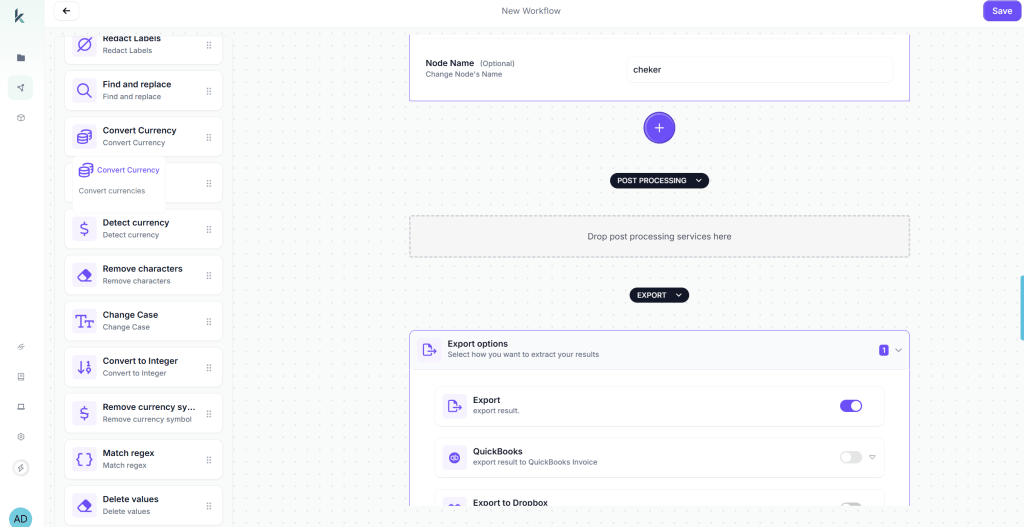
In Kudra’s workflow builder, we created a new workflow specifically for Purchase Order processing:
Add OCR Component – Drag the OCR module onto the workflow canvas. This extracts all visible text from the PO document, including tables, headers, and line items.
Add Vision Language Model (VLM) Component – This is the intelligent layer that understands document structure. We configured it to extract:
po_number– The purchase order identifiersupplier_name– Vendor/supplier nameorder_date– When the PO was issuedtotal_amount– Total PO valueitems– Line items with:sku– Product/item codedescription– Item descriptionquantity_ordered– Quantity orderedunit_price– Price per unitline_total– Extended amount
Add Validation Component – Configured automatic validation rules:
- Verify PO number is present
- Check that total amount matches sum of line items
- Validate date formats
- Flag missing critical fields
Configure Export – Set up JSON export to provide structured data in a standardized format for the matching engine.

Create a Project
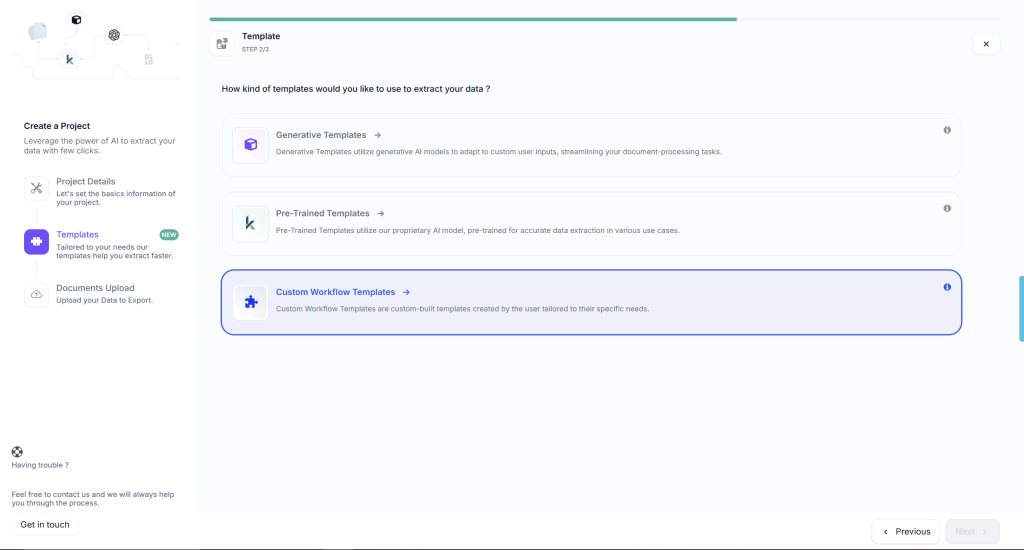
We created a Kudra project called “PO Extraction” and linked it to the PO workflow. This project serves as the processing endpoint—any PO uploaded to this project automatically runs through the configured workflow.
Integrate Kudra via API
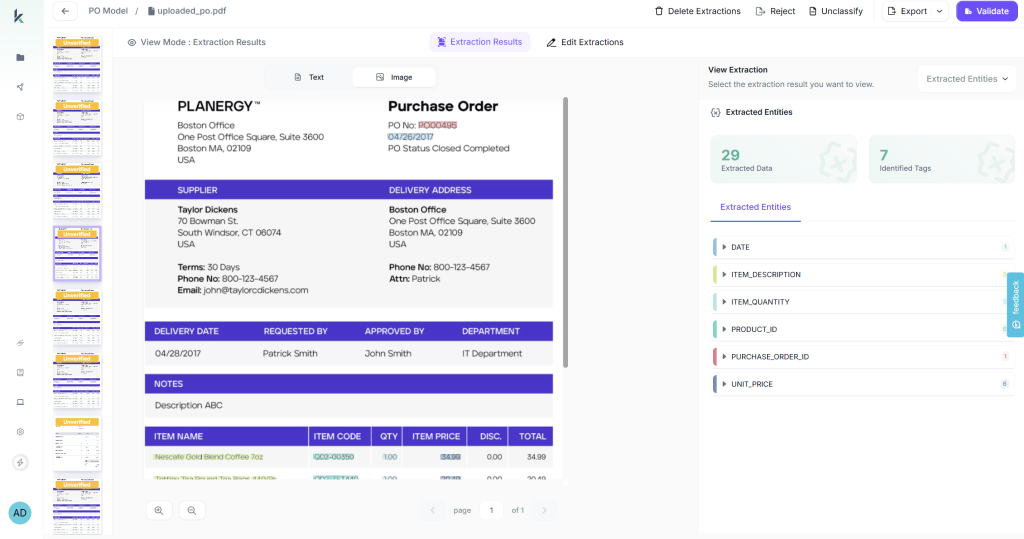
Once your project is set up in Kudra, there’s nothing manual left to do.
You simply integrate Kudra as a tool inside your existing system using the Kudra API.
From that point on, everything runs automatically:
Your system sends the PO document (PDF or image) to Kudra via API
Kudra applies the predefined extraction workflow
Structured data is returned in 10–30 seconds
Your application consumes the JSON and continues the workflow (matching, validation, posting, etc.)
Step B: Automated 3-Way Verification
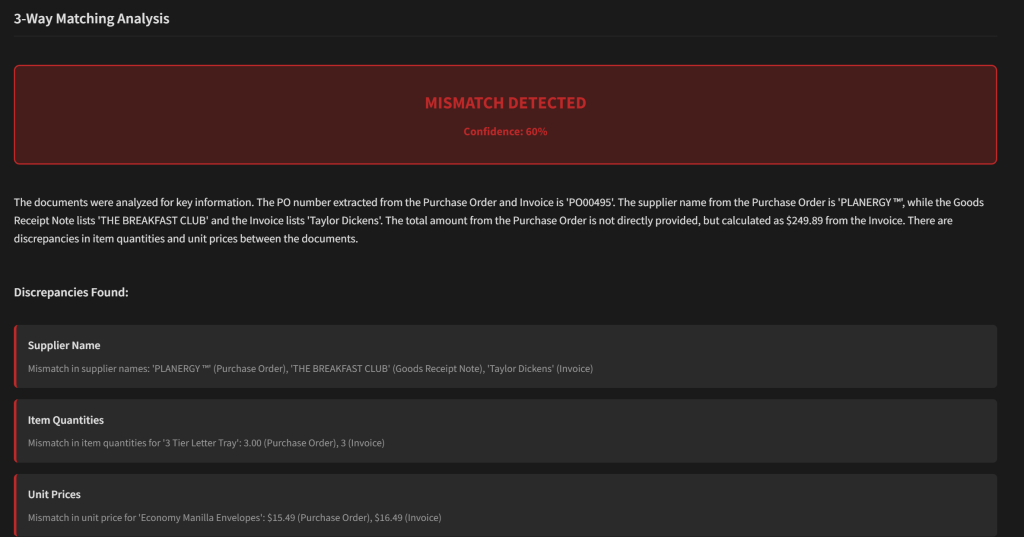
The agentic system automatically links the Purchase Order, Goods Receipt, and Invoice and verifies that they all belong to the same transaction. It confirms the PO number is consistent across documents, validates supplier names, and immediately flags missing or mismatched references. Quantities are then reconciled using the core accounting rule — billed quantity must never exceed received quantity, which must never exceed ordered quantity — allowing the system to detect over-billing or partial delivery issues without human review.
Beyond document linkage, the system validates prices and math at a granular level. Invoice unit prices are compared against PO prices with configurable tolerance thresholds to account for rounding, while unauthorized price increases are flagged automatically. Every calculation is re-computed — line totals, subtotals, taxes, and grand totals — and the final invoice amount is reconciled against the PO total, accounting for tax differences and approved variances. Any deviation outside policy is escalated instantly.
Step C: Intelligent Results & Actionable Decisions

Once verification is complete, the system doesn’t just return a pass or fail — it explains exactly what happened. If a mismatch is detected, the agent identifies where the discrepancy occurred (quantity, price, tax, or reference), which document caused it, and why it violates policy or accounting rules. Instead of forcing teams to manually trace errors across documents, every issue is surfaced with full context.
More importantly, each exception comes with clear, actionable recommendations. The system may suggest approving a variance within tolerance, requesting a corrected invoice, holding payment until goods are fully received, or escalating the case for review. Clean matches are automatically approved and pushed forward, while only true exceptions require human attention — turning 3-way matching from a manual bottleneck into a decision-ready workflow.
The Competitive Advantage
While competitors offer “automation,” we deliver intelligent augmentation. The system doesn’t just replace manual work—it makes your entire AP process smarter, faster, and more accurate.
We’re not just 10% better than alternatives. We’re fundamentally different in our approach, and that difference translates to measurable business value.
Your Next Step
The finance automation revolution is happening with or without you. The only question is: Will you lead it or be left behind?
Every day you wait is another day of:
- Manual work that could be automated
- Errors that could be prevented
- Discounts that could be captured
- Strategic work that could be done
- Competitive ground that could be gained
The cost of inaction is $21,178 per month. The cost of action is a 2-hour setup.
The choice is clear. The time is now. The future of accounts payable is intelligent, automated, and strategic.
Are you ready to transform your AP function from a cost center into a competitive advantage?
Ready to eliminate passport processing bottlenecks in your immigration practice?
Found This Helpful?
Book a free 30-minute discovery call to discuss how we can implement these solutions for your business. No sales pitch, just practical automation ideas tailored to your needs.
Book A Call


