
Managing documents efficiently is one of the greatest challenges for modern businesses. From organizing contracts to processing invoices, manual document workflows can be slow, error-prone, and expensive. Enter Kudra’s drag and drop workflow builder—a powerful, user-friendly tool designed to automate and optimize document workflows, tailored specifically for your unique business needs.
In this article, we’ll explore how Kudra’s platform can help you create seamless workflows, maximize efficiency, and unlock the full potential of automation for document management.
Why Automating Document Workflows is Essential
Without automation, document management often becomes a bottleneck for businesses. Here are the key challenges organizations face with manual workflows:
- Delays: Routing documents between stakeholders takes time, especially when done manually.
- Errors: Human oversight in data entry, approvals, or filing can lead to costly mistakes.
- Compliance Risks: A lack of structured workflows can make it harder to meet regulatory requirements.
- Scattered Information: Without a centralized system, locating specific documents can be a nightmare.
By automating document workflows with Kudra, businesses can save time, reduce errors, and ensure compliance—all through a platform designed to simplify the process for users of any skill level.
How Kudra’s Drag and Drop Workflow Builder Works
Kudra’s drag and drop workflow builder eliminates complexity by allowing you to visually design workflows without any coding knowledge. Whether you’re handling invoices, contracts, or employee records, Kudra provides a structured, intuitive platform for automation.

Key Features of Kudra’s Workflow Builder
• Visual Design: Build workflows step by step using a simple drag-and-drop interface.
• Centralized Data Access: Seamlessly access, upload, and manage documents in one platform.
• Customizable Workflows: Tailor processes to meet specific organizational needs.
• Prebuilt Actions: Use predefined components, such as approval steps, document routing, and storage integration, to create streamlined workflows.
Unlike generic workflow builders, Kudra focuses on empowering users to handle document-heavy processes efficiently, offering practical solutions with no technical barriers.
Step-by-Step: Kudra's Drag and Drop Workflow Builder
With Kudra, creating an automated workflow for document management is straightforward. Here’s a step-by-step guide to using its drag and drop workflow builder:
Step 1: Identify the Document Workflow
Before designing your workflow, clearly define the process you want to automate.
Examples include:
• Invoice Approvals: Streamline invoice reviews and approvals by routing them through designated stakeholders.
• Contract Management: Automate contract creation, sharing, and storage.
• Document Archiving: Organize and archive completed projects with predefined rules.
Consider the specific pain points of your process, such as delays, repetitive tasks, or missing approvals, and decide which actions the workflow needs to address.
Step 2: Start with the Workflow Builder
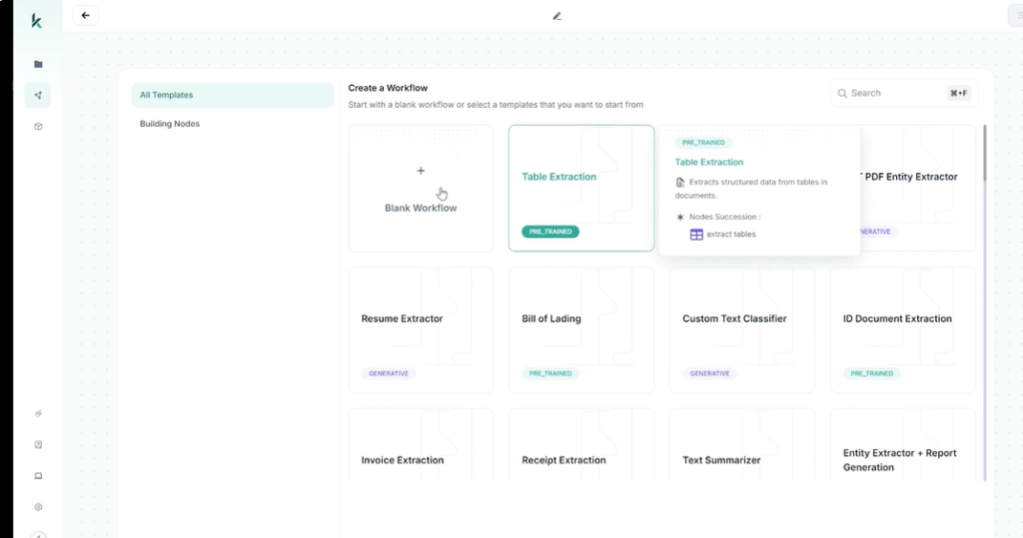
Log into the Kudra platform and navigate to the workflow builder. Here’s how you can begin designing:
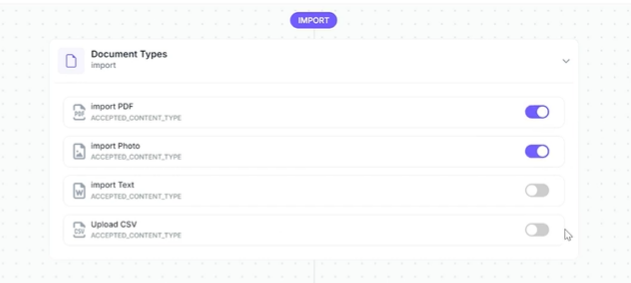
1. Add Document Inputs: Drag the input node to specify where documents will enter the system—via upload, integration with third-party tools (e.g., Dropbox or Google Drive), or manual entry.
Design the Workflow Path: Use Kudra’s drag-and-drop interface to create the flow. Add steps such as:
• Processing: OCR for data capture / Custom extraction model / chatgpt module for analysis or summarization..

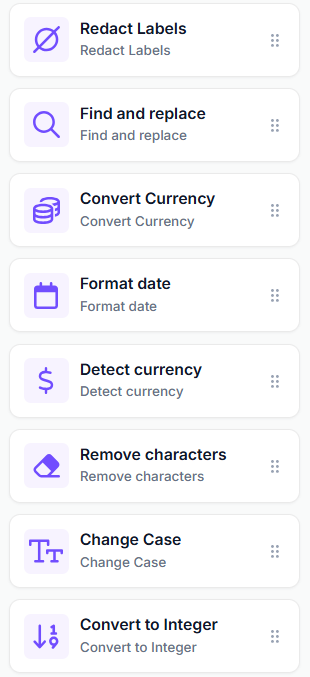
• Post processing: you can redact labels, convert currency, find and replace data…
Benefits of Using Kudra’s Drag and Drop Workflow Builder
By automating document workflows with Kudra, businesses can reap significant advantages:
1. Increased Productivity
Manual tasks like data entry, document routing, and follow-ups are time-consuming. Automation allows your team to focus on higher-value tasks.
2. Error Reduction
By standardizing processes and automating repetitive steps, Kudra reduces the risk of errors commonly associated with manual workflows.
3. Enhanced Collaboration
Kudra’s centralized platform ensures that all stakeholders have access to the same up-to-date information, fostering better teamwork.
4. Real-Time Tracking
Monitor the progress of documents at every stage, ensuring accountability and transparency.
5. Compliance Assurance
With predefined workflows, businesses can ensure regulatory requirements are consistently met. Kudra also maintains detailed audit trails for added peace of mind.
Unique Kudra Features for Document Workflow Automation
What sets Kudra apart from other workflow automation platforms?
1. Effortless Data Retrieval
Kudra’s AI-powered data extraction feature simplifies document handling by automatically identifying and extracting relevant information, such as client names, dates, and amounts. This eliminates the need for manual data entry.
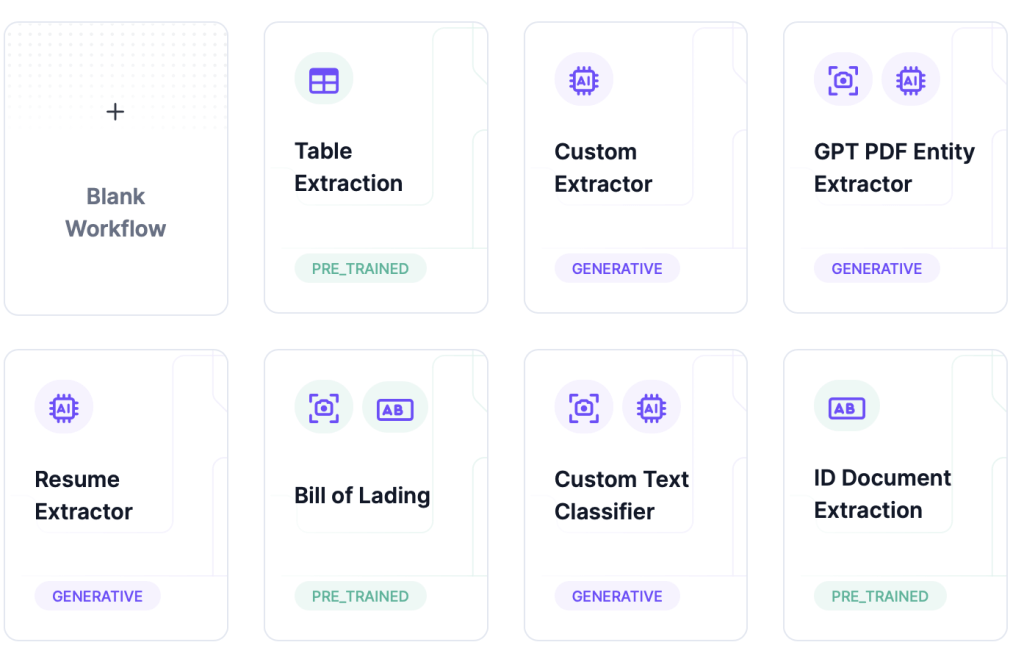
2. Prebuilt Templates
Save time by starting with templates designed for common document workflows, including approval processes, contract management, and data archiving.
3. Integrations
Kudra seamlessly integrates with tools like Slack, Google Drive, Dropbox, and Salesforce, ensuring a connected, efficient workflow environment.

4. Scalability
From small businesses to large enterprises, Kudra’s workflow builder scales with your organization’s needs, handling increasing document volumes effortlessly.
Future Trends in Workflow Automation with Kudra
As automation technology evolves, Kudra remains at the forefront of innovation. Here are key trends to watch in 2025 and beyond:
• AI-Powered Decision-Making: Kudra’s AI will become even smarter, predicting workflow actions based on past usage patterns.
• Seamless Cross-Platform Automation: Deeper integrations with third-party tools will allow for entirely automated ecosystems.
• Enhanced Customization: Users will have more control to design workflows that adapt dynamically to business needs.
Kudra is already incorporating these advancements, ensuring businesses stay ahead of the curve.
Conclusion
With Kudra’s drag and drop workflow builder, businesses can revolutionize their approach to document management. By automating repetitive tasks, reducing errors, and enhancing collaboration, Kudra empowers organizations to work smarter—not harder.
Ready to transform your document management? Get started with Kudra today and experience effortless automation.


