In today’s competitive market, AI-powered document processing tools like Kudra and Docparser are essential for businesses looking to automate data extraction and streamline workflows. While both platforms offer powerful features, they cater to different needs and industries. This article provides a detailed comparison between Kudra and Docparser, focusing on their key features, integrations, and pricing, to help you choose the most suitable solution for your document processing needs.
Kudra Overview
Kudra is a highly customizable AI-driven document processing platform designed to adapt to specific business workflows. It offers advanced features such as custom machine learning models, robust OCR capabilities, and intelligent document classification. Kudra is particularly well-suited for organizations that require precise data extraction from complex documents and need to automate and optimize their document workflows. With its user-friendly interface and flexibility, Kudra is accessible to both technical and non-technical users, making it a versatile solution across various industries.
Docparser Overview
Docparser is a specialized document parsing tool designed to extract data from PDFs and other document formats. It is particularly effective for businesses that need to automate data extraction from structured documents such as invoices, purchase orders, and bank statements. Docparser uses predefined parsing rules to capture data from documents, which can then be exported to various formats or integrated directly into existing business systems. Its ease of use and quick setup make it a popular choice for small to medium-sized businesses looking to streamline their document-based workflows.
Kudra VS Docparser
Training custom Machine Learning Models
Data Extraction Without Training
Advanced Document Classification
Template-Free Processing
Human-in-the-Loop Reviews
Custom Workflows
Extract Data from Tables
Kudra
Docparser
Limited
Kudra key features
1- Advanced Document Processing:
Kudra excels in handling complex document types through features like Named Entity Recognition (NER), relation extraction, and document classification. These AI-driven tools allow for precise data extraction and streamlined workflows, making Kudra ideal for industries with demanding document processing requirements.

2- User-Friendly Interface:
Kudra is designed with an intuitive interface that makes it accessible to users with varying levels of technical expertise. This ease of use reduces onboarding time and enhances productivity across teams.
3- Customizable Workflows:
Kudra allows businesses to create and automate custom document workflows tailored to specific needs. These no-code workflows help to optimize document processing and reduce manual intervention, increasing overall efficiency.

4- Optical Character Recognition (OCR):
Kudra’s OCR capabilities are robust, enabling accurate extraction of data from a wide range of document types, including scanned images and PDFs. This feature is particularly valuable in sectors that rely on high volumes of paper-based documents.
5- Collaboration and Review Tools:
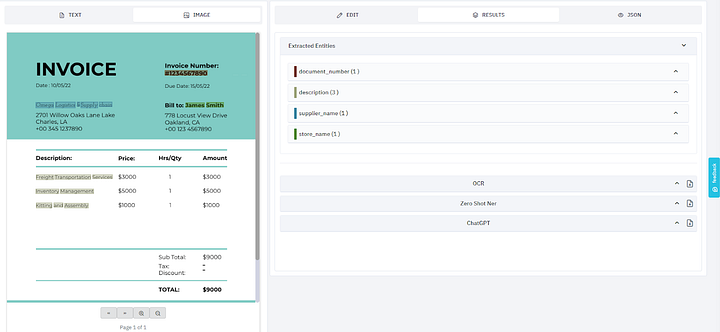
Kudra supports real-time collaboration, allowing multiple users to work on document processing tasks simultaneously. Features like commenting, reviewing, and consensus-based labeling ensure that data processing is accurate and consistent.
6- Custom Model Training:
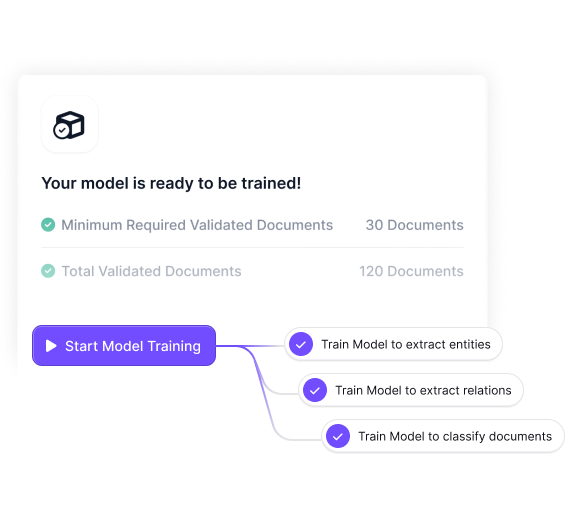
Kudra’s platform enables users to train custom machine learning models, which are tailored to specific document types. This feature is crucial for businesses that need specialized data extraction models.
7- Integration with External Tools:
Kudra integrates seamlessly with other platforms and large language models (LLMs) like GPT, enhancing the accuracy and efficiency of document processing workflows.

Kudra Pricing
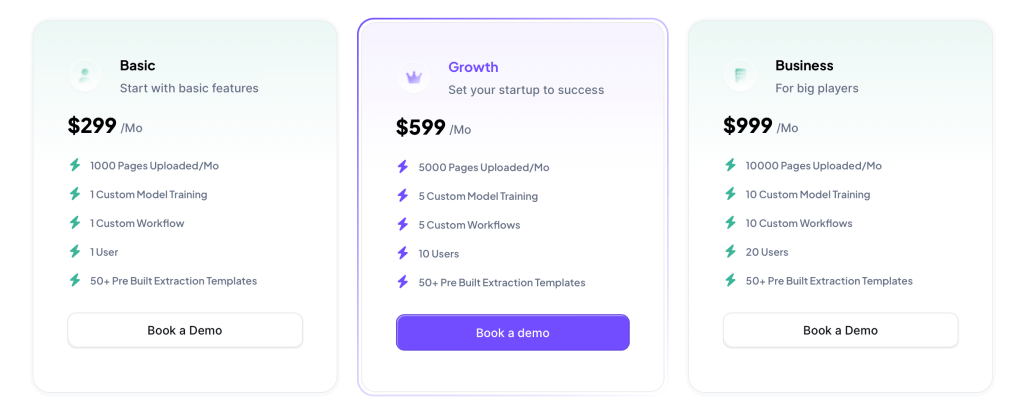
Kudra offers a flexible, usage-based pricing model that allows businesses to scale their document processing operations without large upfront costs. This pricing structure is particularly advantageous for organizations with fluctuating document processing needs, as it enables them to pay only for the features they use.
Docparser Key Features
1- Data Extraction from Structured Documents:
Docparser is designed to extract data from structured documents such as invoices, receipts, and forms. It uses predefined parsing rules to capture specific data fields, which can then be exported to various formats or systems for further processing.
2- Predefined Parsing Rules:
Users can set up parsing rules without any coding knowledge, making it easy to extract specific data fields from documents. These rules ensure that data is consistently captured from structured documents, reducing manual data entry.
3- Template-Based Document Parsing:
Docparser allows users to create templates for different document types, ensuring accurate data extraction across various formats. This feature is particularly useful for businesses that handle large volumes of similar documents.
4- Integration with Business Systems:
Docparser integrates with a wide range of business systems, including CRM, ERP, and cloud storage platforms like Google Drive and Dropbox. This integration streamlines data workflows by automating the transfer of extracted data into the appropriate systems.
5- Custom Export Formats:
Data extracted by Docparser can be exported in various formats, including CSV, Excel, JSON, and XML. This flexibility allows businesses to easily integrate parsed data into their existing workflows.
6- Cloud-Based Deployment:
As a cloud-based solution, Docparser offers easy access and scalability. Users can manage and process documents from anywhere, making it an ideal solution for distributed teams.
Docparser Pricing
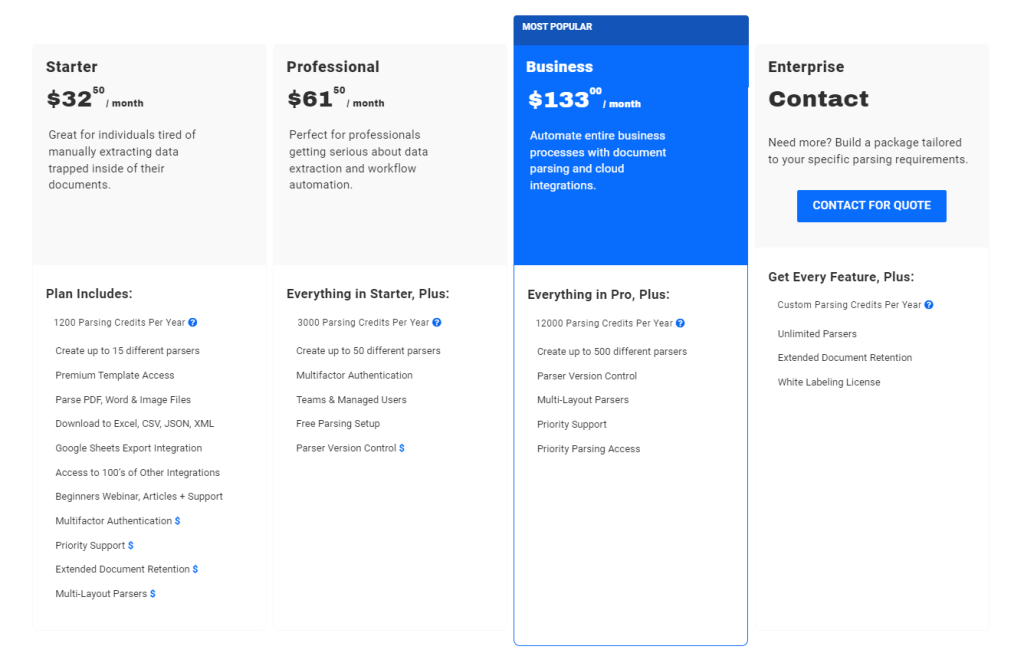
Docparser’s pricing is based on the number of documents processed per month, with several tiers available to accommodate different levels of usage. This straightforward pricing model makes it easy for businesses to choose a plan that fits their needs, with options to scale up as document volumes increase. Docparser also offers a free trial, allowing users to test the platform before committing to a subscription.
Conclusion
When comparing Kudra and Docparser, the choice depends largely on the specific needs of your business. Kudra stands out for its advanced AI-driven features, customizable workflows, and robust OCR capabilities, making it ideal for industries that require precise data extraction from complex documents. Docparser, on the other hand, is a highly specialized tool designed for structured document parsing, offering quick setup, predefined parsing rules, and seamless integration with business systems. It’s best suited for businesses that need a reliable, easy-to-use solution for automating data extraction from structured documents. Both platforms offer unique strengths, and understanding their features and pricing will help you choose the right tool for your document processing needs.


