
Excel is ubiquitous in the business world, used by professionals across industries to track data and create reports. Its powerful calculation and graphing capabilities have made it an essential productivity tool. However, as organizations gather more and more data, Excel reports can become cumbersome and time-consuming. This necessity has driven demand for automating repetitive Excel-based tasks to boost efficiency.
Excel automation entails using features like macros, formulas, and Power Query to systematize data imports, calculations, report generation, and more. It allows users to work smarter by eliminating manual processes.
Organizations can automate hundreds of Excel operations like:
– Importing data from multiple sources
– Cleaning and transforming data
– Performing complex calculations
– Generating insightful pivot tables and charts
– Producing periodic reports and financial statements
– Updating dashboards
The right automation strategies can lead to faster, less error-prone Excel reporting. However, Excel also has limitations when task complexity, data volumes, and customizability needs arise. Understanding these constraints is key when evaluating tools to automate Excel reporting.

Excel Reports Automation Features
Excel offers users several features to help automate workflows:
- Macros: Record and replay sequences of actions for streamlining repetitive tasks.
- Formulas and Functions: Set up calculations that update dynamically based on cell values.
- Power Query: Import, combine, and transform data from multiple sources.
- Power Pivot: Model and analyze large datasets.
- Conditional Formatting: Visualize cell values meeting specified criteria.
- Data Validation: Define permissible values for cells.
- PivotTables: Summarize and analyze data.
- PivotCharts: Visualize PivotTable data graphically.
- Solver: Determine optimal value for formulas based on designated constraints.
- Data Analysis Toolpak: Access additional analytical tools like regression.
- Visual Basic for Applications (VBA): Write customized subroutines and functions.
These features allow automation of everything from data imports to report generation. Users can create macros to reproduce manual processes, set up dynamic formulas and queries to connect and transform data, use PivotTables to generate insights, employ conditional formatting to visualize outputs, and more.
While these tools are useful for small-scale automation, Excel reporting reaches certain limitations as complexity, data volumes, and custom requirements grow.
Understanding Excel Automation Limitations
While Excel automation delivers immense value, users often encounter limitations:
- Complexity: Excel cannot handle intensely elaborate reporting tasks involving extensive calculations, visualizations, and dynamic updates based on customizable criteria.
- Scalability: Excel reporting gets sluggish as data outgrows spreadsheet capacity. Data imports and transformations require manual adjustments, while large PivotTables and data models put strain on computing resources.
- Security: Spreadsheets with external connections or macros can serve as entry points for malicious actors unless access and permissions are carefully configured. Risks grow as automation complexity increases.
- Performance: Large datasets lead to laggy calculation times, long data refresh cycles, and even application crashes. Automated reporting solutions built in Excel often suffer from poor reliability.
- Maintainability: Highly complex Excel reporting solutions become difficult to update, troubleshoot, or handle. Dependency on a single techie user develops over time.
As long as Excel automation stays within complexity, scale, security, and performance guardrails, it remains a viable option. But once reporting needs to push beyond Excel’s sweet spot, limitations necessitate exploring enterprise-grade alternatives.

Financial Excel Report’s Analysis with Kudra
Kudra’s IDP Solution for Instant Excel Reports
Kudra offers an AI-powered intelligent document processing platform designed specifically for automating complex business reporting workflows. It delivers immense value:
- Precision Data Extraction: Kudra leverages industrial-grade optical character recognition (OCR), natural language processing (NLP), and machine learning for accurate data extraction even from handwritten, scanned, or low-quality document images.
- Speed and Efficiency: By automatically classifying documents, and extracting and structuring data, Kudra accelerates document processing up to 90% faster than manual methods. Bulk document processing options scale seamlessly.
- Ease of Use: Kudra’s user-friendly interface enables anyone to build, customize, and manage document processing workflows without coding. Users train Kudra by validating outputs.
- Customizability: Users can customize Kudra’s AI to handle organization-specific documents like contracts, invoices, shipping manifests, and more by training custom machine learning models. Kudra learns unique business terminology, data patterns, and layouts.
- Reasoning Capabilities: Kudra’s integration with ChatGPT allows adding a reasoning layer to workflows. Users can leverage ChatGPT to analyze clauses in contracts, spot errors in financial reports, generate summaries, and more.
- Out-of-the-Box Solutions: Kudra offers pre-trained AI apps for common reporting documents like W2s, real estate contracts, vehicle damage assessments, and many more across finance, legal, logistics, and other domains.
With Kudra, enterprises can achieve Excel-grade productivity at scale across complex reporting processes through an easy-to-use automation solution.
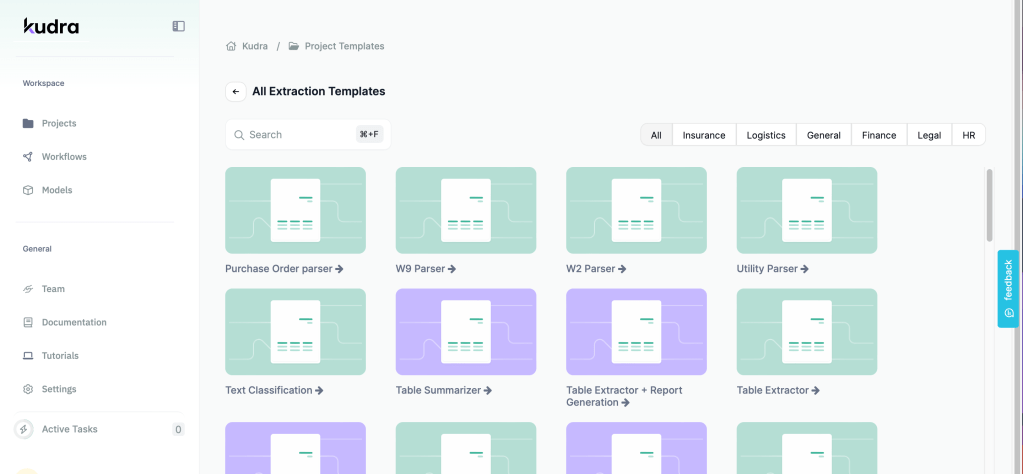
Kudra’s multiple templates
Shifting from Excel to Kudra
For many basic business reporting needs, Excel automation delivers satisfactory outcomes. But as reporting complexity and data volumes outgrow Excel’s capabilities, shifting to Kudra’s enterprise-grade intelligent document processing solution unlocks immense value:
– Kudra seamlessly handles exponentially higher data volumes with faster processing and built-in scalability.
– Kudra offers more advanced automation capabilities like customizable ML models, reasoning through ChatGPT integration, and out-of-the-box AI apps – exceeding Excel’s constraints.
– Kudra’s higher automation accuracy even for handwritten, scanned, and low-quality documents reduces errors.
– Kudra bolsters data security through enterprise-grade access controls, encryption, and permissions.
– With Kudra, multiple teams can access automated reporting flows through APIs and no-code bots unlike Excel solutions dependent on individuals.
For use cases like parsing thousands of complex legal contracts, processing millions of purchase receipts, or analyzing hand-filled medical forms, Kudra outperforms any Excel-based solution. Its ease of use, customizability, and scalability facilitate long-term growth. Even smaller organizations can benefit from Kudra’s reliability, security, and maintainability.
The Future of Excel Reports
Excel Reports automation delivers immense value for basic business reporting needs – but hits limitations as complexity, data volumes and customizability requirements rise. Kudra’s enterprise-grade document processing solutions powered by industrial-strength AI overcome these constraints through extreme precision, scalability, ease of use, and customizability.
Organizations looking to drive efficiency by automating complex document-driven workflows like contract management, accounts payable, or regulatory reporting should explore Kudra’s platform. Purpose-built for unlocking value from documents, Kudra drives tangible business productivity gains.


