
In today’s fast-paced business world, the ability to quickly extract and analyze critical information from documents like contracts, bank statements, invoices, and reports is vital. However, manual document processing can be time-consuming, error-prone, and costly. This is especially true for businesses that deal with large volumes of unstructured documents such as PDFs, Word Docs, and scanned images.
Manual Financial Data Extraction
What is financial data extraction? Well, it’s about extracting key financial data—such as billing amounts, account numbers, and revenue—from documents, but manually doing so can lead to several challenges:
• Time-consuming: Manually processing financial documents takes considerable time.
• High risk of human error: Errors in financial data extraction can lead to significant financial discrepancies.
• Difficulty handling unstructured data: Processing unstructured data from PDFs, Word documents, or scanned images is difficult without automation.
To overcome these challenges, automating the process with advanced tools is necessary. Kudra, an AI-powered document processing platform, offers an efficient way to handle financial data extraction from various document types with high accuracy.
The Solution: Automating Financial Data Extraction with Kudra AI
To overcome these challenges, automating the financial data extraction process is essential. Kudra, an AI-powered document processing platform, is designed to simplify and streamline financial data extraction. By leveraging advanced AI technology, Kudra can accurately extract information from a wide variety of documents—including invoices, contracts, financial statements, and even scanned images—and export the data to tools like Google Sheets.
With Kudra’s pre-trained AI models and integration capabilities, you can eliminate manual document processing, drastically reduce errors, and enhance the efficiency of your financial workflows.
Let’s explore how you can automate financial data extraction in just a few simple steps using Kudra.
Step 1: Choosing the Right Template for Financial Data Extraction
Kudra offers a wide range of pre-trained AI models designed for extracting data from different document types, making it the perfect platform for financial data extraction. Here’s how to get started:
1- Log in to the Kudra platform: If you haven’t created an account yet, sign up on the Kudra website.
2- Select the appropriate template: Kudra provides over 20 pre-trained AI models that can handle different types of documents, including financial statements, invoices, and contracts.

For financial data extraction, you might use templates for:
- Invoices: Extract details like invoice numbers, customer names, billing amounts, and due dates.
- Bank Statements: Pull out data such as transaction amounts, dates, and account balances.
- Financial Reports: Extract crucial metrics such as revenue, income, liabilities, and expenses.
Select the template that fits your financial data extraction needs.
Step 2: Uploading Documents for Financial Data Extraction
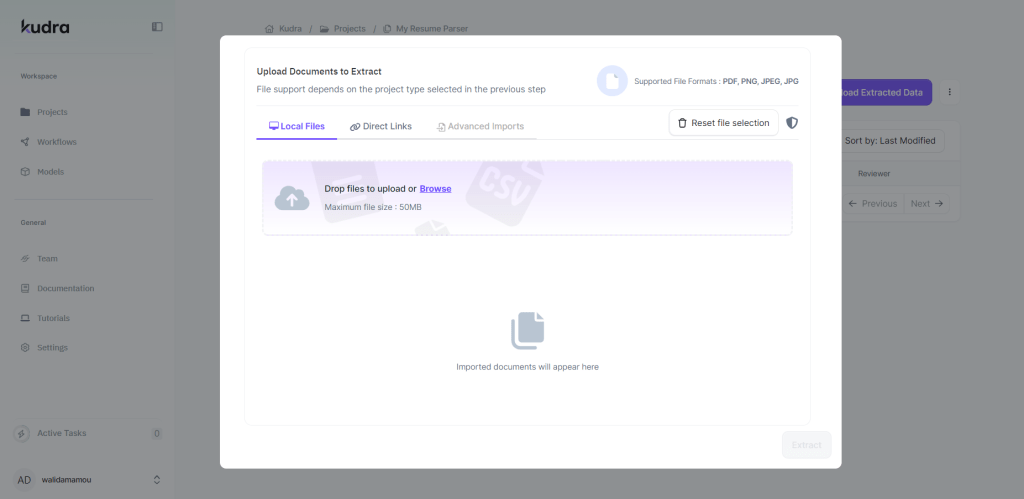
Once you’ve chosen the right template for your financial data extraction, it’s time to upload your documents.
1- Upload your financial documents: Kudra supports various file formats, including PDFs, Word documents, CSV files, and even scanned images.
2- Let Kudra do the work: The platform’s AI will start analyzing the uploaded documents, extracting the necessary financial data in just a few moments. Whether it’s structured or unstructured data, Kudra can handle it all with high precision.
This automated process simplifies financial data extraction from large volumes of documents, ensuring accuracy and efficiency.
Step 3: Extracting Key Financial Data from Documents

Kudra uses advanced AI models to perform accurate financial data extraction from documents. Whether you are processing invoices, bank statements, or complex financial reports, Kudra can extract critical data points such as:
- Invoice Number
- Billing Address
- Customer Name
- Transaction
- Amounts
- Revenue
- Liabilities
The AI automatically highlights the extracted financial data on the document itself, making it easy to verify. This is especially helpful when working with financial documents where precision is paramount.
Step 4: Financial Data Extraction from Complex Financial Documents
Kudra’s capabilities extend beyond simple documents. For more complex financial documents, such as 10-Q filings or annual reports, Kudra simplifies the financial data extraction process.
1- Upload complex financial documents: Documents like balance sheets and income statements often contain large tables of data that need to be extracted.
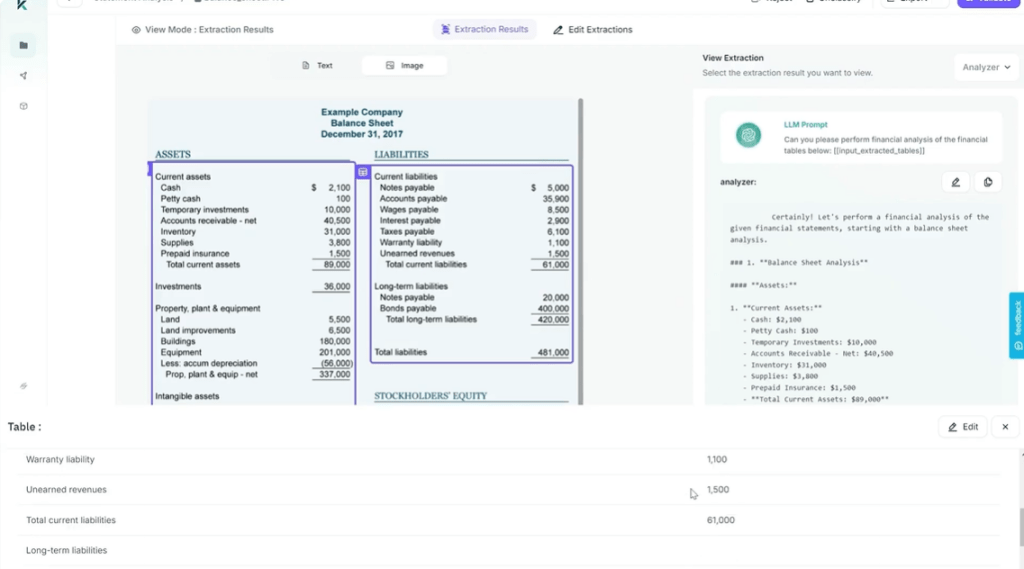
2- Extract key financial metrics: Kudra can pull out metrics such as:
- Total Revenue
- Net Income
- Gross Profit
- Operating
- Expenses
- Total Liabilities
3- Analyze financial data with AI models: You can even feed the extracted tables into a pre-trained AI model (such as GPT) to automatically analyze the data and generate financial reports.
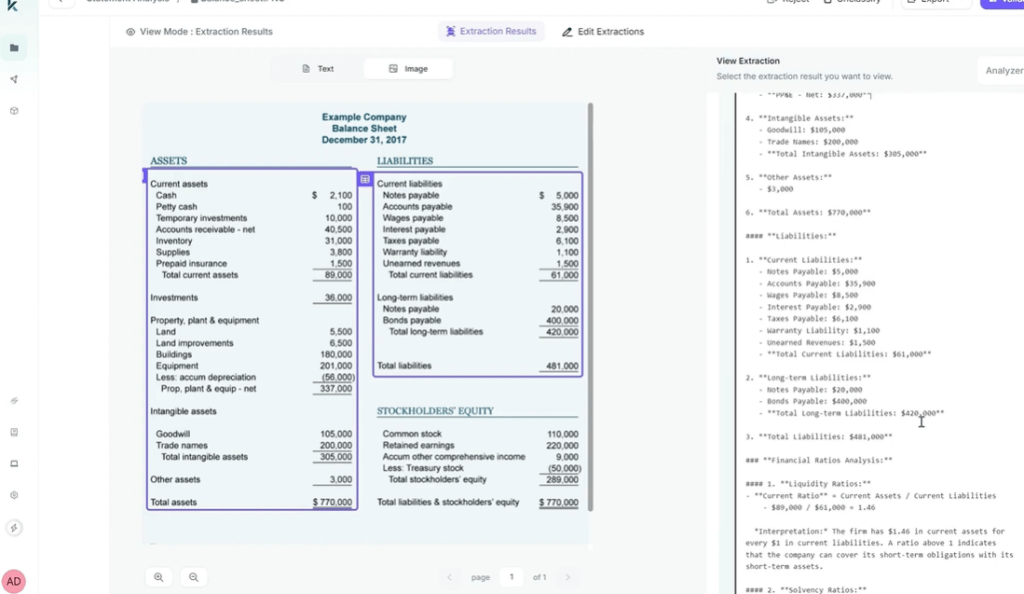
By automating the extraction of critical financial metrics, Kudra saves significant time and improves the accuracy of financial reporting.
Automating Financial Data Extraction for Large-Scale Operations
For businesses handling high volumes of financial documents, scaling financial data extraction becomes critical. Kudra’s platform is designed to handle large-scale operations efficiently.
• Automate high-volume financial data processing: Whether you’re processing hundreds of invoices or analyzing year-end financial statements, Kudra scales effortlessly.
• Reduce human intervention: Automating the entire process—from document upload to financial data extraction and export—eliminates the need for manual intervention, significantly reducing the chance of errors.
• Save time and resources: By automating financial data extraction, you save valuable time that can be redirected to higher-value tasks like data analysis and financial planning.
Advanced Financial Data Extraction Capabilities in Kudra
Kudra’s AI-driven platform offers specialized features for advanced financial data extraction, making it particularly beneficial for industries like accounting, banking, and insurance.
Extract financial metrics from unstructured documents: Kudra can pull key financial metrics from unstructured documents such as handwritten notes, scanned PDFs, or images.
Custom financial data extraction models: If your documents contain unique data points or formatting, Kudra allows for the creation of custom AI models to meet your specific needs.
Integrated financial analysis: By feeding the extracted financial data into a model like GPT, you can create custom financial reports or summaries without any manual data processing.
Benefits of Automating Financial Data Extraction with Kudra
Automating financial data extraction with Kudra provides numerous benefits, especially for businesses dealing with large volumes of financial information:
Efficiency: Automated extraction reduces the time spent manually processing financial documents.
Accuracy: AI-driven extraction minimizes human error, ensuring accurate financial records.
Scalability: Kudra is capable of handling high volumes of documents, making it ideal for businesses of any size.
Centralized Data Management: By exporting the extracted financial data to Google Sheets, you create a centralized system that makes it easy to access and analyze critical financial information.
Conclusion
Kudra makes financial data extraction easy, fast, and highly accurate. By automating the process with Kudra’s pre-trained AI models, businesses can handle a wide range of financial documents, from invoices and bank statements to complex financial reports. Whether you’re processing large volumes of financial data or need to generate financial reports quickly, Kudra offers an efficient and reliable solution.
Ready to optimize your financial processes? Start using Kudra today to automate your financial data extraction workflows and unlock new levels of productivity.


