
As businesses increasingly rely on AI for document processing, choosing the right tool is critical. Kudra and Google Doc AI are two leading platforms that offer distinct features tailored to different needs. This article will dive deep into the key features, usability, integration, and pricing of both platforms, providing a comprehensive comparison to help you make an informed decision.
Kudra Overview
Kudra is a modern AI-driven document processing tool designed for businesses that require tailored document workflows with advanced machine learning capabilities. It emphasizes ease of integration, customization, and robust data validation features.
Google Doc AI Overview
Google Doc AI is part of Google Cloud’s AI services, offering pre-trained models for document processing. It’s aimed at enterprises looking for scalable solutions within the Google ecosystem, with a focus on OCR and data extraction.
Kudra VS Google Doc AI
Training custom Machine Learning Models
Automatic adjustment to documents' layouts
Document Classification using LLMs
Data Validation
Human-in-the-Loop Reviews
Error detection
Custom Workflows
Kudra
Google Doc AI
Kudra key features
1- Advanced Annotation Options:
Kudra excels in Named Entity Recognition (NER), relation extraction, and document classification. Its AI-powered tools allow for precise labeling of text data, enabling users to extract valuable insights and uncover patterns. This not only streamlines document processing but also enhances the efficiency and accuracy of text analysis.

2- Ease of Use:
Designed with a user-friendly interface, Kudra ensures that even non-technical users can navigate its features easily. This simplicity reduces the learning curve, boosting productivity and allowing teams to quickly adapt to the platform.
3- Customized Intelligent Document Workflows:
Kudra allows users to create tailored document workflows without coding. This feature automates and optimizes document processing, reducing manual effort and increasing efficiency, making it ideal for businesses with specific workflow requirements.

4- Optical Character Recognition (OCR):
Kudra’s OCR capabilities are robust, allowing accurate annotation of various document types, including PDFs, scanned images, and contracts. This is particularly beneficial in industries like finance and legal, where maintaining document layout is crucial.

5- Zero-Shot Labeling:
With zero-shot labeling, Kudra enables data extraction without pre-existing labels. This feature is essential for diverse or evolving datasets, as it allows for efficient annotation without needing extensive pre-labeling.
6- Collaboration Tools:
Kudra supports collaboration by enabling multiple users to work on the same project simultaneously. Features like real-time commenting and editing facilitate teamwork, improving the overall efficiency of document processing.
7- Quality Control Mechanisms:
Kudra includes built-in quality control features, such as consensus-based labeling and review workflows, ensuring that document processing is accurate and consistent, leading to higher-quality data outputs.
8- Document Processing Capabilities:
Kudra is well-suited for processing a variety of documents, including bank statements and legal documents. Its advanced extraction options and ease of use make it an efficient tool for various document processing tasks.
9- Integration:
Kudra can be easily integrated with other tools and platforms, enhancing its versatility. It also supports integration with large language models (LLMs) like GPT, enabling automated data processing based on natural language inputs.

10- Custom Model Training:
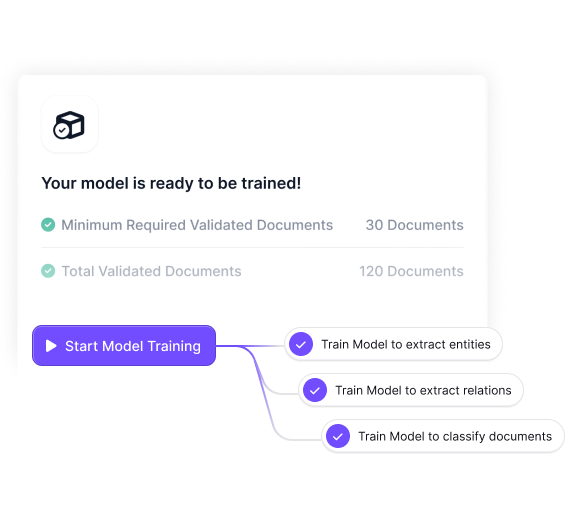
Kudra offers custom model training, allowing users to create tailored machine-learning models with minimal labeled samples. This feature is particularly useful for businesses that need to develop specific models for different document types.
11- Continuous Learning:
Kudra’s machine learning models continuously evolve by incorporating new data and user feedback. This ensures that the platform adapts to changing conditions, maintaining high levels of accuracy and efficiency.
Kudra Pricing
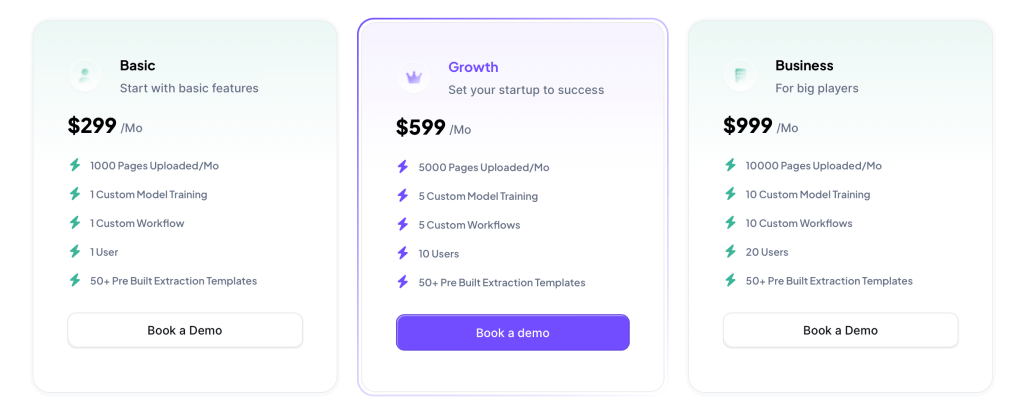
Kudra operates on a transparent, usage-based pricing model, which allows businesses to scale their usage without committing to large upfront costs. This flexibility is ideal for companies that need to manage their budgets carefully and want to avoid unexpected expenses. Users are charged based on the number of pages uploaded and their storage requirements, enabling cost-effective scalability.
Google Doc AI Key Features
1- Optical Character Recognition (OCR):
Google Doc AI is renowned for its powerful OCR capabilities, allowing accurate extraction of text from various document types, including images and PDFs. This feature is crucial for businesses that handle large volumes of documents requiring high-precision text extraction.
2-Document Classification:
Google Doc AI offers robust document classification tools that help categorize and organize documents efficiently. This feature is ideal for businesses dealing with large, unstructured datasets, as it simplifies document management and retrieval.
3- Data Validation:
Google Doc AI includes basic data validation tools that help verify the accuracy of extracted data. Although not as comprehensive as Kudra’s, these tools are sufficient for businesses with less complex validation needs.
4- Error Detection:
Google Doc AI’s error detection is designed for straightforward use cases, offering basic functionality to identify and correct common issues during document processing. This feature is suitable for businesses that do not require extensive error correction.
5- Integration with Google Ecosystem:
Google Doc AI seamlessly integrates with other Google services, such as BigQuery, Google Drive, and Google Sheets. This integration is particularly beneficial for businesses already operating within the Google ecosystem, as it allows for smooth data flow between different platforms.
6- Scalability
Google Doc AI is built to scale, making it an excellent choice for enterprises with growing document processing needs. Its infrastructure supports large volumes of data, ensuring consistent performance even as demands increase.
7- Continuous Learning:
Similar to Kudra, Google Doc AI’s models continuously learn from new data, improving their accuracy over time. This feature ensures that the platform remains effective as business needs evolve.
Google Doc AI Pricing
Google Doc AI also uses a usage-based pricing model, but costs can be more variable due to the nature of Google Cloud’s billing structure. While it offers competitive pricing for large-scale deployments, businesses may need to monitor their usage closely to prevent cost overruns, particularly if they are processing a high volume of complex documents.

Conclusion
Choosing between Kudra and Google Doc AI depends on your business’s specific needs. Kudra is the better option for those who require a highly customizable, user-friendly solution with advanced features like custom model training and detailed quality control. It’s particularly suited for industries that need to process a variety of document types with high accuracy and efficiency.
Google Doc AI, on the other hand, is ideal for businesses that are already integrated into the Google ecosystem and need a scalable, enterprise-grade solution with strong OCR capabilities and pre-trained models. Its seamless integration with other Google services and robust security features make it a reliable choice for large organizations.
Both platforms offer significant advantages, but the choice ultimately comes down to the specific requirements and constraints of your business. Kudra’s customization and ease of use may give it an edge for businesses that need flexibility, while Google Doc AI’s scalability and integration into the Google ecosystem make it a powerful tool for larger enterprises.


