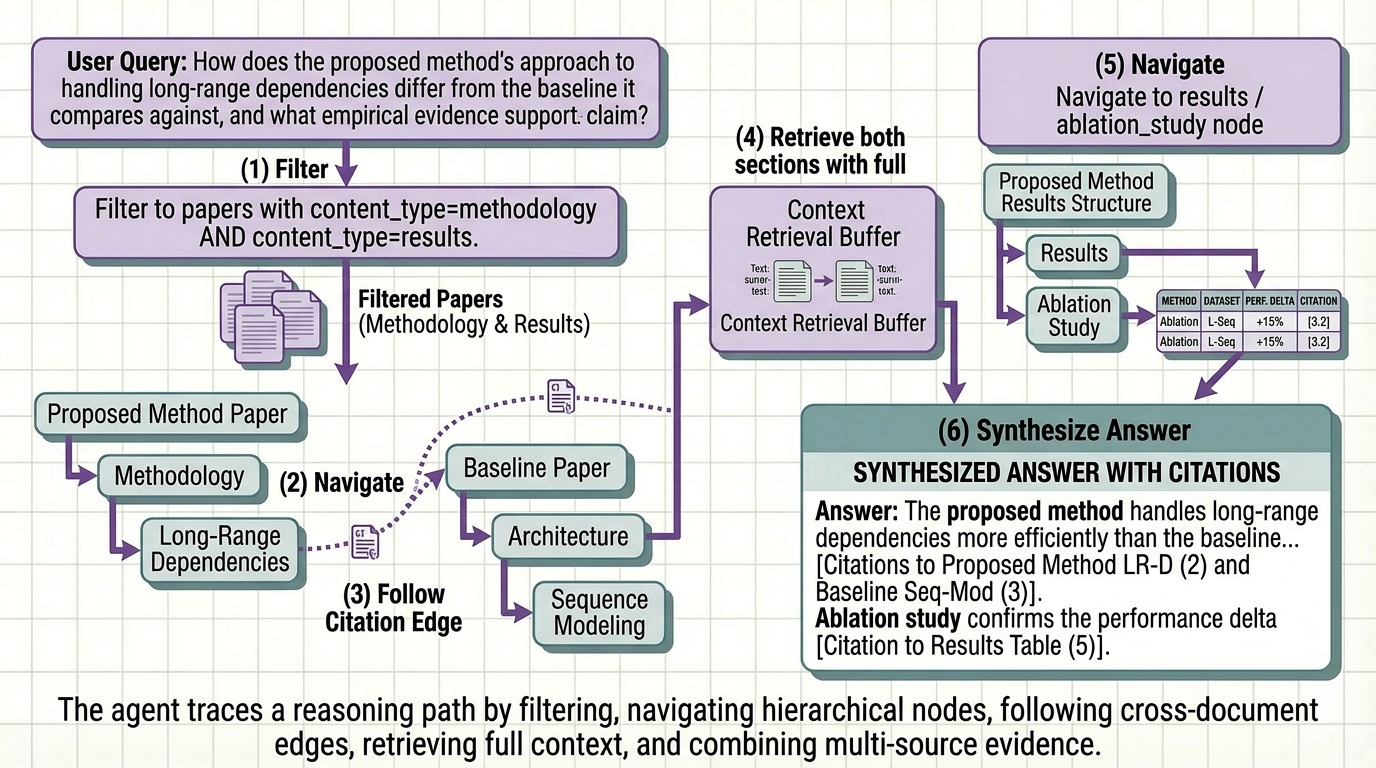
Most teams building on top of documents make the same architectural mistake. They treat their corpus as a search problem.
They chunk the papers, embed the chunks, stand up a vector store, and call it a knowledge base. Queries come in, similar chunks come back, the LLM generates a response. It works well enough in demos. It breaks quietly in production, returning adjacent context instead of the right answer, hallucinating benchmark numbers that were in a table the pipeline never properly parsed, and failing entirely on questions that require reasoning across the methodology of one paper and the results of another.
The problem isn’t retrieval. It isn’t the embedding model or the chunk size or the reranker. It’s that a collection of embedded text chunks is not a knowledge base. It’s an index. And an index is only as useful as the structure underneath it.
A reasoning-ready knowledge base is something different. It’s a document corpus that has been transformed ( extracted, structured, enriched, and organized ) so that an agent can navigate it the way a domain expert would. Not by guessing which chunks are semantically similar to a query, but by understanding what the corpus contains, where specific information lives, and how pieces of information relate to each other across dozens or hundreds of papers.
This article covers how to build one. The architecture, the transformation steps, and the agent behavior you unlock at the end.
Between a Document Corpus and a Knowledge Base
The distinction matters more than most teams realize. A document corpus is raw material. PDFs, preprints, technical reports, conference papers, content created for human readers, with structure and formatting that carries meaning a human researcher uses automatically and a naive pipeline destroys on first contact.
A knowledge base is what you get after you’ve done the work of transforming that raw material into something a machine can reason over. The transformation involves four things most pipelines skip entirely:
Structure preservation : keep relationships intact so context isn’t lost (stay meaningful).
Semantic tagging : label content by meaning, not location, so retrieval can filter intelligently.
Entity resolution : unify different names for the same concepts (models, metrics, datasets).
Relational linking : connect related pieces across the document to enable deeper reasoning.
Most RAG pipelines do none of these. They embed chunks and hope similarity search covers the gaps. For simple lookup queries on clean prose documents, it mostly does. For research corpora where the hard questions require reasoning across structure, it doesn’t.
Step 1: Extraction That Preserves What Matters
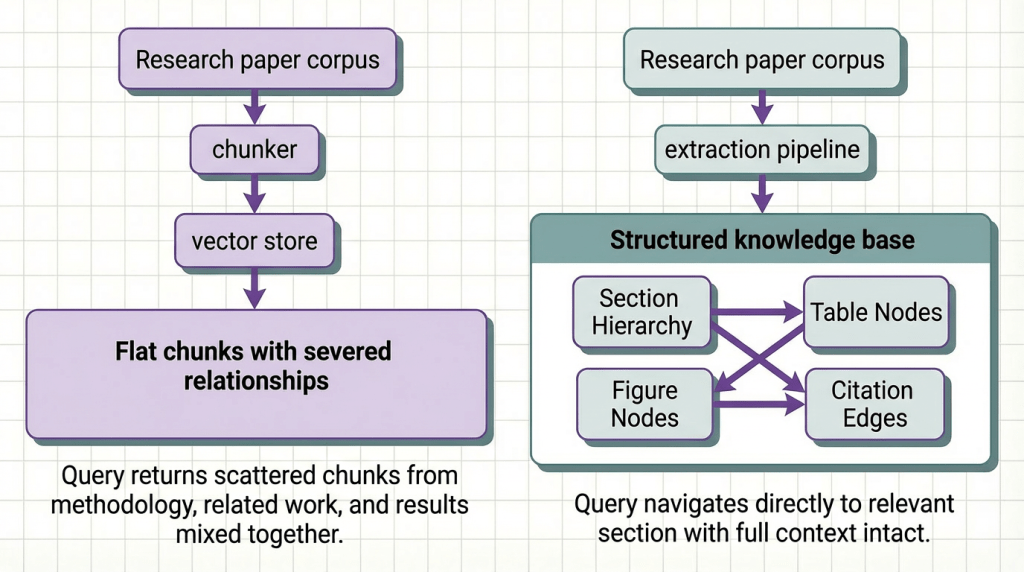
The foundation of a reasoning-ready knowledge base is extraction that treats document structure as signal, not noise.
Research papers are structurally intentional. The IMRaD structure exists because different sections answer different questions. The introduction situates the contribution. The methodology describes what was done and why. The results report what was found. The discussion interprets what it means. A reader navigates these sections deliberately, not randomly. Your extraction pipeline should preserve that navigability.
What structure-preserving extraction looks like in practice:
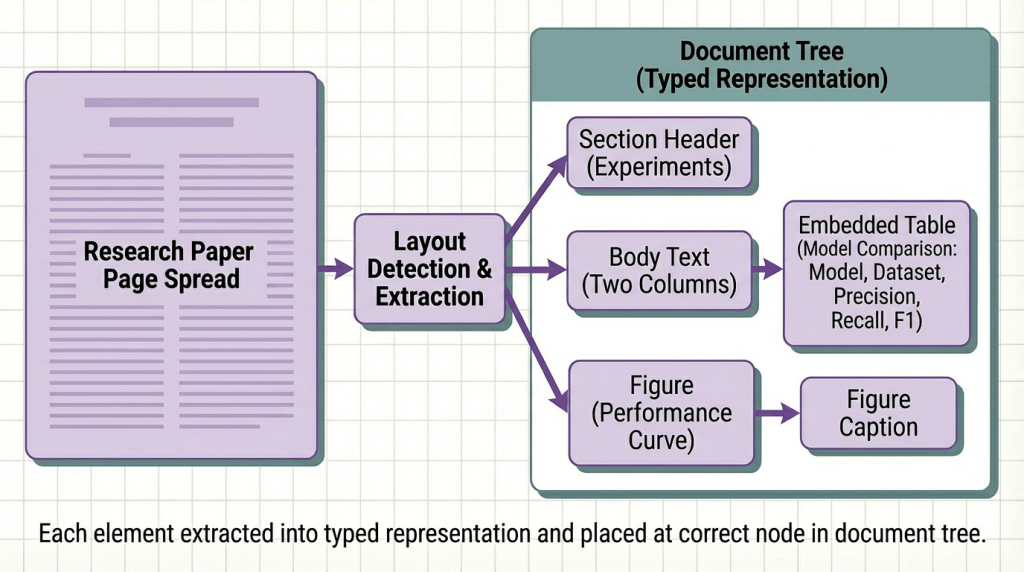
The output of this step is not text. It is a structured document tree where every element has a type, a position in the hierarchy, and a set of attributes describing its content. That tree is the substrate everything else builds on.
Step 2: Enrichment That Makes the Structure Queryable
Structure tells you what a paper contains and where. Enrichment tells you what each piece means, in terms a retrieval system and a reasoning agent can use to decide whether it’s relevant to a given query.
For research paper corpora, enrichment has three critical layers:

A corpus with this enrichment layer is no longer a bag of chunks. It is a structured graph where every node is labeled, every edge is typed, and an agent can navigate it with the same purposefulness a domain expert brings to a literature review.
Step 3: Indexing That Supports Reasoning, Not Just Search
The final transformation step is indexing, but indexing designed to support the retrieval patterns a reasoning agent needs, not just the similarity queries a standard vector store handles.
Standard vector indexing stores embeddings and retrieves by cosine similarity. That is one retrieval pattern: find content that means something similar to this query. It is useful. It is also insufficient for research corpus QA, where most of the hard questions require something more structured.
Metadata-filtered retrieval: filter before search to drastically reduce noise.
Hierarchical retrieval: return the right granularity, from cells to full sections.
Multi-hop traversal: follow cross-paper links for multi-step reasoning.x

Step 4: The Agent Layer
A reasoning-ready knowledge base does not complete the picture on its own. The agent layer is what turns structured retrieval into useful answers but the agent’s behavior is entirely determined by the quality of the knowledge base it is navigating.
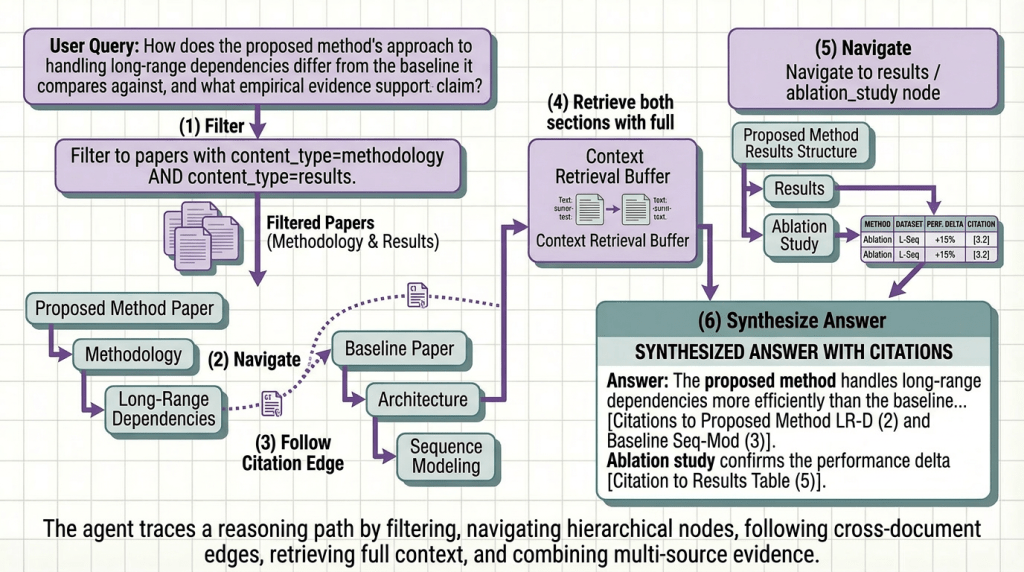
With a properly structured knowledge base underneath it, a research paper agent exhibits specific behaviors that are impossible on top of a flat vector index:
Precise retrieval: read exact values from structured data, not generated guesses.
Cross-paper reasoning: compare setups using normalized, aligned sections.
Citation chain following: follow references directly instead of re-searching.
Transparent provenance: show exact source path (paper → section → table → row).
Putting It Into Practice: From Raw Invoices to an Agent That Acts on Them
The architecture above requires structure-preserving extraction, semantic enrichment, entity normalization, and citation graph construction, significant engineering before you write a single line of agent logic.
Here’s how you’d build it with Kudra Workflows, using a research paper corpus as the example.
Step 1: Build Your Workflow

No custom code for each step. Drag and drop the components. Kudra handles the orchestration and outputs a unified schema (section hierarchy, typed tables, figure descriptions, entity tags, citation links, and section summaries) that your agent can navigate directly.
Step 2: Create a Project and Upload Your Documents
Create a project in Kudra and upload your paper corpus like arXiv PDFs, conference proceedings, technical reports. Kudra runs every document through the workflow automatically and shows you the structured output for each one.
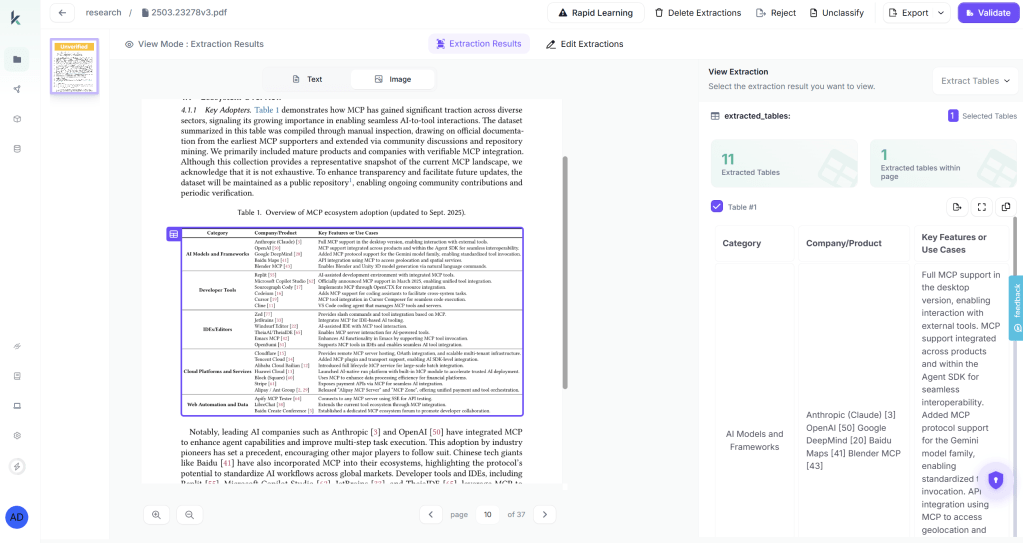
This visibility step matters more than most teams expect. Before writing any agent code, you can see exactly what was extracted from each paper: which tables were parsed correctly, how sections were classified, which citations were resolved, what entity labels were generated. If a results table is miscategorized or a model name wasn’t normalized, you fix it in the workflow and re-run, before it becomes a silent retrieval failure your agent returns wrong answers from.
Step 3: Copy the API and Wire It Into Your Agent
Once extraction quality looks right, generate an API key from the project settings. The workflow becomes a single endpoint your agent calls like any other tool:

We tested this with our own agent across a corpus of 180 NLP papers. The agent correctly answered 93% of complex cross-paper queries without manual intervention. The 7% that required review were surfaced with explicit low-confidence flags — not returned as confident wrong answers. That is what a production-grade knowledge base looks like underneath a reasoning agent.
Final Thoughts
A document corpus is raw material. A reasoning-ready knowledge base is what you build when you treat extraction, enrichment, and indexing as first-class engineering problems rather than preprocessing steps to get through before the real work starts.
The teams building reliable research agents in 2026 are not the ones with the best embedding models or the most carefully tuned rerankers. They are the ones who invested in the transformation layer, preserving section structure, generating semantic metadata, normalizing entities across papers, resolving citations into navigable edges , and built retrieval systems that support reasoning rather than just search.
The patterns here are a progression, not a checklist. Start with structure-preserving extraction. Add semantic tagging when your corpus has more than a handful of papers. Layer in entity normalization when your queries need to span multiple documents consistently. Add citation graph construction only when your use case genuinely requires multi-hop reasoning across the literature.
The hallucinated benchmark numbers, the missed methodology details, the answers that cite the wrong paper, most of them trace back to a transformation step that was skipped because it looked like plumbing.
It is not plumbing. It is the foundation. Fix it first, and everything your agent does downstream gets better.


