
There’s a moment that happens in every finance department, usually around month-end: an invoice gets rejected. Not because it’s fraudulent or incorrect, but because someone in the approval chain is unavailable, or the routing got confused, or the vendor’s formatting didn’t match what your AP clerk expected to see.
The invoice goes back. Emails get sent. The vendor gets frustrated. Your team spends another hour fixing something that should have been caught in the first thirty seconds. And everyone knows it’s going to happen again next week with a different invoice.
This isn’t a people problem. It’s a process problem that’s been hiding in plain sight for years.
The Real Cost Lives in the Interruptions
Most organizations track the obvious metrics: days payable outstanding, processing costs per invoice, early payment discount capture rates. These numbers matter, but they miss the less visible damage happening in the gaps between submission and approval.
Every invoice that requires manual intervention creates a cascade of interruptions. The AP clerk stops what they’re doing to investigate a discrepancy. The department head gets pulled into a question about whether a purchase was authorized. The controller has to personally review an invoice because the system couldn’t determine who should approve it.
These interruptions are worse than the time they consume. They fragment attention, disrupt focus on strategic work, and create an environment where the finance team is constantly reacting rather than planning. You can’t close the books faster when your team is fielding questions about vendor formatting all day.
The problem compounds when you’re processing hundreds or thousands of invoices monthly. Each manual touchpoint multiplies the opportunity for delay, and delays create their own problems: missed discount terms, strained vendor relationships, last-minute payment runs that could have been scheduled more efficiently.
What Changes When Intelligence Comes First

The fundamental shift in modern invoice processing is moving intelligence to the beginning of the workflow rather than relying on human review throughout. Instead of someone manually entering data and then routing the invoice, the system instantly extracts all relevant information, validates it, applies business rules, and determines the correct approval path—all before any human involvement.
This front-loaded intelligence means approval workflows only receive invoices that have already been validated and verified. Approvers aren’t looking at invoices wondering if the math is correct or whether this vendor is legitimate—they’re simply confirming that an already-validated invoice should be paid.
The approval routing itself becomes deterministic rather than judgment-based. Business rules automatically assign invoices to the correct approver based on amount, department, vendor category, account codes, or any other criteria you define. There’s no more guessing about who should approve what, no more invoices accidentally going to someone who lacks authority, no more delays because the usual approver is unavailable and no one thought to set up a backup.
Building Your First Intelligent Approval Workflow with Kudra AI
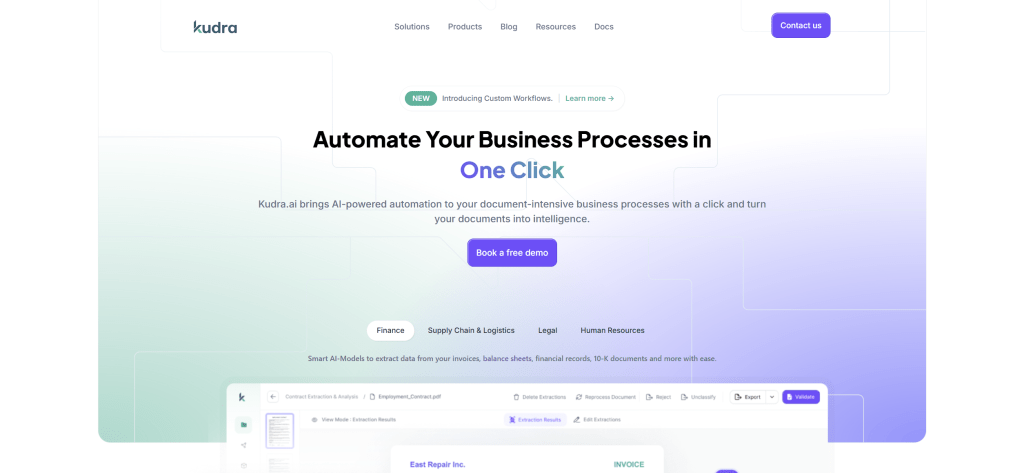
Let’s walk through how this actually works in practice, using a real implementation framework that you can adapt to your organization’s specific needs. Kudra’s flexibility means you can design workflows that match your exact requirements rather than forcing your finance processes into rigid software limitations.
1) Designing the Intelligence Layer
The first step is creating a workflow that handles automatic data extraction and validation before any human sees the invoice. This is where you define what happens to every invoice the moment it enters your system.
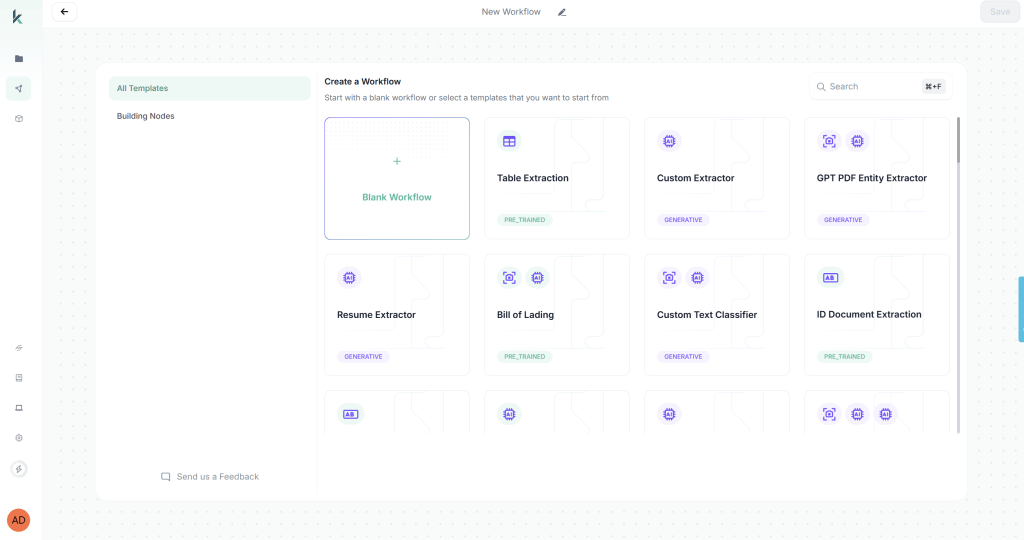
When you first access Kudra’s workflow builder, you’ll be prompted to create a new workflow. You have two options: start from a blank workflow or use a predefined template. For invoice approval automation, we’ll start with a blank workflow to demonstrate the full customization capabilities.
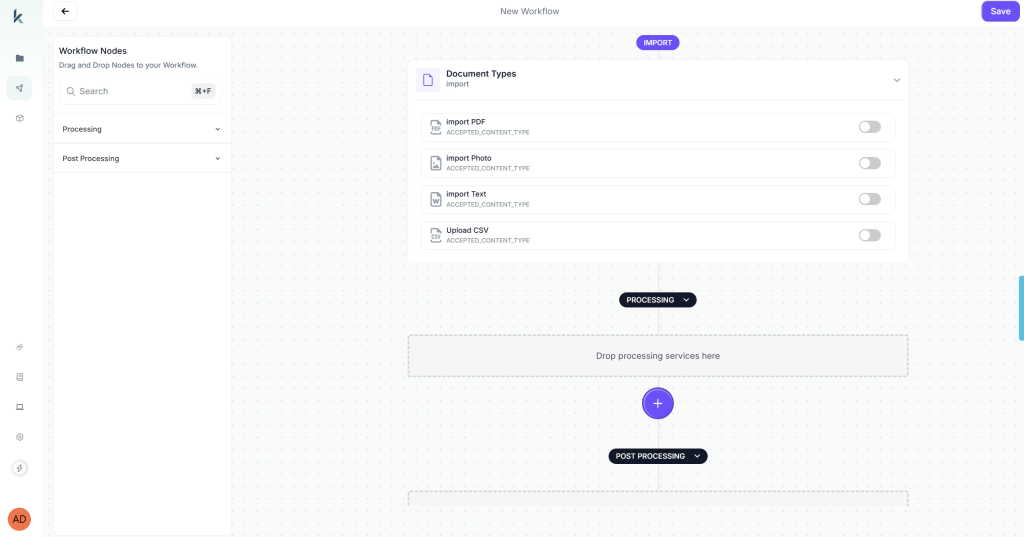
Start with comprehensive data extraction. You want the system to pull every relevant field from the invoice automatically: vendor name and ID, invoice number and date, line items with descriptions and amounts, subtotals and tax calculations, payment terms, purchase order references if present, shipping costs, and any special instructions or notes.
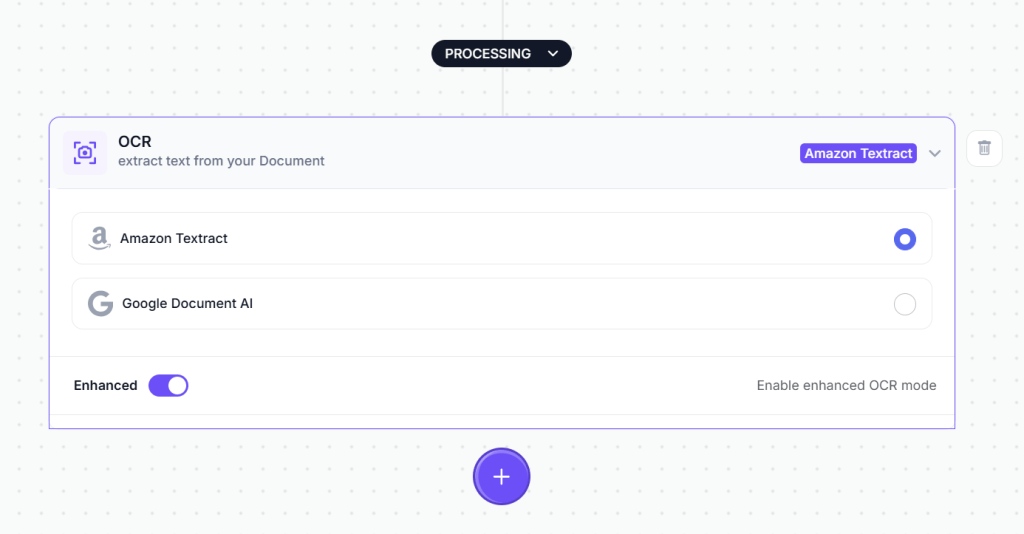
The first component you’ll drag into your workflow to do this is the OCR module. This is the engine that reads text from your invoice documents. Simply drag the OCR component from the component library onto your workflow canvas.
After OCR extracts the raw text, the next step is intelligent field extraction. This is where you add a Vision Language Model (VLM) component to your workflow. The VLM component is more sophisticated than basic OCR, it understands document structure and context. You configure it to extract specific fields from invoices.
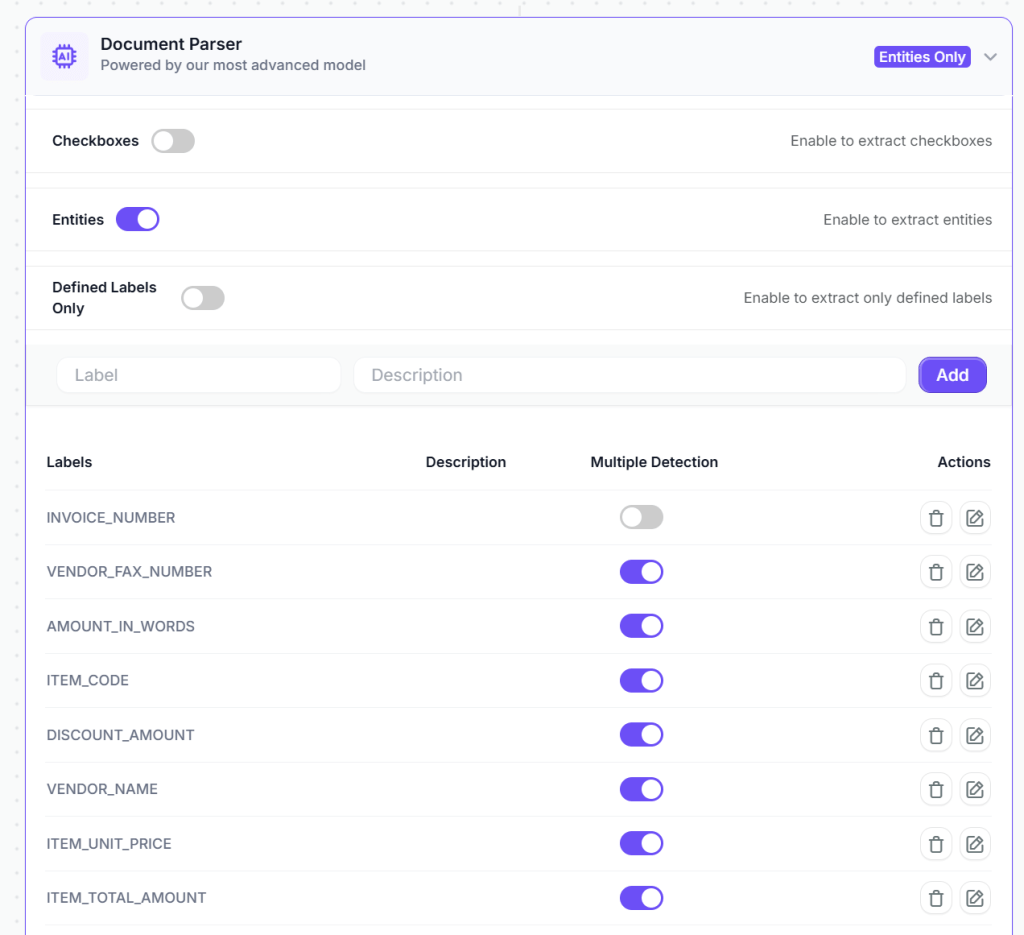
Next, layer in intelligent validation rules that automatically verify invoice accuracy. These aren’t simple threshold checks, they’re contextual validations that understand your business logic.
Configure the system to verify mathematical accuracy: do line items sum to the stated subtotal? Does the subtotal plus tax equal the total amount? Are tax percentages correct for the vendor’s location? These seem like basic checks, but they catch a surprising number of errors before anyone invests time in review.
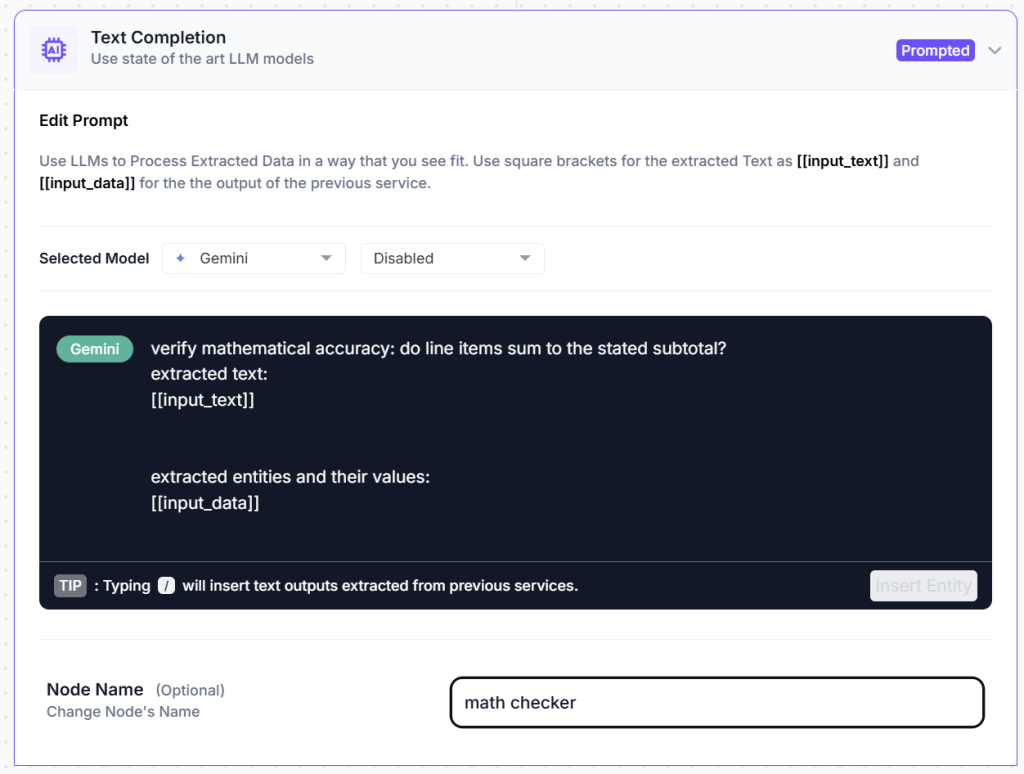
In kudra you just add a text generation component that automatically detects potential issues with the invoice before it enters the approval workflow. All you have to do is prompt it to do the task you need then it analyzes the extracted data and flags problems that would otherwise cause delays or errors.
2) Optional Post-Processing Components

Kudra offers a range of post-processing components that can further refine your extracted data:
Find and Replace: Useful for standardizing vendor names or account code formats. For example, if some invoices show “ABC Corp” and others show “ABC Corporation,” you can automatically standardize to your preferred format.
Format Date: Invoices from international vendors use different date formats (DD/MM/YYYY vs MM/DD/YYYY). This component converts all extracted dates to match your accounting system’s required format.
Text Transformation: Convert account codes to uppercase, standardize currency formatting, or apply other transformations that ensure data consistency.
Data Validation: Apply additional regex patterns or custom validation rules specific to your business needs.
For basic invoice processing, the VLM and text generation components typically provide clean, structured data that’s ready to use without additional post-processing.
3) Configuring Export Options

The final step in workflow design is deciding what happens to your extracted data. Kudra offers multiple export options that you can enable based on your operational needs.
Once the data is extracted and validated, you can automatically send it to the tools you already use, whether that’s Google Sheets for quick visibility, QuickBooks for accounting, or any other system in your existing stack.
No new frameworks to learn. No manual copy-pasting.
Your documents turn into clean, structured, and organized data that flows directly into your workflows, ready to be reviewed, analyzed, or processed further.
4) Processing Invoices at Scale
With your workflow designed and rules configured, you’re ready to process actual invoices. This is where the operational efficiency becomes tangible.
Click “Create New Project” in Kudra’s project dashboard. Give your project a descriptive name—for example, “January 2026 Operating Expenses” or “Q1 Vendor Invoices” or “Marketing Department Invoices.”
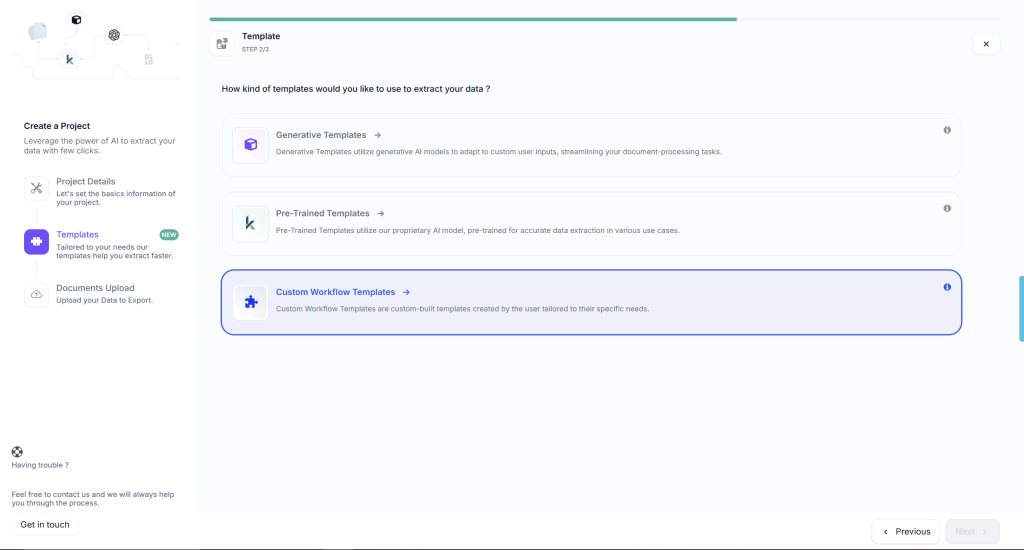
During project creation, you’ll select the workflow you just built from a dropdown menu. This links your invoice approval workflow to this specific project, meaning every document uploaded to this project will automatically be processed according to the rules you’ve defined.
Projects in Kudra can be organized however makes sense for your finance operations. You might create separate projects for:
- Different departments or cost centers
- Different time periods (monthly or quarterly batches)
- Different invoice categories (recurring vendors, one-time purchases, reimbursements)
- Different processing priorities (urgent, standard, scheduled)
Each project maintains its own document history, extracted data archive, and processing logs. This organizational structure makes it easy to track which invoices have been processed, review extraction results from previous periods, and maintain clear audit trails for compliance purposes.
Once you upload all the documents you need to process, Kudra automatically applies your workflow to each invoice. The entire process typically takes 15-30 seconds per invoice, depending on file size and complexity. While processing runs, you can continue uploading more documents or working on other tasks—Kudra handles everything in the background.

This bulk processing capability is particularly valuable during month-end or when catching up on a backlog. Instead of processing invoices one by one, you can upload dozens or hundreds at once and let Kudra work through them all automatically.
What Changes in Daily Operations
Implementing intelligent invoice approval fundamentally shifts how finance teams work. The changes touch everything from daily AP tasks to strategic financial planning.
Your AP team stops being data entry clerks and becomes exception handlers. Instead of spending hours keying in invoice details, they’re resolving the small percentage of invoices that genuinely need human judgment. Their expertise is applied where it matters—investigating unusual vendor behavior, resolving discrepancies with suppliers, improving procurement processes—rather than on routine data transcription.
Approvers stop drowning in approval requests that shouldn’t have reached them. Their queues only contain invoices that are actually ready for approval: mathematically accurate, properly routed, policy-compliant. A manager’s time spent on invoice approval drops from hours to minutes because they’re not checking basic accuracy or figuring out if they’re even the right approver.
Fraud detection happens automatically rather than through random spot checks. The system consistently applies validation rules that catch duplicate payments, suspicious vendor changes, and policy violations that human reviewers might miss when they’re tired or distracted or processing high volumes.
Payment planning becomes predictable because invoice processing times become consistent. You know how long the workflow takes, you know when approvals will complete, you can schedule payment runs with confidence rather than scrambling to catch up on a backlog that appeared unexpectedly.
The finance team’s focus shifts from processing to analysis. When you’re not spending hours on manual invoice handling, you have time to look at spending patterns, vendor performance, procurement efficiency, and opportunities for cost optimization. The work becomes strategic rather than transactional.
Ready to Stop the Bottleneck?
If you’re tired of month-end scrambles, missed payment discounts, and AP teams buried in data entry, it’s time to see what intelligent invoice approval workflows can do for your organization.
Found This Helpful?
Book a free 30-minute discovery call to discuss how we can implement these solutions for your business. No sales pitch, just practical automation ideas tailored to your needs.
Book A Call


