
Website scraping is a fundamental process in the digital age. It allows you to extract valuable information from websites, process it, and use it to fuel data-driven decisions. With platforms like Kudra, this process becomes even more seamless. Kudra not only helps you scrape website content but also enhances it through advanced data processing features, making it a versatile tool for businesses, researchers, and analysts.
In this guide, we will dive deep into how to scrape website content using Kudra, walk through the steps to set up your project and explain how to use its API for automated scraping and data extraction.
What is Website Scraping?
Website scraping refers to the automated extraction of data from websites. It’s a method used to collect and process large volumes of web content that may not be readily accessible in structured formats like APIs or databases. This data can then be stored, analyzed, or integrated into other applications.
For instance, if you’re tracking stock market trends, you may want to scrape website content from financial news sites that frequently mention key products, people, and organizations. A robust platform like Kudra can help you extract this data efficiently.
The Role of Kudra in Website Scraping
Kudra is a sophisticated platform designed to make the process of scraping website content not only easier but also more intelligent. It allows users to create custom extractors, define specific data points (like product names or people’s names), and organize the scraped data for processing. Kudra’s ability to define your own labels makes it stand out, giving you control over the exact information you want to gather.
Whether you’re working on market research, competitive analysis, or even academic research, Kudra’s ability to automate web scraping tasks saves you time and provides deeper insights.
Why Choose Kudra for Scraping Website Content?
There are many tools out there that allow you to scrape website data, but Kudra offers several advantages that make it a top choice for users across different industries:
• Custom Extractor Templates: Kudra lets you create your own data extraction templates based on the entities you want to pull from the site.
• Ease of Use: The platform is user-friendly, with intuitive steps to set up projects, extract data, and automate the process.
• API Integration: Kudra provides easy-to-use API access, which enables you to scale your scraping tasks and integrate them with your existing systems.
• Automation: Once set up, Kudra can automatically handle the scraping and processing of multiple websites, saving valuable time.
• Data Processing: The platform not only extracts data but also helps you process it, providing a ready-to-use format for your projects.
Step-by-Step Guide to Scrape Website Content
Let’s now take a closer look at how you can use Kudra to scrape website content and process it effectively.
1. Creating a New Project
The first step to scrape website content is to create a new project within Kudra. Here’s how to do it:
– Log in to Kudra and select “New Project.”
– Give your project a meaningful name, such as “Website Scraping Project” or a name relevant to the websites you’re targeting.

– Proceed to the next step by selecting “Generative Templates.”
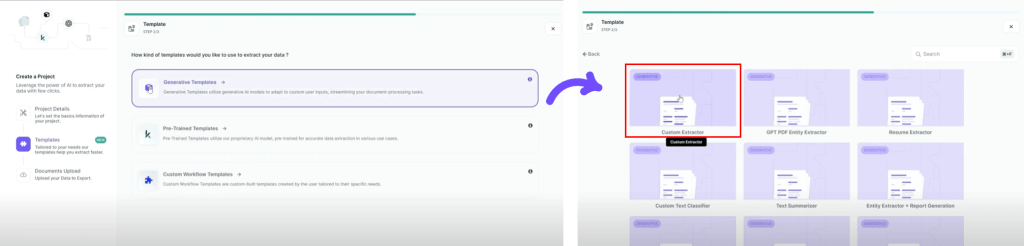
The key advantage here is that Kudra allows you to define custom extraction templates. This is where you can tell Kudra exactly what kind of data you want it to scrape from a website.
2. Defining Custom Extractor Templates
Once you’ve created your project, you can define your own data labels (also called entities) to extract. Kudra’s flexibility in this aspect allows you to target exactly the information you need.
For example, if you are scraping a financial news website, you might want to extract:
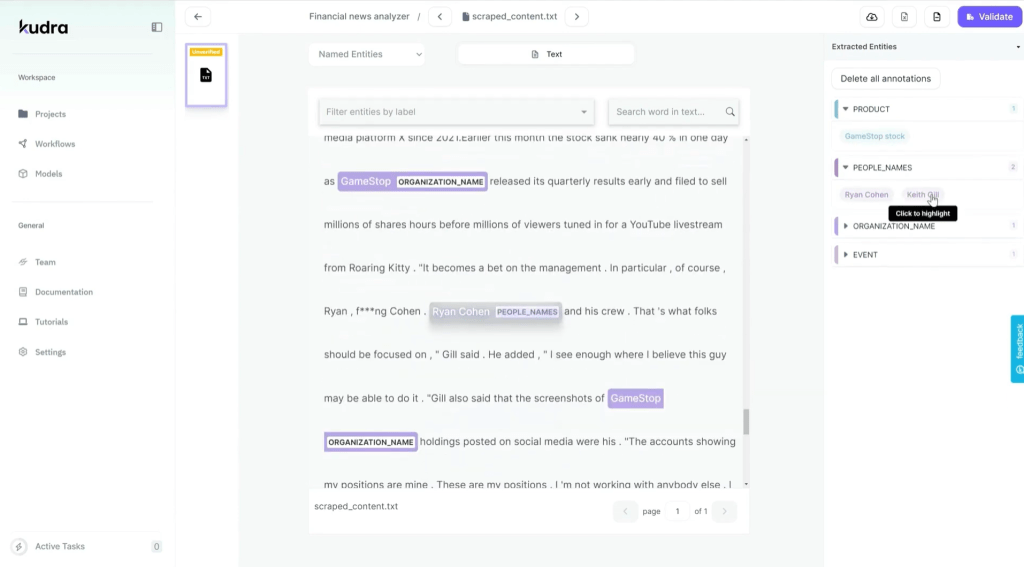
- Product Names: Extract mentions of specific products, such as GameStop stock, or any financial instrument mentioned in the articles.
- People’s Names: Scrape the names of people mentioned in the articles.
- Organizations: Pull out the names of companies or organizations that are cited in the text.
- Events: Extract mentions of specific events like product launches, company earnings reports, or industry conferences.

This custom extractor template helps Kudra focus on only the data that’s most important to your project, making the scraped content highly relevant and structured.
3. Generating and Copying the API Code
Once your custom extractor templates are defined, the next step is to use Kudra’s API to automate the scraping process. You can easily generate the API code within the platform:
– In the project dashboard, find the three-dot menu and click on “Preview API Code.”
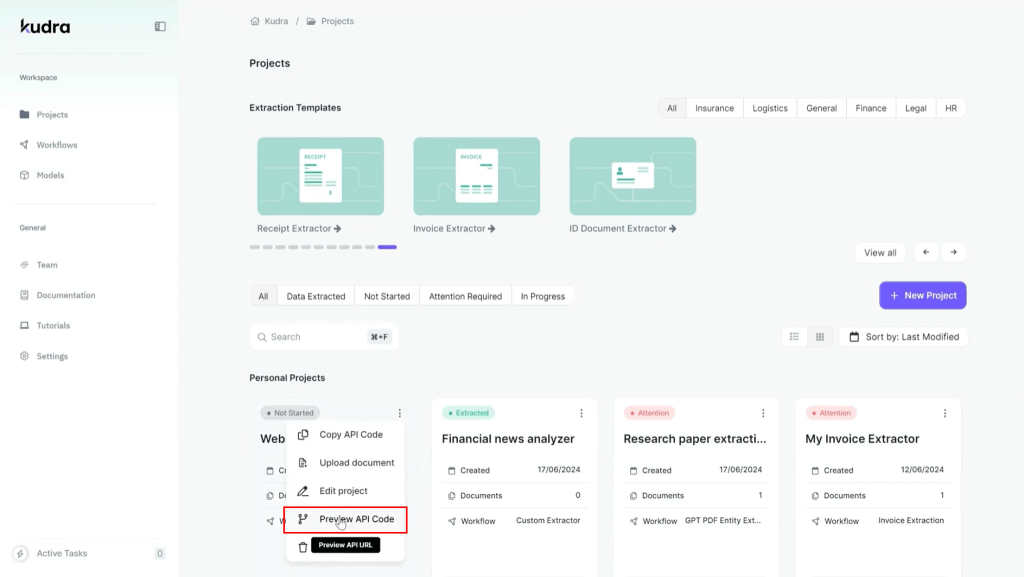
– Copy the generated API code, which you will later use in your script to scrape website data.
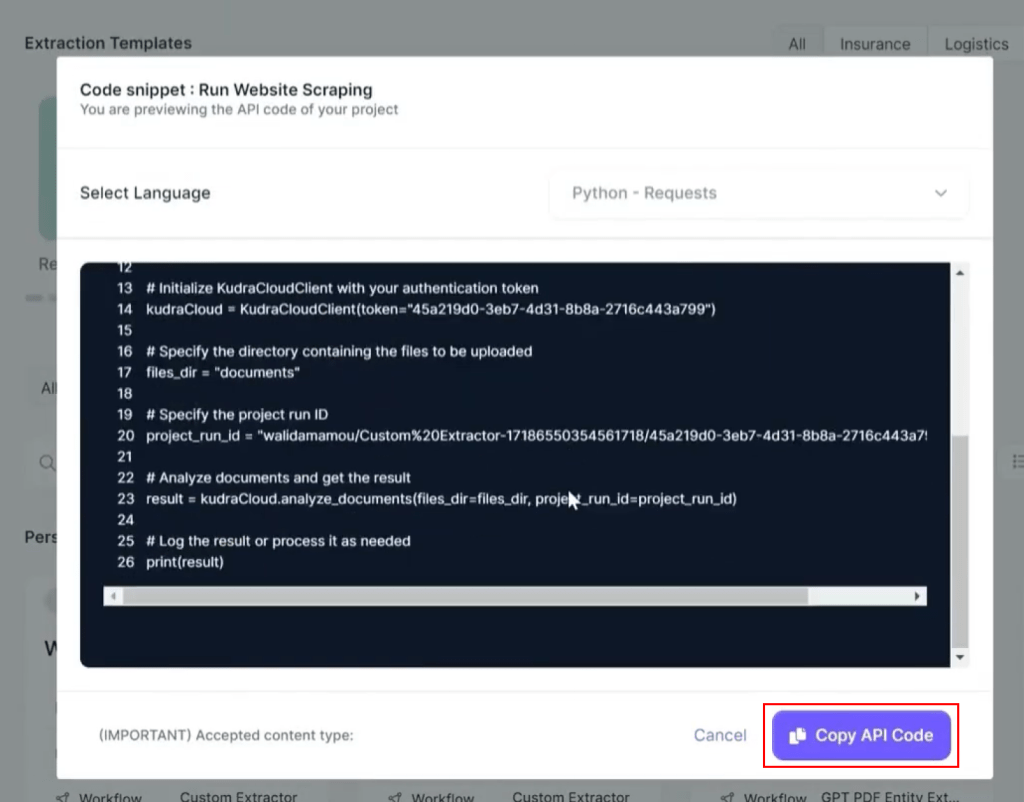
This API code is the bridge between your scraping script and Kudra’s powerful processing engine.
4. Set Up Your Website Scraping Script
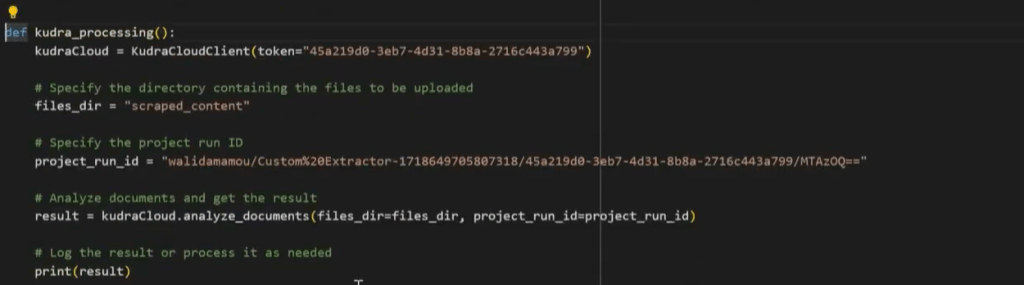
The actual process of scraping websites involves writing a script that calls the Kudra API and processes the data. Here’s how to structure your script:
• Scraping Function: Create a function that takes the website’s URL as input and scrapes the content.
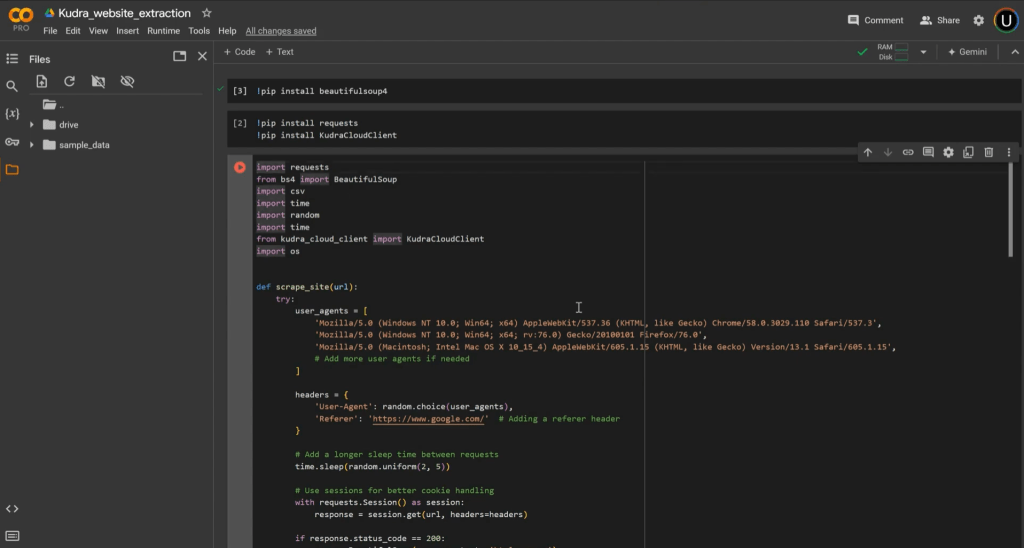
• Kudra API Function: Include the API code that was copied earlier. This code will enable your script to send the scraped data to Kudra for processing.
• URL List: Define a list of URLs that you want to scrape. You can have one or multiple URLs, and the script will loop through them.

Each website’s data is scraped, stored in a folder, and then processed by Kudra. It’s crucial to save the scraped content properly so Kudra can process it later on.
5. Automation of Website Scraping and Processing
Once the script is set up, you can automate the process to scrape website content from multiple sites. Here’s what happens next:
1- Scraping: The script goes through each URL, scrapes the content, and stores it in a folder.
2- API Call: The script calls the Kudra API, which processes the content and extracts the predefined data points (e.g., product names, organizations, etc.).
3- Processing: Kudra analyzes the folder, extracts entities according to your templates, and displays the results within the platform.
At this point, the data is processed and organized in a structured format, making it ready for analysis or further use in other applications.
Best Practices for Website Scraping
While Kudra simplifies the process of scraping websites, there are some best practices to keep in mind:
- Respect Website Terms of Service: Ensure that you have permission to scrape the website content, as some websites may restrict automated scraping.
- Monitor Your Data Quality: Always check the accuracy of the data extracted to ensure it aligns with the entities you’ve defined in your templates.
- Handle Large Volumes of Data: If you’re scraping large websites, make sure your script is optimized for performance and can handle high data volumes without crashing.
- Test Your Script: Before running your script on multiple URLs, test it on a single site to ensure it’s working correctly.
Advanced Features of Kudra for Web Scraping
Kudra offers advanced features that go beyond basic scraping:
– Data Enrichment: Kudra can enrich scraped data with additional information, such as entity linking or sentiment analysis.
– Integrations: You can integrate Kudra with other tools and platforms, allowing you to export processed data to various formats or databases.
– Automation Scheduling: Set up scheduled scraping tasks that run automatically, ensuring your data stays up-to-date without manual intervention.
Conclusion
Scraping website content can unlock valuable insights, especially when processed with a powerful platform like Kudra. With its intuitive project setup, custom extractor templates, and seamless API integration, Kudra allows users to efficiently extract, process, and analyze data from websites.
Whether you’re gathering product mentions, tracking key individuals in your industry, or analyzing event mentions, Kudra provides the tools you need to automate these tasks and stay ahead of the competition.


