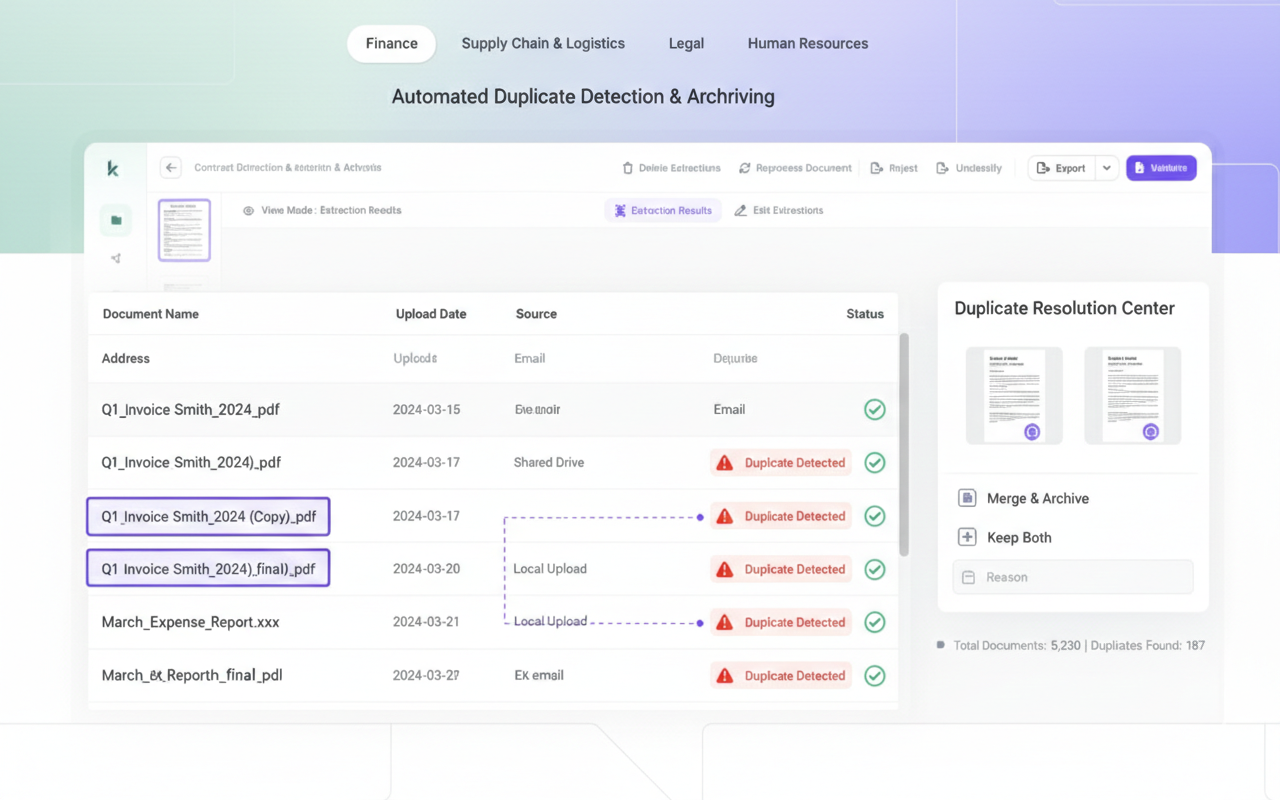
Every year, businesses worldwide hemorrhage billions of dollars through a surprisingly common mistake: processing the same invoice multiple times. What seems like a simple oversight becomes a massive financial drain when scaled across thousands of transactions.
This guide will walk you through identifying duplicate invoices before they drain your accounts, the warning signs your team should watch for, and how intelligent automation detects what manual reviews consistently miss.
Key Takeaways
- Duplicate invoices occur when identical invoices for the same transaction get submitted and processed more than once.
- Root causes include human data-entry mistakes, poor tracking systems, or deliberate fraud schemes.
- Financial consequences are significant: unnecessary payments, cash flow disruption, audit failures, and vendor relationship damage.
- Manual verification alone fails. Automated processing and intelligent workflows are essential for reliable duplicate prevention.
- AI-powered platforms like Kudra AI employ OCR, machine learning, document fingerprinting, and instant alerts to identify duplicates before payment approval.
- Dual advantages: Organizations save money by eliminating duplicate payments while saving time through reduced manual verification and improved accuracy.
What is a Duplicate Invoice?
A duplicate invoice represents any invoice submitted more than once for an identical transaction. These duplicates fall into two categories: accidental submissions and fraudulent attempts.
Accidental duplicates typically stem from data entry errors, technical system issues, or situations where vendors send the same invoice through multiple channels (email and postal mail, for example). Fraudulent duplicates involve intentional manipulation, such as minor alterations to original invoices designed to circumvent detection systems.
Regardless of origin, both types create identical problems: overpayments that erode profitability. Organizations combat this through manual cross-checks, systematic verification protocols, or intelligent automation platforms designed to catch duplicates automatically.
Why Duplicate Invoices Occur
Duplicate invoices and the resulting duplicate payments stem from various sources. The most frequent culprits include:
- Human error: Mistakes happen throughout invoice handling—from initial data entry through reconciliation to final approval. Manual processes inevitably introduce errors that create duplicate submissions or allow duplicates to pass undetected.
- Fraudulent activity: Some duplicates result from intentional fraud by employees or suppliers attempting to exploit payment systems for personal gain through expense or invoice fraud schemes.
- Insufficient controls: When invoice processing lacks proper oversight and verification checkpoints, duplicate invoices easily slip through until after payment has been issued.
- Decentralized submission: Without a unified system where all invoices must be submitted, vendors may send invoices through various channels simultaneously. These parallel submissions often go unnoticed until they’ve both been processed and paid.
Accidental or deliberate, every duplicate invoice carries a cost. Let’s examine the specific impacts on business operations.
The Impact of Duplicate Invoices
When duplicate invoices go undetected, the consequences ripple across your entire organization. Common impacts include:
- Direct financial damage: Duplicate invoices mean overpayments that directly reduce profitability and weaken your financial position.
- Cash flow disruption: Money locked in duplicate payments becomes unavailable for legitimate business needs, potentially creating liquidity problems that prevent you from meeting other financial obligations on time.
- Regulatory and audit failures: Duplicates create discrepancies in financial records that trigger audit red flags. When auditors discover these inconsistencies, organizations face increased scrutiny, potential penalties, and possible fines.
- Damaged supplier relationships: Duplicates that cause payment delays or incorrect payment amounts frustrate vendors and erode the trust necessary for strong long-term partnerships.
- Accounting inaccuracies: Duplicate invoices corrupt financial data and create inconsistencies across accounting systems, making accurate expense tracking and revenue reporting nearly impossible.
While duplicate invoices create serious problems, they’re also highly preventable. The following section outlines practical steps to detect and eliminate them.
How to Prevent and Detect Duplicate Invoices
Preventing duplicate invoices requires building processes that minimize opportunities for human error. While duplicates arise from various sources, most are preventable with proper structure, verification protocols, and technology.
Here are the most effective prevention and detection strategies.
Manual Detection Methods
- Compare critical fields: Review invoices for identical or nearly identical invoice numbers, vendor names, dates, and total amounts.
- Watch for minor variations: Stay alert for subtle differences that basic systems overlook, such as “INV1001” appearing as “INV-1001” in different submissions.
- Verify against purchase orders: Confirm whether purchase orders have already been fulfilled and paid. New invoices linked to completed POs may indicate duplicates.
- Maintain centralized records: Create a master log of all received invoices that allows quick verification of whether a new invoice has already been received and is awaiting processing.
Automated Detection Methods
- Deploy AP automation platforms: These systems automatically compare incoming invoices against your complete invoice database to flag potential duplicates before payment processing.
- Enable three-way matching: Automation software that compares invoice details against both purchase orders and receiving documentation ensures payment accuracy and catches duplicates.
- Apply fuzzy matching algorithms: Advanced software identifies “near matches” even when invoice numbers or other details contain slight variations.
- Schedule regular audits: Run periodic reports analyzing your invoice database to uncover duplicates that escaped daily verification processes.
- Utilize AI and machine learning: Modern platforms group suspected duplicates and assign confidence scores that help teams prioritize which invoices require human review.
The right combination of process discipline and intelligent technology dramatically reduces both financial and operational risks from duplicate invoices.
Next, we’ll explore how Kudra AI’s document intelligence platform provides advanced duplicate detection that stops problematic invoices long before they impact your bottom line.
How Kudra AI Helps You Detect Duplicate Invoices
Detecting duplicate invoices becomes significantly more effective when you move beyond manual verification. Kudra AI’s document intelligence platform combines OCR, Vision Language Models, and intelligent validation workflows to identify duplicates—even when they’re subtle or deliberately disguised.
Building Your Invoice Workflow in Kudra AI
1 Design Your Workflow
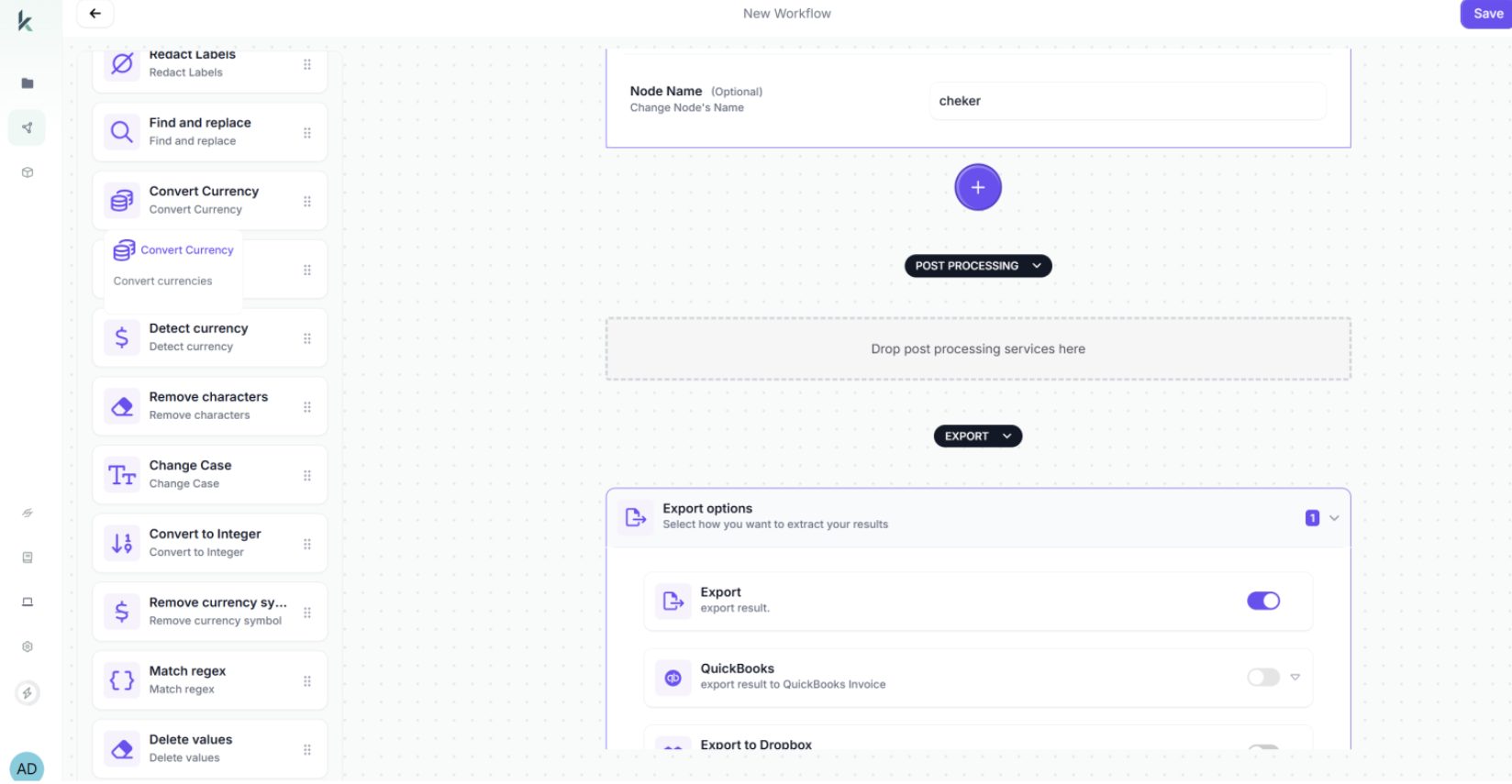
First, drag the OCR module onto your workflow canvas. This component extracts all text from invoice documents—including invoice numbers, vendor details, line items, amounts, dates, and payment terms.
Next, add the Vision Language Model (VLM) component. The VLM goes beyond simple text extraction to understand invoice structure and context. Configure it to extract and standardize these critical fields:
- Vendor name and identifier
- Invoice number
- Invoice date
- Due date
- Total amount
- Line item details
- Payment terms
- Tax information
The VLM intelligently handles variations—recognizing that “Invoice No.” and “Invoice #” mean the same thing, or that invoice numbers follow different formats across vendors.
2 Implementing Intelligent Duplicate Detection
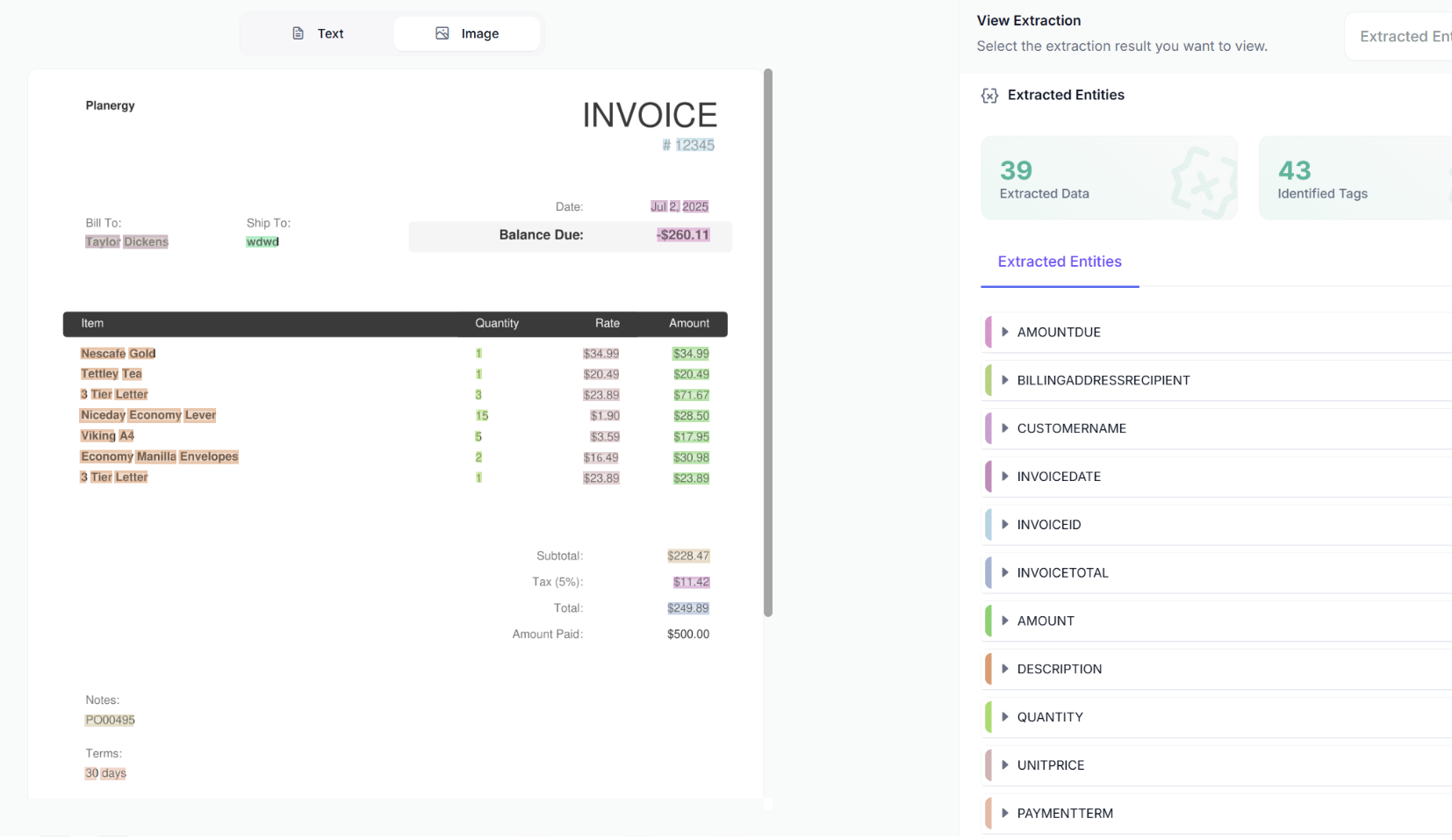
Here’s where Kudra AI becomes truly powerful for duplicate prevention. Add a text generation component that automatically analyzes invoices for duplication indicators.
Configure validation rules that catch various duplicate scenarios:
- Exact duplicate detection: Identifies invoices with identical invoice numbers, vendor names, dates, and amounts. These represent the most obvious duplicates.
- Near-duplicate identification: Catches invoices where minor details differ but core information matches. For example, detecting “Vendor Inc.” and “Vendor Incorporated” as the same supplier, or recognizing “INV-2024-001” and “INV2024001” as the same invoice number with different formatting.
- Date proximity alerts: Flags multiple invoices from the same vendor with identical amounts submitted within a short timeframe, even if invoice numbers differ.
- Amount matching: Identifies invoices with identical or suspiciously similar amounts from the same vendor, which may indicate resubmission attempts.
- Cross-reference validation: Compares new invoices against your complete invoice history to detect if the same purchase order or service has already been invoiced.
This validation component performs the quality checks that accounting staff would normally do manually, but executes them instantly and consistently for every single invoice.
3 Document Fingerprinting
Kudra AI generates unique digital fingerprints for each invoice based on multiple data points beyond just invoice numbers. This fingerprinting technology detects:
- Exact duplicates submitted multiple times
- Near-duplicates with intentional minor alterations
- Fraud attempts where document layout or specific values have been changed
When a new invoice arrives, Kudra immediately compares its fingerprint against all existing invoices, flagging matches before the invoice enters your approval workflow.
4 Real-Time Alerts and Reporting
As invoices are uploaded and processed, Kudra provides instant feedback:
- Confidence scores for each extraction field, indicating accuracy levels
- Validation warnings when potential duplicates are detected
- Visual comparison tools that display suspected duplicate invoices side-by-side for quick human verification
- Detailed audit logs tracking every invoice processed and all duplicate detection results
5 Create Your Invoice Processing Project
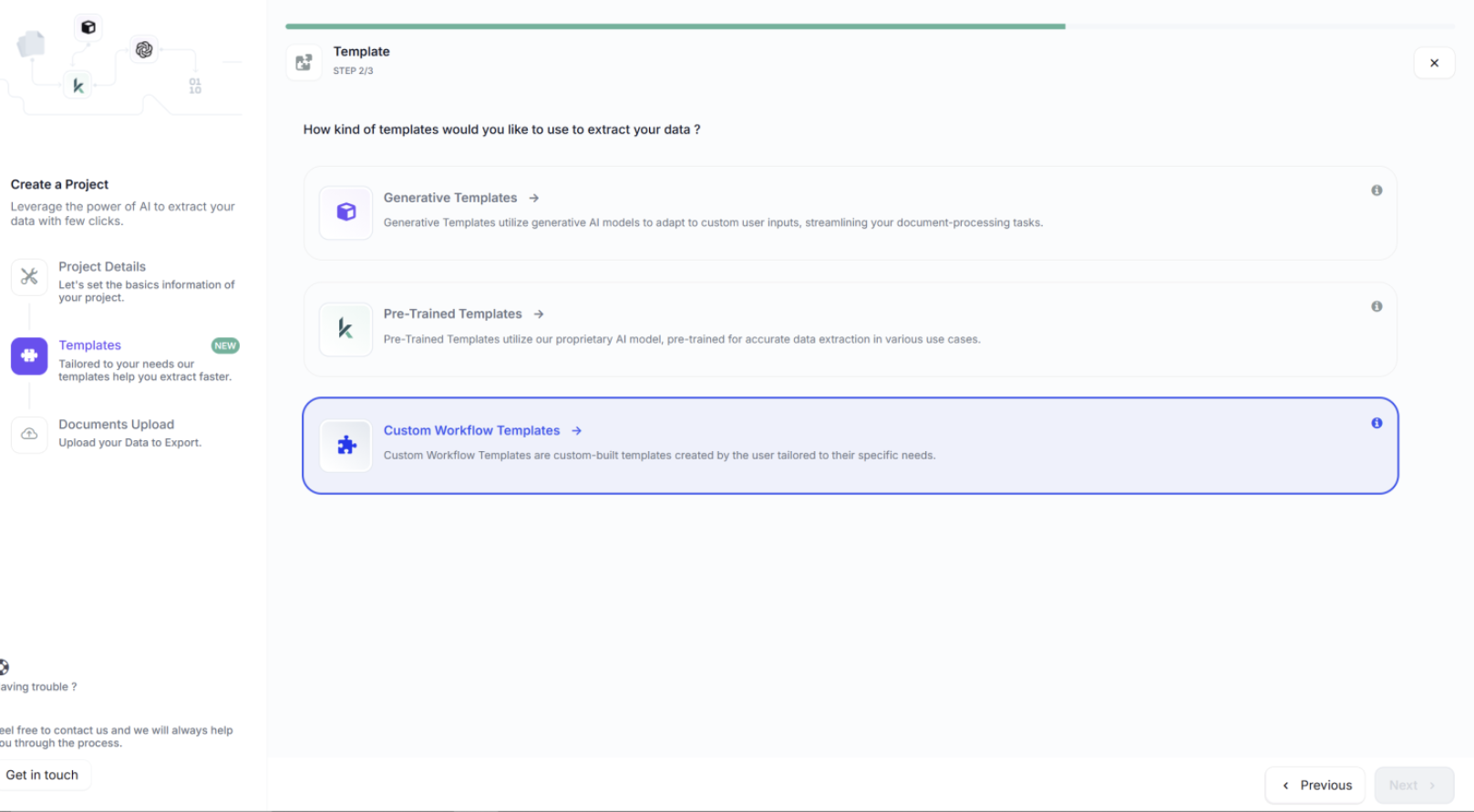
After designing your workflow, create a project in Kudra’s dashboard. Name it descriptively—for example, “Q1 2026 Accounts Payable” or “Vendor Invoices – Operations Department.”
Link your duplicate-detection workflow to this project. Every invoice uploaded to this project will automatically be processed according to the rules you’ve defined.
You can organize projects by department, vendor category, time period, or any structure that matches your business needs. Each project maintains its own document history and processing logs for clean audit trails.
6 Upload and Process Invoices
Processing invoices in Kudra is remarkably straightforward. Upload invoice documents through:
- Single file upload: Process individual invoices as they arrive
- Batch upload: Select multiple invoices simultaneously for bulk processing
- Folder upload: Upload entire folders containing hundreds of invoices
Kudra supports PDF, JPEG, PNG, and TIFF formats, handling everything from high-resolution scans to mobile phone photos.
Once uploaded, Kudra automatically applies your workflow: OCR Extraction → VLM Analysis → Duplicate Detection → Validation → Export. Processing typically takes 10-30 seconds per invoice.
7 Review Results and Export Data
After processing, access complete extraction results for each invoice:
- All extracted fields with values
- Confidence scores for extractions
- Duplicate detection warnings
- Side-by-side comparison with suspected duplicates
- Original invoice image for verification
Export options include:
- JSON format for system integration
- Google Drive for cloud backup
- Database export for direct integration with accounting software
- Webhook integration for real-time data flow to ERP systems
- Email notifications when duplicates are detected
Seamless Integration with Existing Systems
Kudra AI integrates with your current accounting software, ERP platforms, and procurement systems. Duplicate detection insights flow directly into your accounts payable workflow, ensuring nothing gets lost between systems.
The platform adapts to your processes rather than forcing you to change how you work.
Conclusion
Duplicate invoices may appear to be minor administrative errors, but their cumulative financial and operational impact grows rapidly. Fortunately, with proper processes and technology, nearly all duplicates are completely preventable. By strengthening invoice workflows, automating critical verification steps, and implementing advanced detection tools, organizations can virtually eliminate the risk of paying the same invoice twice.
Kudra AI’s document intelligence platform takes duplicate prevention further with sophisticated OCR, Vision Language Models, document fingerprinting, and real-time validation alerts. These capabilities stop duplicates before they reach your approval workflow. With smarter, automated invoice processing, your accounts payable team operates faster, with greater accuracy, and higher confidence.
Ready to discover how Kudra AI can transform your invoice processing?
Contact our team today to schedule a demonstration and see the platform in action!


