
Whether you work in insurance, lending, logistics, or any number of industries, you’ve likely encountered the ubiquitous PDF file format. PDFs are popular for their ability to preserve formatting across platforms and devices. However, unlocking the data trapped within these digitized documents can cause major headaches for organizations. Manual data entry is tedious and error-prone. Generic PDF converters fail to consistently extract information accurately. Even optical character recognition (OCR) software with rules-based extraction cannot reliably parse the myriad of layouts and formats used in PDF documents.
To overcome these challenges, a new method is emerging: intelligent PDF data extraction powered by artificial intelligence. AI-based data extraction platforms like Kudra can rapidly and precisely analyze PDFs, CSVs, images, schematics, and more to pull out key information. But how exactly does this technology work? And what sets it apart from the traditional approach you use to extract data from PDF? Let’s take a closer look.
The Ubiquity and Limitations of PDF Files
PDF, short for Portable Document Format, has become a globally recognized standard for document sharing and archiving. The success of PDF comes down to its ability to preserve the visual presentation of text and graphics consistently across various platforms and devices. This makes it a handy file format for forms, statements, invoices, reports, and other business documents that need to retain their original formatting and layout.
However, the same characteristics that make PDFs broadly usable also create barriers to accessing and manipulating the data locked within them. PDF documents are inherently unstructured, meaning they lack the defined fields and data schema that allow information to be easily searched and analyzed computationally. For instance, an invoice PDF may visually convey all the relevant billing details to the human eye, but the underlying data exists as images rather than discrete text elements. This makes extracting specific data points like customer names, invoice numbers, line item descriptions, and more extremely tedious.
Overview of Traditional PDF Data Extraction Methods
Organizations have applied various tactics over the years to try and overcome the difficulties of unlocking data from PDFs, with limited success. These approaches include:
• Manual Data Entry – Humans manually review PDF documents, interpret the contents, and type the relevant information into designated databases or files. This ensures high accuracy but is enormously time-consuming, expensive, and difficult to scale. Even teams of data entry professionals cannot keep pace as document volumes grow.
• PDF Converters – Software can convert PDF files into alternative formats like Word documents and Excel spreadsheets to make the text components more accessible. However, these conversions are rarely perfect, often introducing formatting issues that break page layouts and data schemas. Important metadata, images, and other elements may fail to transfer as well.
• Rules-Based OCR Extraction – Optical character recognition (OCR) software can scan PDF documents and identify textual elements. Combined with templating and rules that specify the expected location of relevant data, this approach can automatically extract defined fields. But PDFs exhibit a vast diversity of formats, layouts, and styles across various sources and industries. Too often, documents deviate from the prescribed templates, causing OCR systems to miss critical data.
Artificial Intelligence Advances PDF Data Extraction
While previous tactics left much to be desired, artificial intelligence has recently unlocked new potential for automating the extraction of data from PDF files. AI data extraction platforms leverage machine learning algorithms that can dynamically parse the contents of PDF documents without relying strictly on rigid templates.
One such platform is Kudra, which combines OCR, natural language processing (NLP), and other AI technologies to extract key data points from PDFs as well as CSV, Excel, Word, and image files. The user simply uploads a sample of representative documents and selects the relevant information they want to capture, such as customer names or invoice amounts, and the platform handles the rest.
Kudra’s algorithms analyze the visual and textual structure of the input files to infer the probable locations of data fields of interest. The platform essentially learns by example instead of depending solely on predefined rules and templates. Users can validate the extractions and further refine the AI as needed to improve accuracy over time. This semi-supervised learning approach allows Kudra to adapt to new, previously unseen document types and formats.
Harnessing Kudra’s AI for Intelligent PDF Data Extraction
Purpose-built for data extraction, Kudra makes it easy for no-code users to build AI workflows that unlock information from PDFs and other documents with speed and precision. Let’s examine some of the platform’s key capabilities:
• Multi-format Handling – Kudra’s AI readily handles PDFs, Word documents, Excel files, CSV data, and even images like scanned invoices, supporting both old and new formats in one seamless workflow.

• Customizable OCR – Integrated optical character recognition provides text extraction capabilities that users can tailor to specific needs by selecting and comparing various OCR engines.

• Extraction Templates – Over 20 pre-trained AI templates immediately extract common fields from standard documents like W2s, real estate paperwork, and vehicle registrations, no training is required.
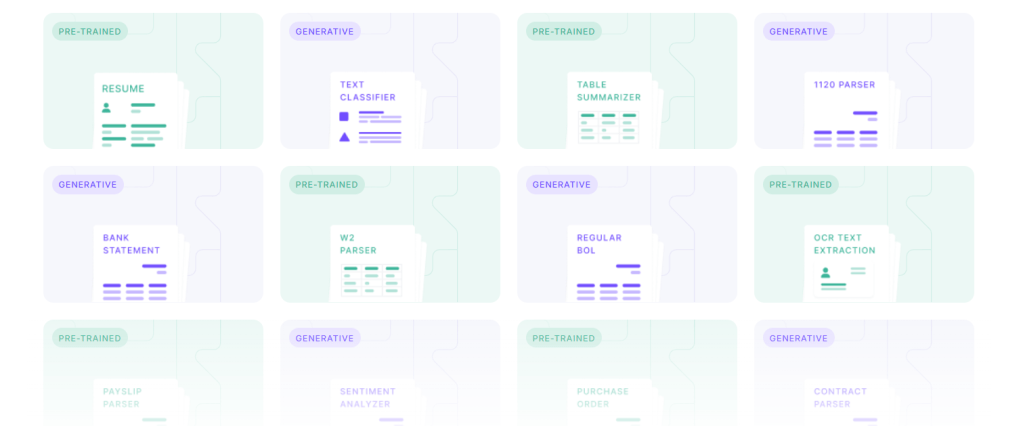
• Visual Workflow Builder – Kudra’s intuitive drag-and-drop interface lets users quickly construct and alter AI extraction workflows without coding.

• Custom AI Models – For more complex documents, Kudra allows training custom machine learning models focused on specialized data fields that generic extraction cannot reliably parse.
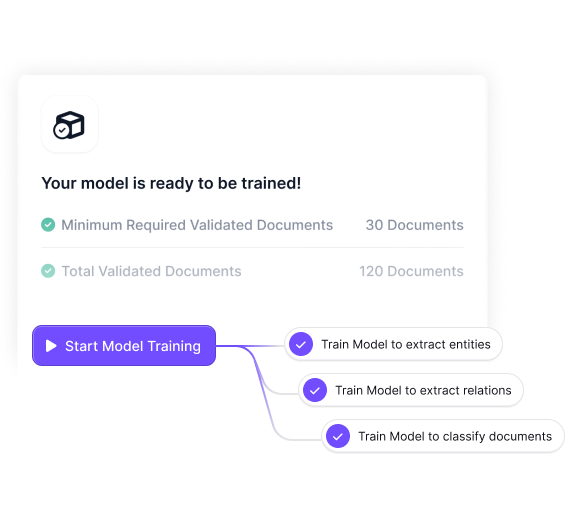
These features make Kudra well-equipped to overcome the constraints of traditional PDF data extraction methods. The platform’s AI-powered approach requires no rigid templates, instead learning to dynamically identify relevant data as it appears in real-world documents. Integration of the ChatGPT conversational AI gives users an added method for prompting text summaries, data validation checks, and other natural language instructions to enhance extraction workflows.
Let’s walk through a couple of examples of how Kudra can intelligently extract information from sample PDF documents.
Logistics Case Study: Shipping Manifest Data Extraction
A logistics firm needs to closely track invoices, shipping manifests, and other documents related to packages handled through its warehouses. This requires extracting fields like air waybill numbers, part numbers, weights, addresses, and delivery status from thousands of PDF files daily.
With Kudra, the logistics company can upload a sample set of representative shipping manifest PDFs. The platform’s AI will scan the files, identifying probable locations for each data field needed based on text proximity patterns and document structure without needing predefined templates. For instance, the waybill number almost always appears next to the “Waybill No.” text label. Product weights typically show up in tables under a “Weight” column header.
Once the initial AI model is trained, Kudra can run new manifest PDFs through the system to automatically extract the key fields. The platform achieves over 90% accuracy straight from machine learning. Where the AI falls short, Kudra allows manually correcting any missed or misinterpreted data so the algorithms continue learning.
Soon this logistics firm cuts the time spent manually reviewing and entering shipping records by 80% while also eliminating human data entry errors. And with real-time visibility into manifest contents, the company can spot shipment issues quicker and keep customers informed.
The Power Behind Intelligent Document Understanding
As these examples illustrate, Kudra provides the cutting-edge AI capabilities necessary to unlock PDFs and other critical business documents. The platform’s machine learning algorithms dynamically adapt to parse data from new forms and formats without strict templating requirements. This intelligent document understanding allows for automated information extraction even from complex, unstructured file types, all while requiring minimal training data from users.
Kudra also handles much of the technical heavy lifting involved in data extraction behind the scenes. Built-in OCR, template libraries, and a robust cloud infrastructure allow users to focus on building workflows rather than data science. The no-code interface provides simple click-and-drag functionality for constructing AI pipelines tailored to an organization’s specific document universe and data needs.
Of course, while powerful, even the most advanced AI has limitations. Kudra’s accuracy and extraction speed still depend greatly on the quantity and quality of training documents provided. More examples yield better results. Certain types of data remain difficult for machines to interpret perfectly, like handwritten notes or complex legal clauses, often requiring some human validation.
But in totality, Kudra’s intuitive design paired with cutting-edge AI delivers immense time and cost savings by automating the extraction of mission-critical data from documents like PDFs. For any enterprise that relies on large volumes of forms and files to operate, intelligent data extraction is an indispensable efficiency tool.
The Bottom Line – Intelligent Extraction Beats Manual Document Review
In closing, despite widespread reliance on PDFs and other document types across functions like finance, insurance, supply chain logistics, and more, unlocking the meaningful data trapped within these digitized files remains a major productivity bottleneck. Manual information entry is impractical. Conventional extraction software lacks sophisticated AI to handle file diversity.
Intelligent data extraction platforms such as Kudra overcome these hurdles through machine learning algorithms purpose-built to dynamically parse both structured and unstructured documents. Though training robust AI requires time, effort, and computing resources, the accuracy and workflow efficiency gains make the investment well worth it.
So if your organization handles stacks of critical PDFs, images, Excel sheets, or other essential files, consider intelligent document data extraction. Compatible solutions like Kudra put previously out-of-reach data at your fingertips, providing the visibility and insights needed to work smarter. Why settle for squinting at PDFs when you could let an AI assistant handle the heavy lifting instead?


