Due diligence is one of the most document-intensive processes in business operations. Whether you’re evaluating investment opportunities, onboarding new vendors, conducting M&A reviews, or assessing loan applications, the process requires analyzing dozens of documents across multiple formats: audited financial statements in PDF, business plans in Word, contracts in scanned images, product information in Excel, and supporting materials ranging from corporate registrations to market research presentations.
The traditional approach to due diligence is entirely manual. Analysts spend days extracting data from financial statements, reading through contracts to identify key terms, compiling information from business plans, and packaging everything into standardized investment memos or evaluation reports. The process is slow, inconsistent, and creates bottlenecks that delay critical business decisions.
For organizations processing high volumes—investment funds reviewing hundreds of applications, banks conducting credit assessments, or procurement teams evaluating supplier qualifications—manual due diligence becomes operationally unsustainable. A single investment memo can take 5-10 days to complete. When you’re reviewing 1,000 applications per funding cycle, the math simply doesn’t work.
The solution is due diligence automation—specifically, using AI-powered document processing to automatically extract data from multiple document types, analyze financial statements, generate quality summaries, and produce standardized evaluation reports. By leveraging advanced OCR, Vision Language Models (VLMs), and generative AI, organizations can reduce due diligence time from days to hours while improving consistency and analytical depth.
What is due diligence automation?
Due diligence automation uses AI, OCR, and intelligent document processing to automatically extract, analyze, and summarize financial statements, contracts, and business documents—reducing review time from days to hours while improving accuracy and consistency.
In this guide, we’ll show you exactly how to automate due diligence workflows that handle diverse document types, extract critical business information, and generate professional evaluation reports in minutes rather than days.
Automate Your Due Diligence
The 5 Critical Challenges with Manual Due Diligenceg
Organizations conducting due diligence at scale encounter systematic problems that compromise both efficiency and decision quality.
1. Multi-Format Document Processing Creates Bottlenecks: Due diligence packages arrive in all formats: scanned PDFs, Word, Excel, PowerPoint, photos, etc. Analysts spend hours opening each file, extracting data, and reconciling inconsistencies. Processing a 30-document package can take 8–10 hours just for data extraction, making large-scale review extremely inefficient.
2. Financial Statement Analysis is Complex and Error-Prone: Extracting numbers from balance sheets, income statements, and cash flow reports to calculate ratios (liquidity, profitability, leverage, efficiency) is slow and mistakes are common. Even minor errors can misrepresent a business’s financial health, while manual calculations consume 40–60% of due diligence time.
3. Inconsistent Report Quality and Formatting: Analysts produce reports of varying lengths, detail, and formatting. Investment committees struggle to compare opportunities fairly, and presentation quality can skew decisions, letting mediocre businesses get approved while strong opportunities are overlooked.
4. Limited Analytical Depth: Due diligence should include financial benchmarking, trend analysis, market sizing, risk assessment, scenario planning, and strategic alignment. Analysts often focus only on surface metrics due to time constraints, missing deeper insights that reveal high-potential or complex opportunities.
5. Institutional Knowledge Isn’t Captured: Organizations accumulate years of expertise on what drives business success, but this knowledge often lives in analysts’ heads. When staff leave, lessons are lost, new analysts repeat old mistakes, and best practices aren’t consistently applied, preventing the organization from learning over time.
How Multi-Format Document Processing Works
Due diligence is a prime candidate for automation because it involves high volumes of documents in multiple formats, repetitive analysis tasks, and time-sensitive decisions requiring accuracy. Understanding the technical process behind due diligence automation helps organizations implement it effectively for their specific evaluation workflows.
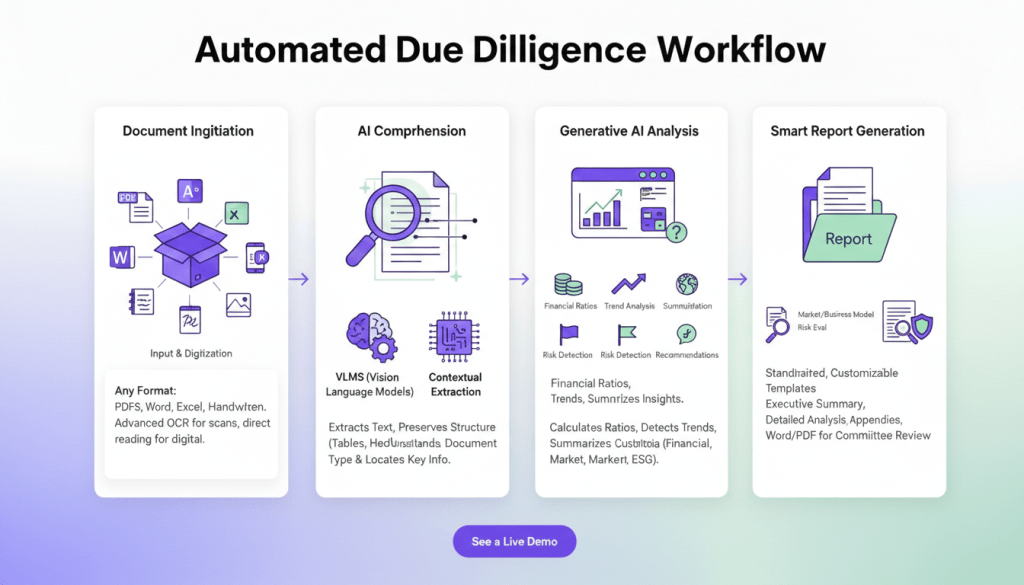
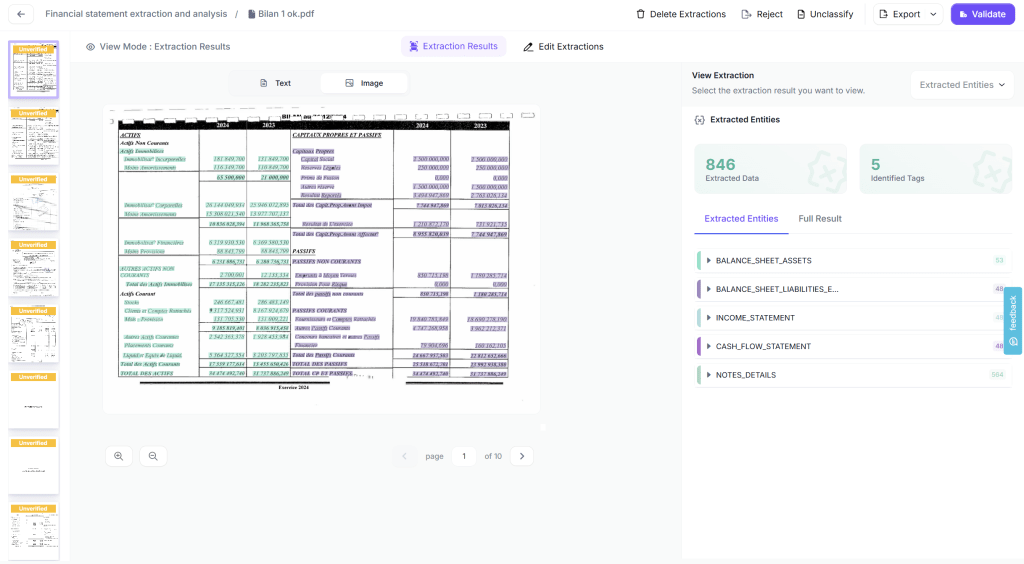
Automation simplifies due diligence by handling documents in any format—PDFs, Word, Excel, PowerPoint, images, photographs, and even handwritten forms—without requiring conversion. Advanced OCR extracts text accurately from scanned or low-quality documents, while digital files are read directly, preserving structure like tables, headers, and formatting for context. Vision Language Models (VLMs) then understand the document type and context, locating key information across diverse layouts, whether it’s a balance sheet, business plan, or contract.
Once data is extracted, generative AI performs intelligent analysis: calculating financial ratios, identifying trends, benchmarking against industry standards, detecting risk factors, summarizing key insights, and generating recommendations. This analysis is fully customizable to your evaluation criteria, scoring dimensions like financial sustainability, management quality, market opportunity, or social impact according to your framework.
Finally, the system integrates institutional knowledge to ensure best practices are applied consistently and generates standardized evaluation reports. Reports include executive summaries, detailed financial analysis, market and business model assessments, risk evaluation, and appendices referencing source documents. Templates are fully customizable and ready in Word or PDF format for committee review, delivering speed, consistency, and analytical depth.
How to Auomate Due Diligence with Kudra AI
Kudra.ai is an Intelligent Document Processing (IDP) platform that lets you automate all types of document workflows, including converting PDFs to structured formats like JSON. You can try it for free and contact us to see it in action!
Let’s walk through the exact process of building an automated due diligence workflow using Kudra AI. This tutorial uses investment fund due diligence as the example, but the same approach applies to vendor qualification, loan underwriting, M&A evaluation, or any other multi-document assessment process.
Interested in seeing it in action? Take a look at our step-by-step tutorial showing how the process works on our platform.
Step 1: Create Your Kudra AI Account
Kudra AI is a contact-first platform because we care about our customers’ experience. Just reach out to us, and we’ll set up your account and guide you through the process to get your document workflows running smoothly.
Step 2: Build the Multi-Format Document Processing Workflow
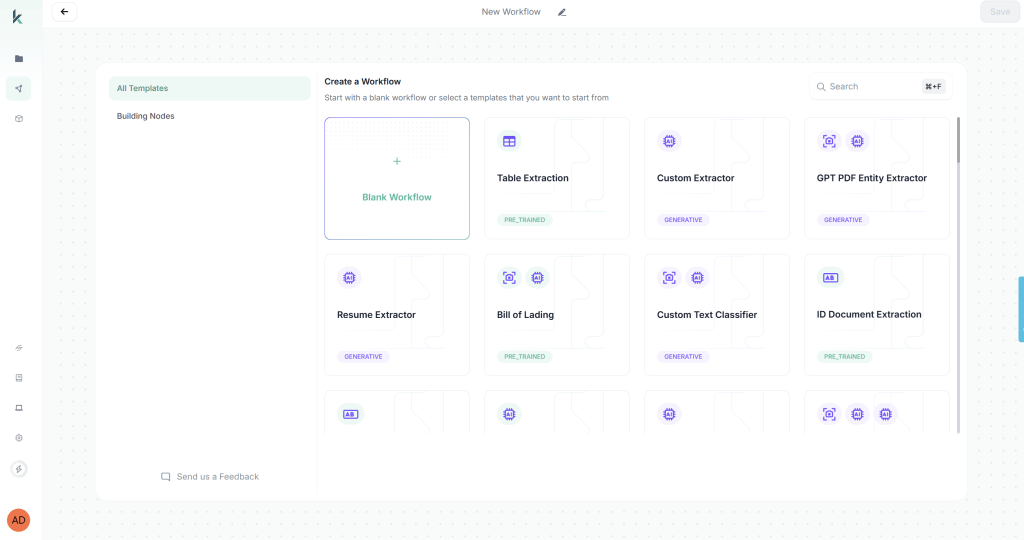
Access Kudra’s workflow builder by clicking “Create New Workflow” from the dashboard. You have two options: start from a blank workflow or use a predefined template. For this tutorial, we’ll start from scratch to demonstrate the full customization capabilities.
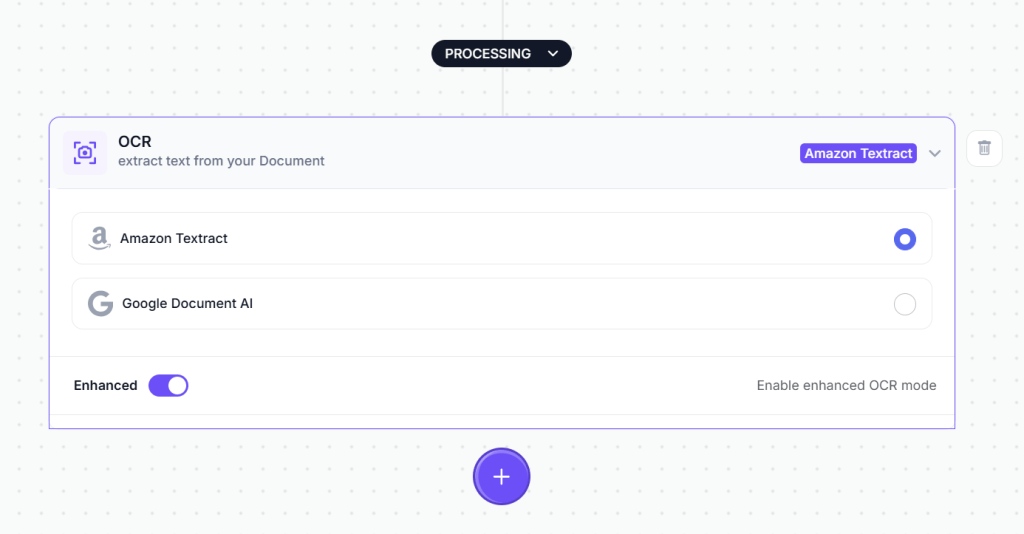
Add the OCR Component:
The first component processes the visual document and extracts raw text. From the component library, drag the OCR module onto your workflow canvas. This module handles text extraction from PDFs, scanned images, mobile photos, and any other document format you upload.
No configuration is required for the OCR component, it automatically processes whatever document format you provide.
Add the Vision Language Model (VLM) Component:
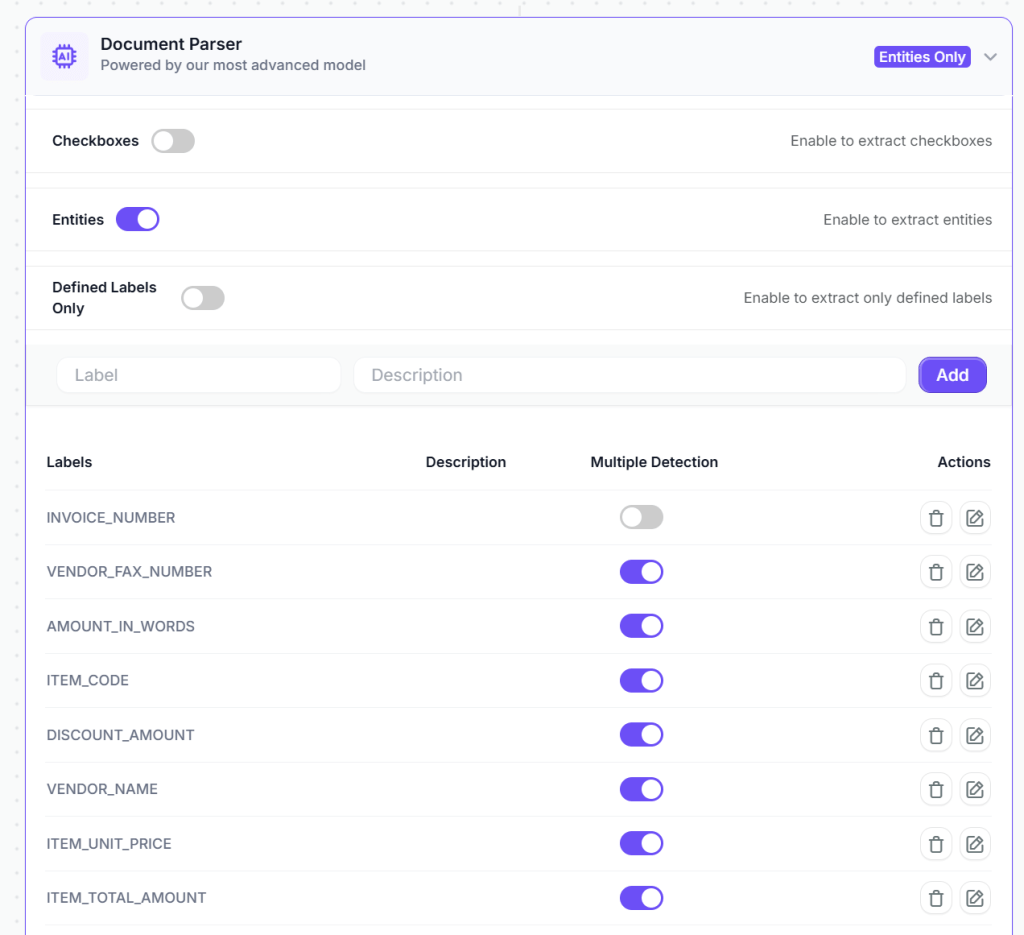
Next, add a VLM component for every type of document you are working with to intelligently extract specific data fields. For example for financial statement analysis you can add a VLM to understand the structure and context, allowing it to locate relevant information regardless of document layout variations.
The VLM component in Kudra adapts to different vendor invoice formats automatically. You’re not building rigid templates that break when a vendor changes their invoice design—you’re teaching the system what information matters regardless of where it appears on the document.
Add Validation Through Text Generation Component
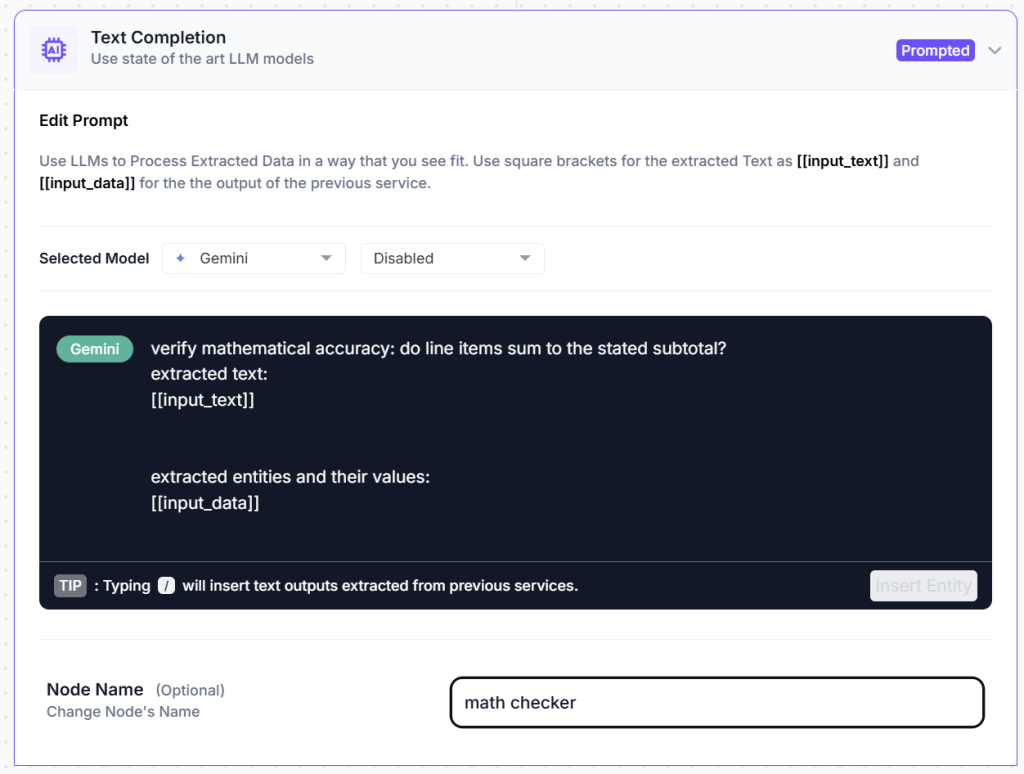
To ensure data quality, add a text generation component that automatically detects potential issues before data enters your accounting system. Configure it with validation prompts:
Using the extracted financial data, calculate the following ratios for each available year: Current Ratio (Current Assets / Current Liabilities), Quick Ratio ((Current Assets - Inventory) / Current Liabilities), Debt-to-Equity Ratio (Total Debt / Shareholder Equity), Gross Profit Margin (Gross Profit / Revenue), Net Profit Margin (Net Profit / Revenue), Return on Assets (Net Profit / Total Assets), Return on Equity (Net Profit / Shareholder Equity). Calculate year-over-year growth rates for Revenue, Gross Profit, Net Profit, and Total Assets. Identify trends and flag any concerning patterns.
This validation component acts as your automated quality control, catching errors that would otherwise require manual review or cause downstream system failures.
Optional: Add Post-Processing Components
Depending on your specific requirements, you can add additional data refinement steps:
Find and Replace: Standardize vendor names that appear in multiple formats. For example, invoices showing “ABC Corp” and “ABC Corporation” can be automatically matched to your vendor master database.
Format Date: Convert dates to match your accounting system requirements. This ensures consistency across international vendors using different formats (DD/MM/YYYY vs MM/DD/YYYY).
Text Transformation: Apply formatting rules such as converting account codes to uppercase, standardizing currency symbols, or making other adjustments to ensure data consistency.
Optional Post-Processing: For basic invoice processing, the VLM and validation components usually provide clean, structured data without extra steps. These additional options are available when your business logic requires them.

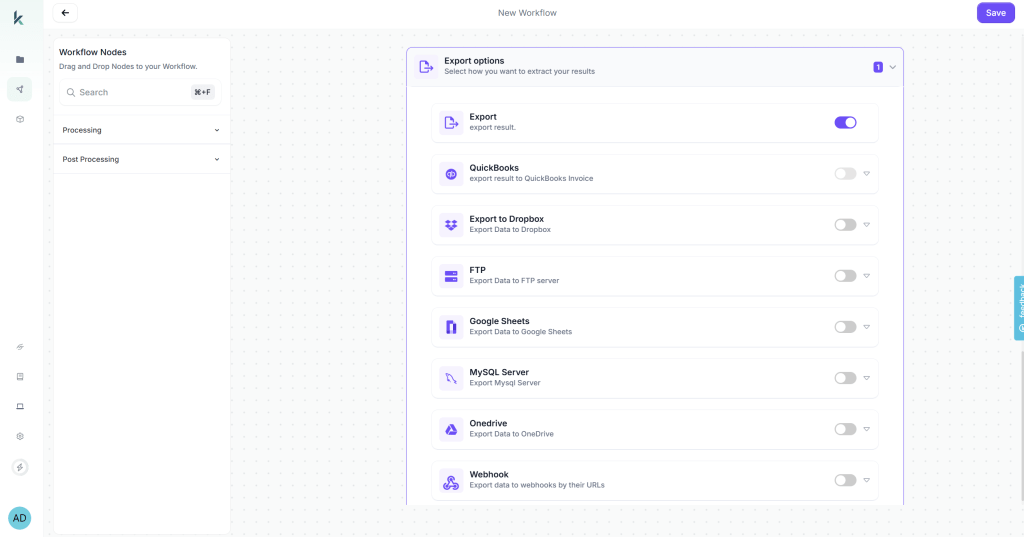
Configure Export Destinations
Kudra AI lets you send extracted data wherever it’s needed. Connect directly to accounting software, ERP systems, spreadsheets, databases, or automation platforms like Zapier. Multiple destinations can run at the same time, giving your team full visibility and seamless integration without manual work.
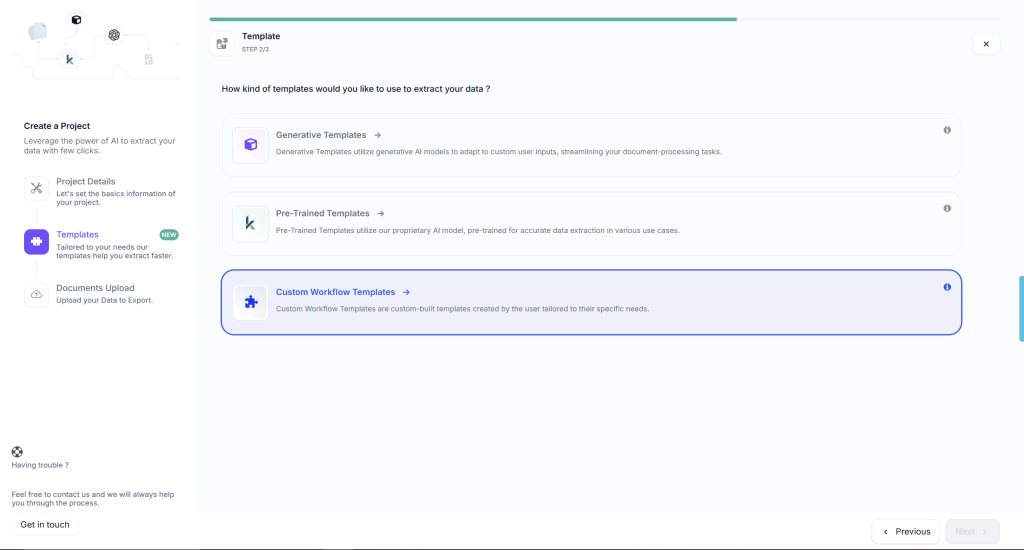
Step 4: Create a Production Project and Process at Scale
Once your workflow is ready, create a production project for ongoing invoice processing. In Kudra AI, click “Create New Project” and give it a descriptive name: “January 2026 Operating Expenses” or “Q1 Vendor Invoices” or “Accounts Payable – Ongoing.”
During project creation, select the workflow you just built from the dropdown menu. This links your automated data extraction workflow to this specific project, meaning every document uploaded to this project will automatically be processed according to your configured rules.
Now upload your invoices. You can drag and drop files, upload entire folders, or connect to sources where invoices arrive automatically such as email attachments, cloud storage folders like Google Drive or Dropbox, or FTP locations for legacy system integration.
Kudra AI processes each invoice automatically, typically in 15-30 seconds per document. Processing runs in the background while you continue uploading additional documents or working on other tasks. There’s no need to monitor progress, the system handles everything automatically.
Ready to Automate Your Due Diligence Process?
Manual due diligence creates bottlenecks that delay critical business decisions: days spent extracting data from financial statements and business plans, inconsistent evaluation quality across different analysts, limited analytical depth due to time constraints, and inability to process high application volumes without massive team expansion.
Due diligence automation solves these problems by processing multiple document formats simultaneously, extracting financial data and calculating ratios automatically, generating standardized evaluation reports in hours instead of days, and applying institutional best practices consistently across all evaluations.
Kudra AI provides due diligence automation specifically designed for investment funds, lending institutions, procurement teams, and M&A groups that need to evaluate businesses comprehensively using diverse document types. Our multi-format document processing, intelligent financial analysis, customizable evaluation frameworks, and automated report generation mean you can implement sophisticated due diligence workflows in weeks rather than months.
Process diverse document types: financial statements, business plans, contracts, presentations, and supporting materials—all through one workflow
Want to see how automated due diligence works for your specific evaluation process? Book a free demo where we’ll process your actual due diligence documents (with sensitive information redacted) through Kudra AI and show you the generated investment memo or evaluation report. No sales pitch, just a practical demonstration of what automation delivers for your organization.
Found This Helpful?
Book a free 30-minute discovery call to discuss how we can implement these solutions for your business. No sales pitch, just practical automation ideas tailored to your needs.
Book A Call


