
In the rapidly evolving landscape of data labeling and machine learning, choosing the right tool is not just a matter of convenience but a crucial determinant of project success. Among the plethora of options, Kudra and Nanonets stand out as prominent players, each offering unique features and capabilities. This article aims to provide a comprehensive comparison of these two tools. By dissecting their functionalities and strengths, we seek to empower readers to make informed decisions that align with their project’s specific data labeling requirements.
Kudra Overview
Kudra is a versatile Document Process tool renowned for its ease of use and effectiveness in processing various documents, including bank statements, insurance, and legal documents. Its intuitive interface and advanced extraction options make it a preferred choice for projects working with diverse document formats. Kudra’s collaboration tools enable seamless teamwork, allowing multiple users to process documents efficiently and simultaneously. Additionally, Kudra’s built-in quality control mechanisms ensure the accuracy and reliability of annotated data, making it a reliable tool for processing complex document types.
Nanonets Overview
Nanonets is an innovative data labeling tool that leverages AI-powered algorithms to streamline the annotation process. One of Nanonets’ key features is its ability to automate the labeling process, significantly reducing the need for manual annotation. This makes it ideal for projects with large datasets and repetitive labeling tasks
Kudra VS Nanonets
Training custom Machine Learning Models
Data Extraction Without Training
Advanced Document Classification
Template-Free Processing
Human-in-the-Loop Reviews
Seamless Integration with LLMs
Custom Workflows
Kudra
Nanonets
Kudra key features
1. Advanced Annotation Options
Kudra shines in its ability to excel in Named Entity Recognition (NER), relation extraction, and document classification tasks. With its advanced AI-powered Document Processing Tools, Kudra enables users to label text data with precision, extract valuable insights, and uncover underlying patterns within documents. This
functionality not only streamlines the document process but also enhances the overall efficiency and accuracy of text data analysis, making Kudra a valuable asset for projects requiring sophisticated text processing capabilities.
2. Ease of Use
Kudra is designed with a user-friendly interface, making it easy for non-coder users to navigate and utilize its features. This simplicity enhances productivity and reduces the learning curve for new users.
3. Customized Intelligent Document Workflows
Kudra allows users to create customized intelligent document workflows tailored to their business needs without the need for coding. This feature enables users to automate and optimize document processing workflows, enhancing efficiency and reducing manual effort.

4. OCR
Kudra offers an impressive Optical Character Recognition (OCR) annotation feature, which stands out as a key highlight. This functionality enables users to annotate a wide range of documents, including native PDFs, scanned images, pictures, invoices, and contracts, all while maintaining the original layout of the documents. This capability is especially beneficial for industries like finance, legal, and insurance, where PDFs are commonly used. It eliminates the need for time-consuming manual editing, ensuring precise annotations.

5. Data Extraction Without Training
Kudra’s zero-shot labeling feature allows users to extract data even without pre-existing labels. This capability is particularly useful for scenarios where the dataset is diverse or evolving, enabling efficient annotation without the need for extensive pre-labeling efforts.
6. Collaboration Tools
Kudra provides robust collaboration tools, enabling multiple users to work on the same project simultaneously. This feature promotes teamwork and accelerates the document extraction process. Collaboration features allow team members to review, comment, and edit annotations in real time. This collaborative environment fosters teamwork and improves the overall efficiency of document processing, making Kudra an ideal choice for projects that require a collaborative environment.
7. Quality Control Mechanisms
Kudra offers built-in quality control mechanisms, such as consensus-based labeling and review workflows. These tools ensure the accuracy and consistency of the automation document extraction process, leading to higher-quality datasets.
8. Document Processing Capabilities
Kudra is well-suited for processing various types of documents, including bank statements, insurance documents, and legal documents. Its extraction options and ease of use make it an efficient tool for document processing tasks.
9. Integration
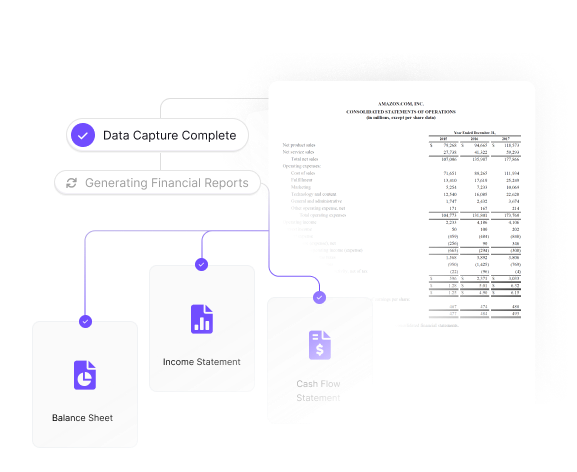
Unlike a traditional data extraction system, Kudra can be easily integrated with other tools and platforms, making it versatile and adaptable to different workflows and requirements. It also offers integration with large language models (LLMs) like GPT, enabling automated data processing based on natural language inputs. This integration enhances the efficiency and accuracy of the document extraction process.

10. Custom model training
Kudra’s custom model training feature draws inspiration from the process of creating tailored machine-learning models with minimal labeled samples. By leveraging Kudra’s intuitive Text Annotation Tool, users can craft a custom dataset from their document collection, even with limited labeled samples per template. This approach allows Kudra to formulate distinct models for different document types.

11. Continuous learning
Kudra’s continuous learning feature revolutionizes document processing by enabling its machine learning models to evolve and improve continuously. By seamlessly incorporating new data and user feedback, the models adapt to changing conditions,
ensuring accuracy and efficiency.
Kudra pricing
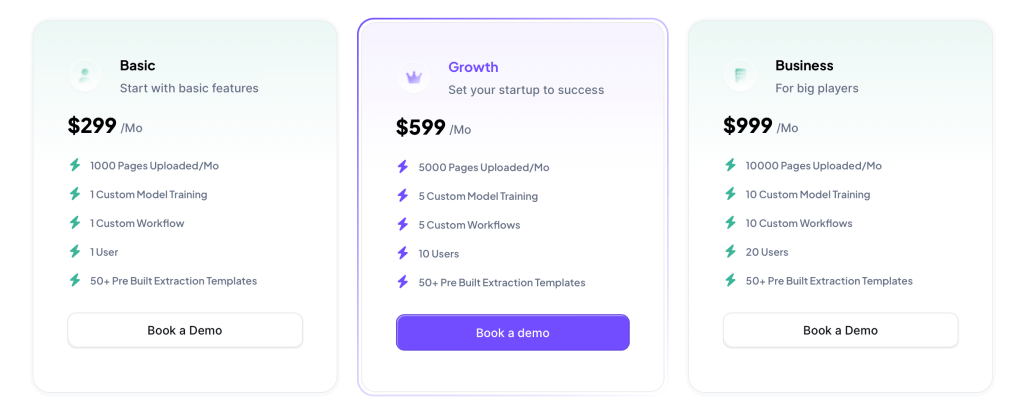
Kudra offers a flexible and transparent pricing model based on a pay-as-you-go approach.
Users are charged based on the number of pages uploaded and their storage requirements, enabling cost-effective scalability. Kudra’s pricing is transparent, with no hidden fees, making it easy for users to budget and plan their document processing costs accurately.
Nanonets Key features
1. Document Classification and Extraction
Nanonets offers powerful capabilities for classifying and extracting information from various types of documents, Nanonets can accurately identify and extract relevant data. This feature significantly reduces the need for manual data entry, which can be time-consuming and error-prone.
2. Approval and edit history
Nanonets also offers a comprehensive approval and edit history feature, which allows users to track and manage changes made to annotations. This feature provides transparency and accountability, ensuring that all annotations are accurate and consistent. Users can easily review and approve annotations, as well as track the history of edits made by team members.
3. Specify Fields
This feature allows you to keep your data clean and crisp. You can upload unstructured documents from multiple customers and only extract the fields you need.
4. External Integration
Nanonets boasts seamless external integration with popular applications such as Salesforce, Quickbooks, Google Sheets, and Google Docs. This feature allows users to effortlessly incorporate Nanonets’ capabilities into their existing workflows, enhancing productivity and efficiency. By integrating with these applications, users can easily import and export data for annotation.
5. Collaboration
Nanonets facilitates seamless collaboration among team members, enabling multiple annotators to work on the same project simultaneously. Nanonets also offers role-based access control, ensuring that team members have the appropriate permissions based on their roles.
6. Continuous Learning
Where its AI algorithms evolve with every new document processed. This means that as your business expands and deals with more transactions and data, Nanonets’ model continues to learn and improve its accuracy. With each new document, the model gains a deeper understanding, allowing it to capture data with increasingly higher accuracy over time.
Nanonets Pricing

Nanonets offers a variety of pricing plans to cater to different needs. The Starter plan is free for the first 500 pages, then costs $0.3 per page. The Pro plan costs $999 per month per workflow, includes 10,000 pages, and then costs $0.1 per page. Kudra, on the other hand, is generally more cost-effective than Nanonets, making it a budget-friendly option for data labeling tasks.
How to Choose the Right Automation Tool for Your Projects ?
Choosing the right tool for your projects is crucial to ensure efficiency, accuracy, and cost-effectiveness. When deciding between Kudra and Nanonets, consider the following factors:
• Project Requirements:
Evaluate the specific needs of your project, such as the type of data to be processed and the complexity of tasks. Kudra’s advanced document processing capabilities and custom workflow options make it suitable for projects requiring intricate document processing.
• Ease of Use:
Consider the user-friendliness of the tool, as it can impact productivity and the learning curve for your team. Kudra is praised for its intuitive interface and advanced AI algorithms, which can simplify complex tasks.
• Collaboration and Integration:
Assess the collaboration and integration features of each tool, especially if your project involves multiple team members or requires integration with other tools and platforms. Kudra provides robust collaboration tools, allowing multiple users to work simultaneously. Nanonets offers seamless integration with external applications like Salesforce and Google Sheets, enhancing workflow efficiency.
• Scalability and Pricing:
Consider the scalability and pricing options of each tool, particularly if your project is expected to grow over time. While both Kudra and Nanonets offer scalable solutions, Kudra is generally more cost-effective, making it a budget-friendly option for small to medium-sized projects.
Ultimately, the choice between Kudra and Nanonets depends on your project’s specific requirements and budget. Evaluate these factors carefully to select the tool that best aligns with your project’s needs and goals.
Kudra Use Cases
Claims processing
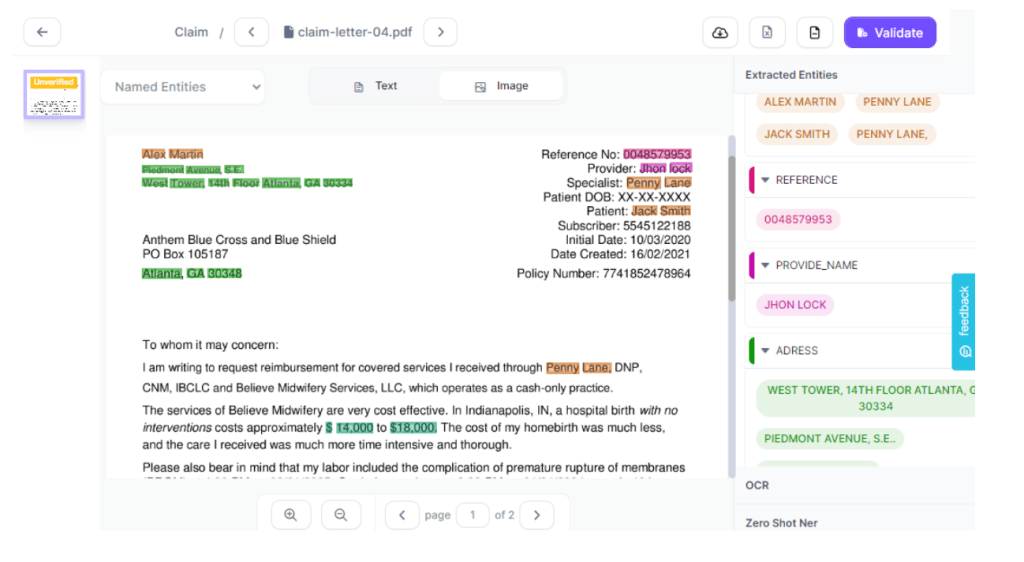
Effortlessly review the extracted data using Kudra.ai’s user-friendly dashboard, designed to ensure accuracy and completeness. The intuitive interface allows you to quickly navigate through the extracted information, verifying its accuracy with just one click. This streamlined process enhances the efficiency of data review, saving time and ensuring the quality of your annotated data.
Bank Statement Processing
Kudra.ai excels in extracting all necessary information from bank statements within seconds.
Its advanced algorithms are designed to quickly and accurately identify and extract relevant data such as transaction details, account numbers, dates, and balances. This rapid extraction process not only saves time but also ensures that all critical information is captured efficiently.
Conclusion:
In conclusion, when comparing Kudra and Nanonets, it is crucial to evaluate the specific needs of your project. Kudra proves to be a versatile and cost-effective document processing tool, providing advanced capabilities and customizable workflows for intricate document processing tasks. Its collaboration features and integration capabilities further enhance its suitability for a wide range of projects. Moreover, automation significantly reduces the risk of human error by minimizing the need for manual data entry and processing. Overall, incorporating automation tools like Kudra or Nanonets can result in increased efficiency, improved accuracy, and enhanced productivity in document processing workflows.


