
PDFs are ubiquitous in the modern business world. From financial documents and legal contracts to healthcare records and inventory lists, they hold vast amounts of vital information. However, unlocking this data has historically been a tedious and error-prone process. Manual methods are no longer sufficient to keep up with the sheer volume of documents companies handle daily. This is where AI PDF data extraction comes into play. By automating the data extraction process, businesses can transform how they access and use critical information.
What is AI PDF Data Extraction?
AI PDF data extraction involves using artificial intelligence technologies to identify and extract data from PDF documents. This process is more advanced than basic optical character recognition (OCR) because AI can understand the structure and meaning of the content, including tables, images, and text blocks. Instead of merely transcribing text, AI-driven systems make sense of the document’s content, offering structured outputs that are ready for integration into databases or analytics platforms.
How Does AI Transform PDF Data Automation?
Traditional OCR methods could only handle simple text recognition. However, with AI, data extraction has evolved to encompass:
• Complex Table Recognition: AI algorithms can accurately extract data from tables, even those with merged cells or non-uniform layouts.
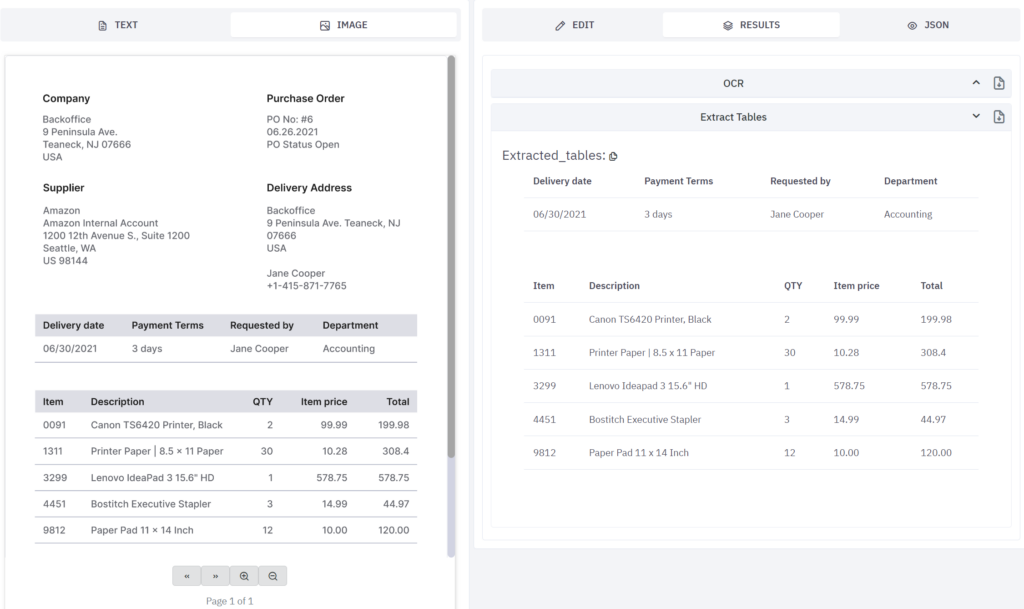
• Image-to-Text Conversion: With advancements in OCR PDF extraction, even low-quality scans and embedded images can be processed.
• Natural Language Processing (NLP): AI systems can interpret the meaning of phrases and categorize data accordingly. For instance, recognizing dates, monetary values, and names becomes automated.
Why is Automating PDF Data Extraction Essential?
Organizations across industries have to deal with an overwhelming amount of unstructured data, especially in PDFs.
Automation offers transformative benefits:
• Enhanced Accuracy: Manual data entry is prone to human errors, which can lead to costly mistakes. AI-based PDF data automation tools ensure high precision by continuously learning and adapting.
• Time and Cost Savings: Automating data extraction reduces the time employees spend on monotonous tasks. This efficiency translates into significant cost reductions.
• Scalability: As your business grows, AI PDF data extraction systems can handle increasing volumes of data without a hitch.
• Consistency: AI offers uniform performance, ensuring that data is consistently extracted and structured, regardless of variations in the PDF formats.
Use Cases of AI PDF Data Extraction Across Industries
1. Finance: Financial institutions deal with contracts, tax forms, and investment reports in bulk. AI can extract transactional data, account balances, and KYC information swiftly, aiding in real-time decision-making.
2. Healthcare: Medical professionals use PDF records extensively. AI can extract patient information, treatment history, and insurance data, facilitating faster patient care and research.
3. Legal Services: Law firms are often buried under contracts and case files. AI helps automate the extraction of legal clauses, case details, and precedents.
4. E-commerce and Logistics: Automated extraction of order forms, shipping labels, and inventory reports accelerates supply chain operations.
The Process Behind AI-Driven PDF Data Extraction
Automating data extraction involves several key steps, each powered by cutting-edge AI algorithms:
1. Preprocessing Documents
Before extracting data, AI systems preprocess documents to enhance readability. Techniques like image enhancement, text normalization, and noise reduction are used to make low-quality PDFs clearer.

2. OCR PDF Extraction
OCR (Optical Character Recognition) is a foundational technology that converts text from scanned PDFs into machine-readable data. Unlike traditional OCR, modern AI-powered OCR handles:
• Complex Layouts: AI understands document structures, even when text is scattered across columns or embedded in graphics.
• Multiple Languages: It recognizes and processes text in different languages, making it invaluable for multinational companies.
• Handwritten Text: Some advanced systems can even interpret cursive handwriting, which is common in older documents.
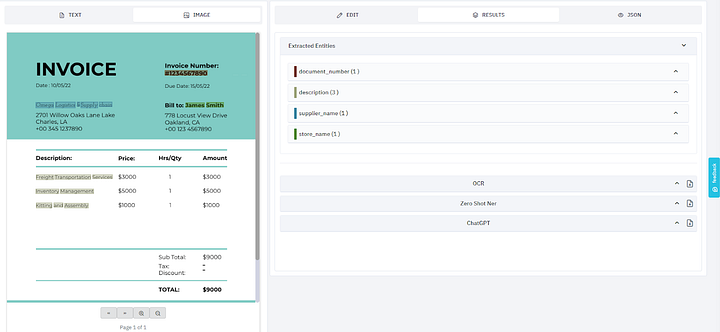
3. Data Validation and Quality Control
AI models continuously validate the extracted data, ensuring high accuracy. They flag anomalies and learn from corrections, improving over time. This step is crucial for fields like finance and healthcare, where data integrity is paramount.

How Kudra Enhances AI PDF Data Extraction
Kudra stands out by offering a holistic approach to PDF data automation. Here’s how Kudra addresses common challenges:
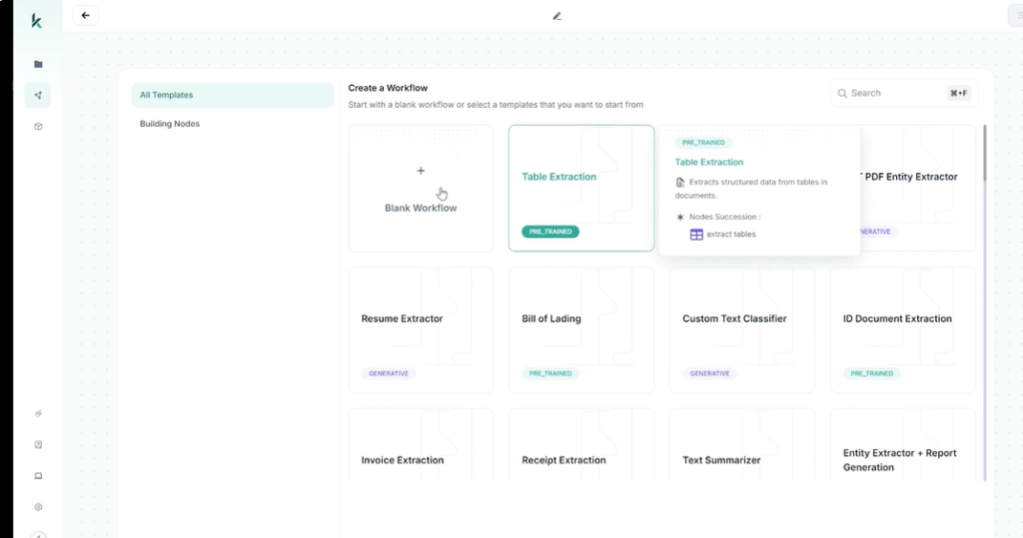
1. Customizable Workflows
Kudra’s platform is built for adaptability. Users can create workflows tailored to specific document types. For example, financial firms can configure Kudra to extract specific line items from brokerage statements, while healthcare providers can set up workflows for patient records.
2. Integration with Enterprise Systems
Extracted data is only as good as its usability. Kudra seamlessly integrates with CRMs, ERP systems, and cloud storage platforms, ensuring a smooth flow of information across an organization. This integration eliminates the need for manual data transfers.

3. Advanced Security Protocols
Data security is a top priority, especially when dealing with sensitive information. Kudra employs state-of-the-art encryption and access controls, ensuring that extracted data remains confidential and compliant with regulations.
Challenges in AI PDF Data Extraction and How Kudra Solves Them
Despite the many benefits, automating PDF data extraction has its challenges:
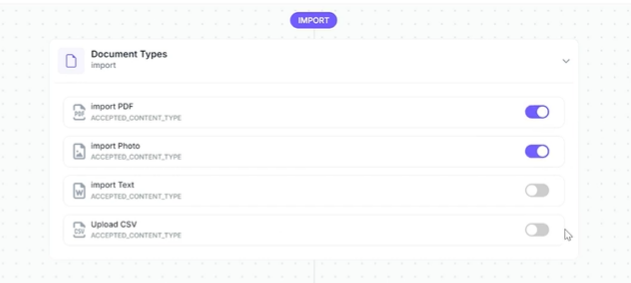
1. Variability in Document Formats
PDFs come in countless layouts, from simple text-based documents to complex forms with nested tables. This variability can confound less sophisticated systems. Kudra’s AI models are trained on a diverse set of document types, enabling them to handle everything from structured contracts to free-form medical notes.
2. Low-Quality Scans
Poor-quality scans are common, especially in industries like healthcare. Traditional OCR struggles with these documents, but Kudra’s preprocessing algorithms improve clarity, making text recognition more accurate.

3. Data Privacy and Compliance
Handling sensitive data requires strict adherence to privacy laws. Kudra provides customizable compliance settings, allowing businesses to control data access and retention policies.
Unlocking the Full Potential of AI PDF Data Extraction
Automating PDF data extraction with AI isn’t just about improving efficiency; it’s about transforming the way businesses access and utilize critical information. In a world where data is key to staying competitive, Kudra’s AI-driven PDF data extraction solutions offer a clear advantage by combining accuracy, speed, and seamless integration. From customizable workflows to advanced data security protocols, Kudra provides the features that today’s organizations need to manage complex document workflows with confidence.
With Kudra, companies across finance, healthcare, legal, and logistics can unlock the full potential of their data, freeing up valuable time and resources while ensuring the highest data quality and compliance. As the field of AI PDF data extraction continues to advance, Kudra is dedicated to remaining at the forefront, delivering powerful, adaptable tools that meet the evolving demands of modern business. For organizations ready to embrace the future of data automation, Kudra offers the expertise and innovation to lead the way.


