
Most engineers have the same first experience with document extraction. You find a library, write ten lines of code, and a PDF becomes text. It works and you move on.
However, the dirty secret of document AI is that text extraction and data extraction are completely different problems. Text extraction is solved, there are dozens of mature libraries that will turn any PDF into a string. Data extraction is the hard part: pulling structured, typed, semantically meaningful information out of documents that were designed for humans to read, not machines to parse.
Technical documents make this maximally difficult. A research paper is a two-column layout with embedded tables, floating figures, footnotes, cross-referenced sections, and a citation graph linking it to dozens of other documents. A technical standard has numbered clauses, normative references, and appendices that qualify the main body. A patent has a strict legal structure where every word in a claim has precise scope implications. None of these were designed with your extraction pipeline in mind.
And the failure modes are insidious. Your pipeline doesn’t crash. It returns something. The LLM sounds confident. The answer is wrong in ways that only surface when someone actually checks the source.
This article covers 6 patterns for building extraction pipelines that produce data an agent can actually reason over, not just text it can hallucinate around.
The Extraction Layer Is Not Plumbing
There’s a mental model most engineers carry into document AI: extraction is infrastructure. You resolve it once, early, and then you do the interesting work, the embeddings, the retrieval logic, the agent reasoning. The LLM is where intelligence happens. Extraction is just getting data into the room.
That model is wrong, and it’s expensive to discover why in production.
Every downstream capability in your agent stack has a hard ceiling set by the extraction layer. Retrieval precision cannot exceed what was accurately captured. Agent reasoning cannot extend to content that was silently dropped. Structured outputs cannot normalize fields that were never extracted as fields in the first place. You can have the best embedding model, the most carefully tuned retrieval pipeline, and a frontier LLM, and still get confidently wrong answers because a table got flattened into a string on page 4.
The extraction layer does three distinct jobs, and most pipelines only do one:

- Capture: Getting text, tables, figures, and layout structure out of raw documents accurately
- Interpretation: Understanding what the captured content means structurally, which numbers belong to which rows, which claims reference which prior art sections, which figure captions describe which images
- Preparation: Producing output in a format an agent can actually use, not a string dump, but typed fields, linked references, and metadata an agent can filter and reason over
Most pipelines handle capture, poorly. The patterns below handle all three.
Pattern 1: Naive Text Extraction
What it is: Pass the document through a basic parser (PyMuPDF, pdfplumber, python-docx) and capture the raw text stream. No layout awareness, no structure detection, no post-processing. The output is a flat string, one per page.
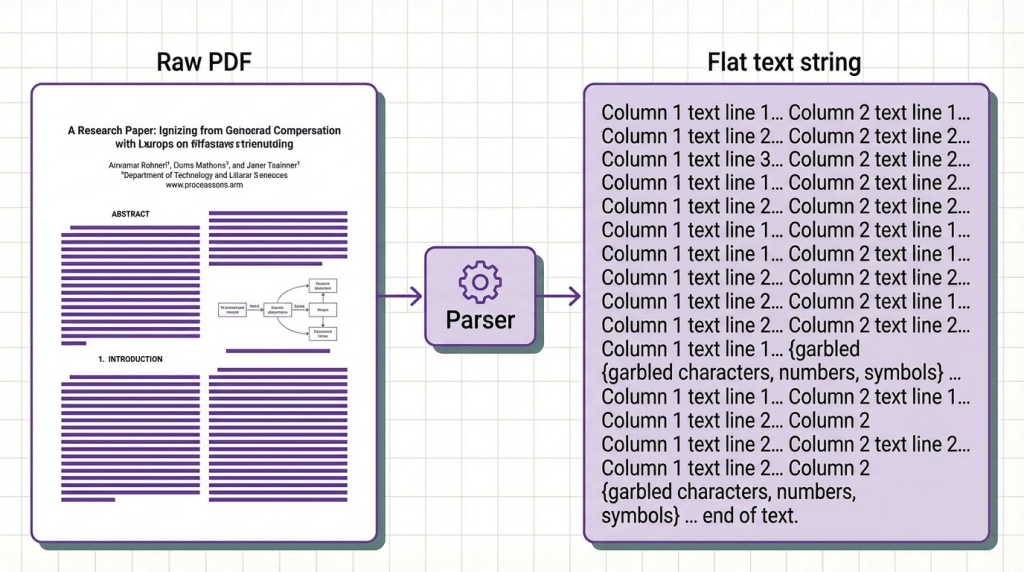
This is where almost every pipeline starts. And for a narrow set of documents, it works fine. Pure prose with no tables, no columns, no figures (simple reports, email threads, markdown files) extract cleanly. The parser sees linear content and returns linear text.
The failure mode arrives the moment your documents have structure. A 2026 benchmark on 200 machine learning papers found that naive text extraction produced corrupted table content in 61% of documents with multi-column layouts. The parsers were functioning correctly. The document structure was a problem they were never designed to solve.
When to use it: Only for documents you have verified are pure prose with no tables, columns, or structured figures. Internal memos, plain-text exports, simple markdown files. The moment your corpus includes academic papers, technical reports, or patents, you need a different pattern.
Pattern 2: Layout-Aware Extraction
What it is: Before extracting text, detect the document’s physical layout and use that spatial map to guide extraction. Text is read not as a stream but as positioned elements assembled in logical reading order.
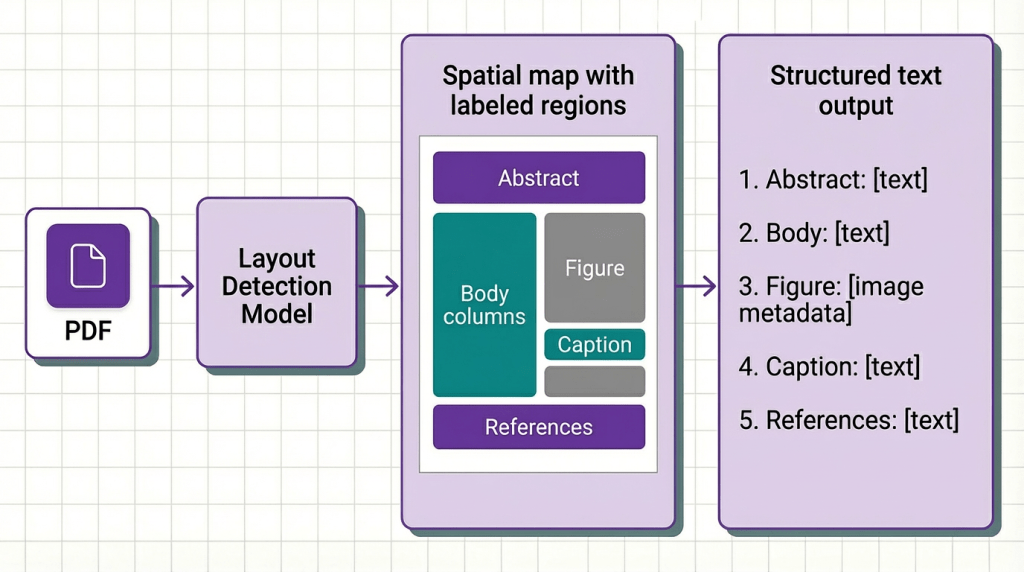
Layout-aware extraction treats a document the way a human eye treats it, not as a sequence of characters but as a two-dimensional arrangement of content blocks with implied relationships. A two-column paper is understood as two separate columns, not one interleaved stream. A results table is detected as a grid before any text is read. A figure caption is linked to the figure above it, not concatenated with the paragraph below it.
The tools that enable this (DocLayNet-based models, vision-language models doing region classification) have matured significantly in 2026. Accuracy on academic PDFs now exceeds 91% for standard layouts, dropping to roughly 74% on heavily formatted conference papers with custom templates.
The tradeoff is latency. Layout detection adds 1.5 to 4 seconds per page depending on model size and document complexity. For batch processing research corpora, this is almost always worth it. For real-time single-document pipelines where a user is waiting, you need to decide whether extraction quality justifies the delay.
When to use it: Any document where layout carries meaning. Academic papers, technical standards, patent filings, regulatory submissions. If your documents have multi-column layouts, figures with captions, or tables with complex headers, this pattern is not optional, it’s the prerequisite for every pattern that follows.
Pattern 3: Table and Figure Extraction
What it is: Treat tables and figures as first-class extraction targets with dedicated pipelines separate from prose extraction. Tables are parsed into structured JSON with typed rows, columns, and headers. Figures are extracted as images and passed through vision-language models to generate structured captions and content descriptions.
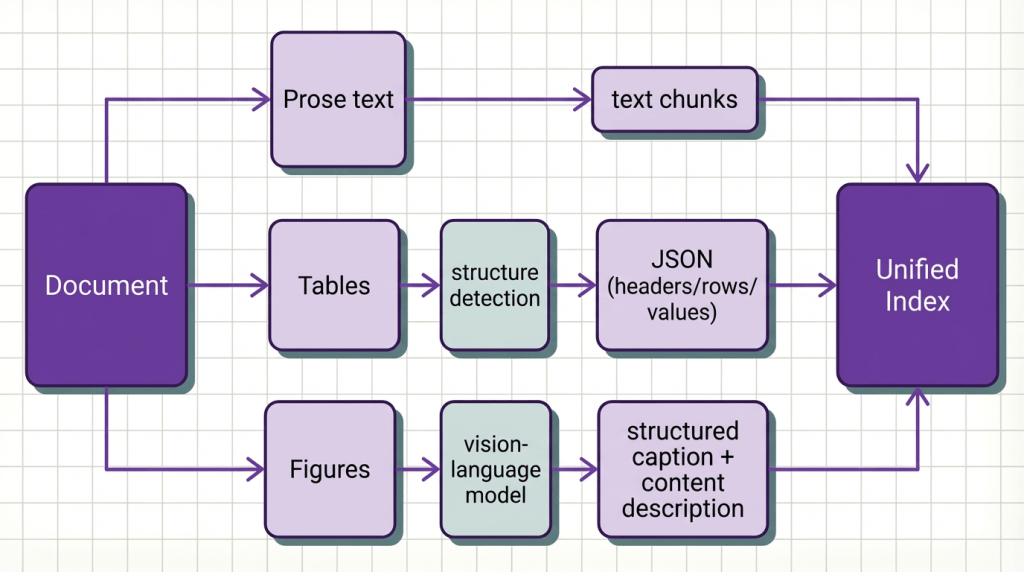
Most documents are unusually dense with non-prose content. A typical machine learning paper for example contains 4 to 8 tables and 5 to 12 figures, and a disproportionate share of the paper’s actual claims live in those elements. The abstract says “our method achieves great results.” The table on page 6 is where the specific numbers are. If your extraction pipeline treats that table as prose, your agent will retrieve the claim but never the evidence.
Figure extraction via vision-language models is newer but increasingly critical. A 2026 study on scientific paper QA found that 34% of questions in benchmark datasets required reasoning over figure content, content that every text-only extraction pipeline had simply discarded.
When to use it: Any pipeline where agents need to answer quantitative questions, compare results across papers, or verify claims against evidence. Systematic literature review agents, research summarization tools, scientific QA systems. If your agent is supposed to reason about numbers and it can’t see the tables, it will invent them.
Pattern 4: Semantic Structure Detection
What it is: After extracting raw content, apply a classification layer that identifies the semantic role of each section (abstract, introduction, related work, methodology, results, discussion, conclusion, appendix) and tags every chunk with its structural position in the document. Retrieval and reasoning are then conditioned on those tags.
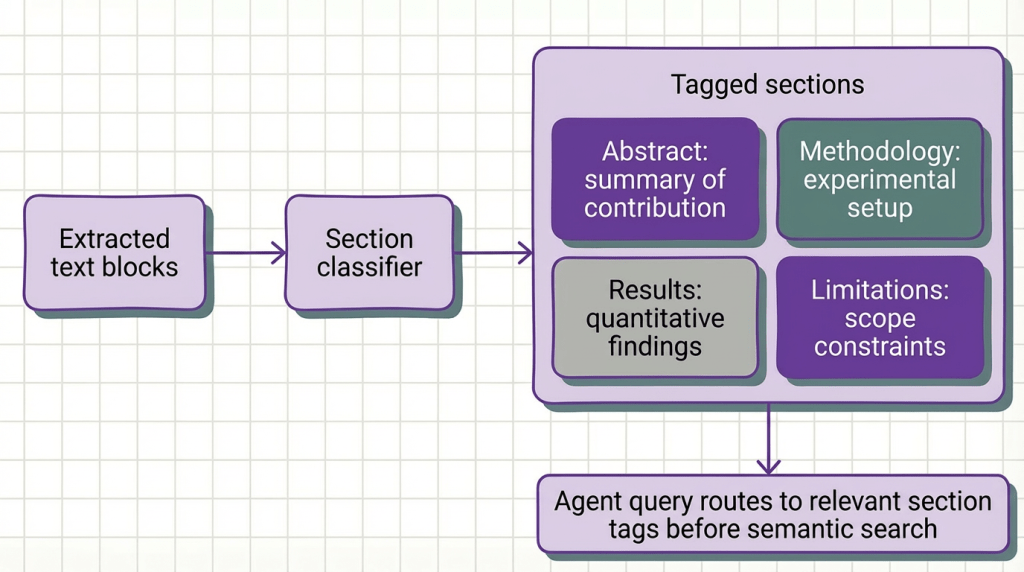
Without semantic structure detection, your retrieval system treats all sections as equivalent and returns whichever chunks happen to be semantically closest to the query embedding. This produces a specific failure mode: queries about limitations retrieve contribution claims because both use similar domain vocabulary, while the actual limitations section (written more cautiously, with hedged language) scores lower and gets filtered out.
Semantic structure detection fixes this by giving your agent a second retrieval axis. Instead of pure semantic similarity, it combines section-type filtering with semantic search: “retrieve from results and methodology sections, ranked by similarity to this query.” Retrieval precision on multi-section academic documents improves by 18–23% with this approach, according to a 2026 benchmark across 500 NLP papers.
When to use it: Any agent that needs to answer different types of questions from the same document. Literature review agents, research summarization pipelines, technical report analyzers. If your agent ever asks “what were the limitations of this approach” and gets back a contribution claim instead, semantic structure detection is what you’re missing.
Pattern 5: Cross-Document Reference Resolution
What it is: Detect and resolve explicit references between documents or between sections within a document (citations, cross-references, exhibit links, appendix pointers) and represent them as structured edges in your knowledge graph rather than as dangling text fragments.

Cross-document reference resolution requires two components: a reference parser that identifies the type and target of each reference, and a linker that resolves targets to actual content nodes in your index. For within-document references this is largely solved by layout-aware extraction combined with section tagging. For cross-document citation resolution, you need either a citation database lookup or a local corpus index that maps paper identifiers to content.
The payoff is significant. Agents with reference resolution can follow reasoning chains across documents (starting from a claim, retrieving the cited evidence, then retrieving the methodology behind that evidence) rather than treating each document as an isolated island.
When to use it: Literature review agents, systematic review pipelines, technical standard compliance checkers, any agent that needs to follow chains of reasoning across multiple documents. If your corpus contains documents that reference each other and your agent needs to verify claims, reference resolution is what enables it to actually do that.
Pattern 6: Adaptive Extraction Orchestration
What it is: Instead of applying a fixed extraction strategy to all documents, a lightweight classifier analyzes each document’s type, format, and content density and dynamically routes it to the appropriate extraction pipeline. A dense methodology paper gets layout-aware extraction with full table parsing. A preprint with minimal figures gets fast recursive text extraction. A technical standard with numbered clauses gets structure detection optimized for regulatory document formats.
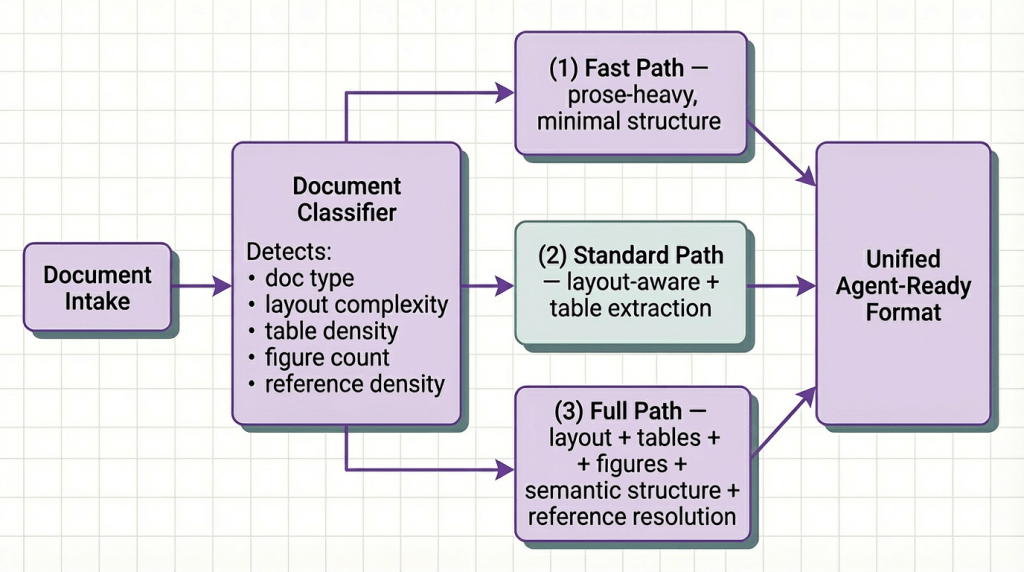
This is the pattern that makes heterogeneous corpora tractable at scale. If you’re building a research agent that ingests papers from arXiv, internal technical reports, regulatory filings, and patent databases simultaneously, no single extraction strategy is optimal across all four. Applying full layout detection with figure extraction to every plain-text preprint wastes compute. Applying naive text extraction to a densely formatted conference paper corrupts the data.
The important caveat: adaptive orchestration requires observability to justify its complexity. You need to know which documents are being routed where, and you need quality signals from downstream retrieval to detect when the classifier is making wrong routing decisions. Without that feedback loop, you’re adding complexity without the data to manage it.
When to use it: High-volume pipelines processing documents from multiple sources and formats. Enterprise research platforms, multi-domain technical knowledge bases, scientific literature agents. If your document corpus is uniform (all arXiv ML papers, all SEC filings) pick the single best-fit strategy and stick with it. If it’s mixed, adaptive orchestration pays for itself in both quality and cost.
Quick Reference: Which Pattern Do You Need?
| Pattern | Best For | Key Tradeoff |
|---|---|---|
| Naive Text Extraction | Pure prose, prototyping only | Fast but blind to structure |
| Layout-Aware Extraction | Multi-column papers, formatted reports | +2–4s latency per page |
| Table & Figure Extraction | Quantitative claims, results comparison | Requires vision model for figures |
| Semantic Structure Detection | Multi-question agents, section-specific retrieval | Needs section classifier training |
| Cross-Document Reference Resolution | Citation chains, claim verification | Requires corpus index or citation DB |
| Adaptive Orchestration | Mixed corpora at scale | Adds routing complexity + needs observability |
Putting It Into Practice: From Raw Invoices to an Agent That Acts on Them
The patterns above are architectural decisions. Implementing layout-aware extraction, table parsing, and semantic structure detection from scratch is significant engineering, weeks of work before you write a single line of agent logic.
Here’s how you’d do it with Kudra Workflows using invoices as the example, though the same approach applies to any document type.
Step 1: Build Your Workflow
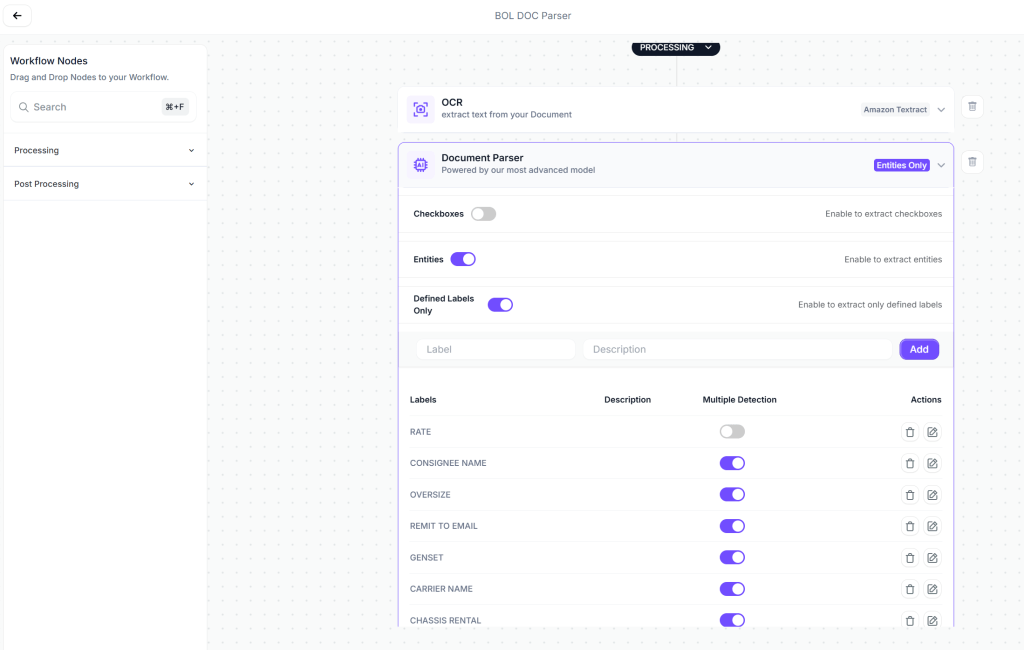
No custom code. Drag and drop the components you need. Kudra handles the orchestration and normalizes everything into a clean schema (vendor name, line items, totals, dates) all as typed fields your agent can query directly.
Step 2: Create a Project and Upload Your Documents
Once your workflow is built, create a project in Kudra and upload a batch of invoices. Kudra runs every document through the workflow automatically. You can see the structured output for each one, what was extracted, how fields were normalized, what the raw document looked like versus what came out.
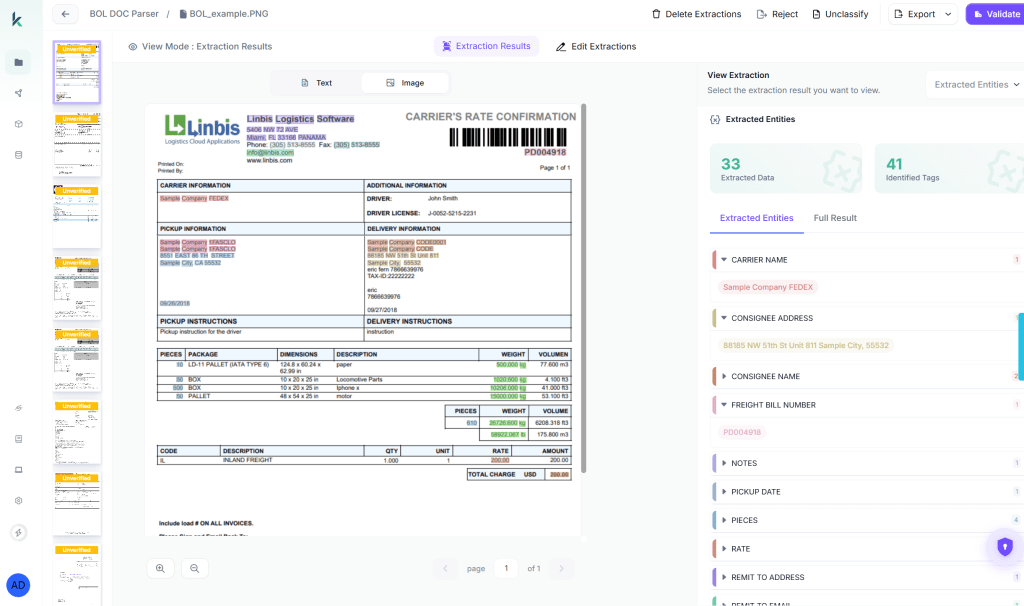
This is the step most developers skip when building from scratch. You don’t just get output, you get visibility into what your extraction pipeline actually understood.
Step 3: Review the Results
Before touching any agent code, look at what came out. For each invoice you should see:

If a field looks wrong, adjust the workflow — swap a component, tune a normalizer, and re-run. This feedback loop before the agent layer is what separates pipelines that work on 80% of documents from ones that work on 97%.
Step 4: Copy the API and Wire It Into Your Agent
Once extraction quality looks right, generate an API key from the project settings. The workflow becomes a single endpoint your agent calls like any other tool:

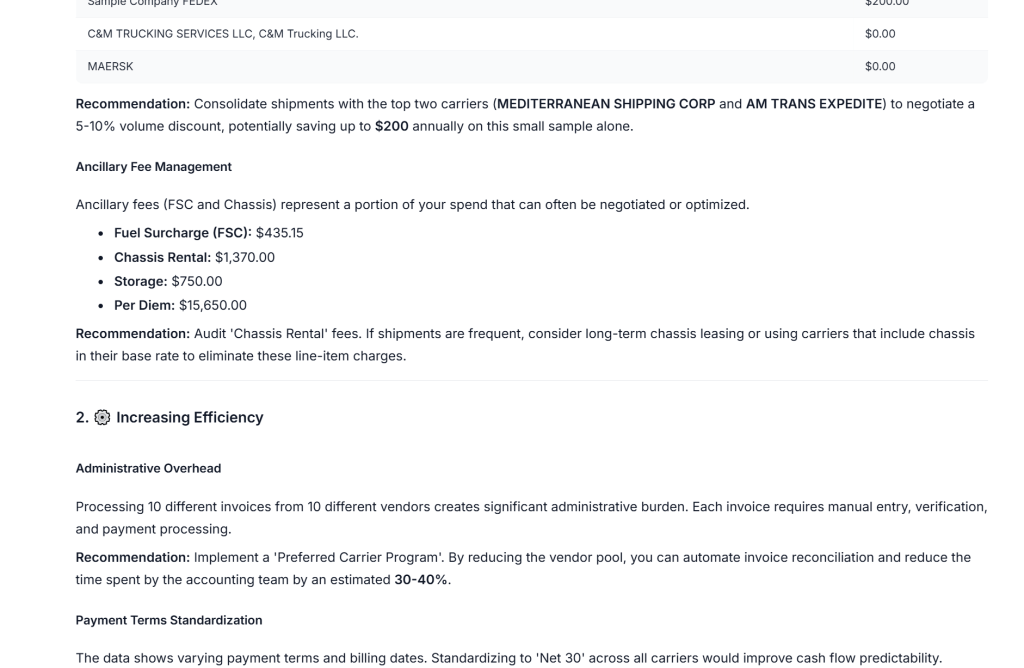
We tested this with our own agent across a batch of 200 invoices from 40 different vendors, varying layouts, different currencies, multi-page documents, scanned PDFs. The agent correctly extracted and acted on 94% of them without any manual intervention. The 6% that required review were flagged automatically, not silently wrong. That’s what a production-grade extraction layer actually looks like underneath a working agent.
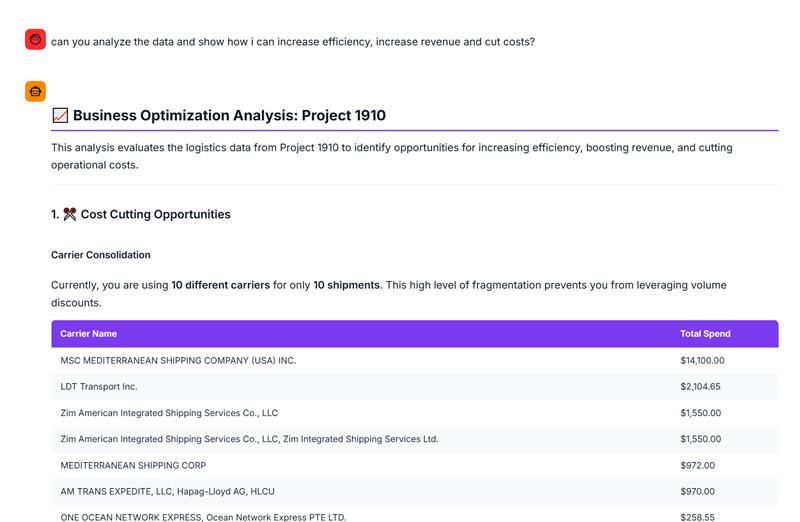
That’s the difference between a document agent that sounds intelligent and one that actually is.
Final Thoughts
Extraction is where document agents win or lose. Every hallucinated result, every missing citation, every claim your agent couldn’t verify, most of them trace back to an extraction decision that didn’t match the document type it was processing.
The patterns here are a progression, not a checklist. Start with layout-aware extraction. Add table and figure parsing when your documents carry quantitative claims. Layer in semantic structure detection when your agents need to answer different questions from different parts of the same document. Add reference resolution only when your use case genuinely requires cross-document reasoning.
The engineers building reliable document agents in 2026 are the ones who treat extraction as a first-class engineering problem, not a preprocessing detail they resolved by calling .extract_text() and moving on. Your pipeline’s weakest link is probably not your retrieval logic or your LLM. It’s probably the table your parser silently corrupted on page 4.
Fix the extraction layer first. Everything downstream gets better.


