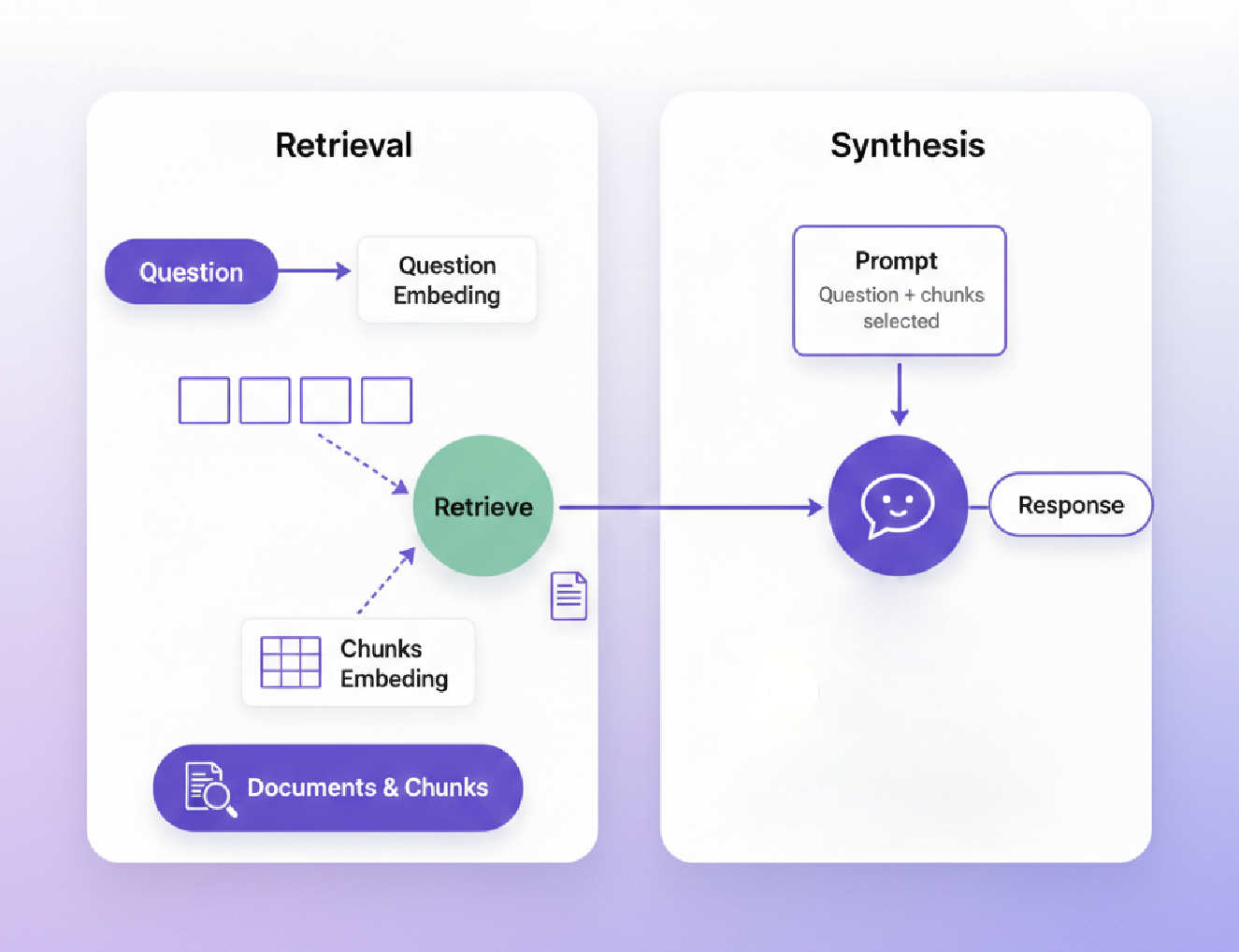
Here’s a truth most AI engineers learn the hard way: your RAG system is only as good as the data you feed it.
You can have the perfect embedding model, the most sophisticated retrieval strategy, and a state-of-the-art LLM, but if your document extraction is garbage, your answers will be garbage too. Worse, they’ll be confidently garbage, wrapped in hallucinations that sound plausible.
This becomes painfully obvious when dealing with financial documents: investment reports, 10-Ks, earnings statements, portfolio summaries. These aren’t clean blog posts. They’re PDFs with:
- Complex multi-column layouts
- Financial tables with nested headers
- Footnotes and disclaimers scattered across pages
- Charts, graphs, and embedded images
- Scanned documents with varying quality
In this guide, we’ll build an intelligent financial document chatbot using agentic RAG with LangGraph, but with a critical addition: production grade document extraction. We’ll show you exactly how extraction quality impacts retrieval accuracy and how to prevent hallucinations at the source.
Brief On RAG Extraction Quality
Most RAG tutorials skip document extraction entirely. They assume you already have clean text and structured data. But in production systems, extraction is where 80% of quality issues originate.

In reality, when extraction goes wrong, everything downstream quietly breaks: messy text loses structure and meaning, chunking embeds corrupted facts, retrieval confidently surfaces the wrong information, and the LLM faithfully repeats it. This is the classic garbage in → garbage out problem but with a dangerous twist: each stage adds confidence, not accuracy, turning a small extraction error into a polished, believable hallucination the user trusts.
Why Financial Documents Are Especially Brutal
Financial PDFs break standard extraction tools because:
- Precision Matters Absolutely: 1.5M vs 15M isn’t “close enough”
- Table Structure is Critical: Row-column relationships encode meaning
- Context Spans Pages: Footnotes on page 47 explain tables on page 12
- Layout Complexity: Multi-column, side-by-side tables, embedded charts
- Scanned Documents: Many older financial reports are scanned PDFs with quality issues
The solution isn’t better embeddings or smarter retrieval, it’s better extraction at the source.
Architecture: Agentic RAG for Financial Documents
Our system combines four key components: Kudra for extraction, ChromaDB for vector storage, LangGraph for agentic orchestration, and OpenAI GPT-4 for generation.

Key Components:
- Kudra Extraction Layer: Converts messy PDFs into clean, structured JSON with preserved table structure and numerical precision
- ChromaDB: Stores embeddings with rich metadata (document type, section, confidence scores) for filtered retrieval
- LangGraph Agent: Routes queries intelligently based on complexity—simple lookups go straight to RAG, complex analyses escalate to humans
- GPT-4: Generates responses grounded strictly in retrieved context, with citations back to source documents
Critical Innovation: By using Kudra’s layout-aware extraction, we maintain table structure, preserve numerical precision, and keep contextual relationships intact, before any embedding or retrieval happens. This prevents the corruption cascade we saw earlier.
Implementation: Building the System
Now let’s build it. We’ll go step-by-step, showing exactly how Kudra integrates into a production RAG pipeline. By the end, you’ll have a working financial document chatbot that extracts with precision, retrieves accurately, and minimizes hallucinations.
Before we start, make sure you have:
- Kudra Account: Sign up at kudra.ai (Free tier: 100 pages/month)
- OpenAI API Key: For embeddings and LLM generation
- Python 3.9+: With pip or conda for package management
Let’s begin building.
Step 1: Prepare Your Environment & Access
We’ll start by installing all the required packages. This includes the Kudra Cloud SDK for document extraction, LangChain and LangGraph for building our agentic RAG system, ChromaDB for vector storage, and OpenAI for embeddings and LLM access.
					# Install all required packages
!pip install -q kudra-cloud langchain langgraph langchain-openai langchain-community \
              chromadb openai python-dotenv pydantic requests
Step 2: Import Required Libraries
Now let’s import all the libraries we’ll need throughout this tutorial. We’re importing the Kudra SDK, LangChain components for RAG, LangGraph for agentic orchestration, and ChromaDB for vector storage.
					import os
import json
import requests
from typing import List, Dict, TypedDict, Annotated
from pathlib import Path
from dotenv import load_dotenv

# Kudra SDK
from kudra_cloud import KudraCloudClient

# LangChain & LangGraph
from langchain_openai import ChatOpenAI, OpenAIEmbeddings
from langchain_core.prompts import ChatPromptTemplate
from langchain_core.messages import SystemMessage, HumanMessage
from langchain_core.documents import Document
from langchain_community.vectorstores import Chroma
from langgraph.graph import StateGraph, END
from pydantic import BaseModel, Field
Step 3: Set Up API Keys
You’ll need three credentials to run this notebook:
OpenAI API Key: Get this from platform.openai.com. We’ll use it for embeddings (text-embedding-3-small) and LLM generation (GPT-4).
Kudra API Token: Get this from your Kudra dashboard under Settings → API Keys. This authenticates your requests to Kudra’s extraction API.
Kudra Project Run ID: After you create a workflow in Kudra (we’ll cover this in Step 4), you’ll create a project and get a unique run ID. This links your API calls to your specific extraction workflow.
Let’s set these up securely using getpass (so your credentials aren’t exposed in the notebook).
					from getpass import getpass

# Set up OpenAI API key
OPENAI_API_KEY = getpass("Enter your OpenAI API Key: ")
os.environ["OPENAI_API_KEY"] = OPENAI_API_KEY

# Set up Kudra credentials
KUDRA_API_TOKEN = getpass("Enter your Kudra API Token: ")
KUDRA_PROJECT_RUN_ID = input("Enter your Kudra Project Run ID: ")

print("✅ API credentials configured")
Step 4: Create an Extraction Workflow
Before we can extract documents via API, we need to create a specialized extraction workflow in the Kudra dashboard. This is where we configure exactly how Kudra should process our financial documents.
Why a custom workflow? Generic OCR treats all PDFs the same. Financial documents need specialized handling: table structure preservation, numerical precision, contextual extraction. Kudra’s workflow builder lets you compose a pipeline tailored to your documents.
Here’s how to create your workflow in Kudra’s dashboard:
1. Create New Workflow
- Click “+ New Workflow” in your dashboard
- Name it: “Financial Document Extraction – RAG Pipeline”
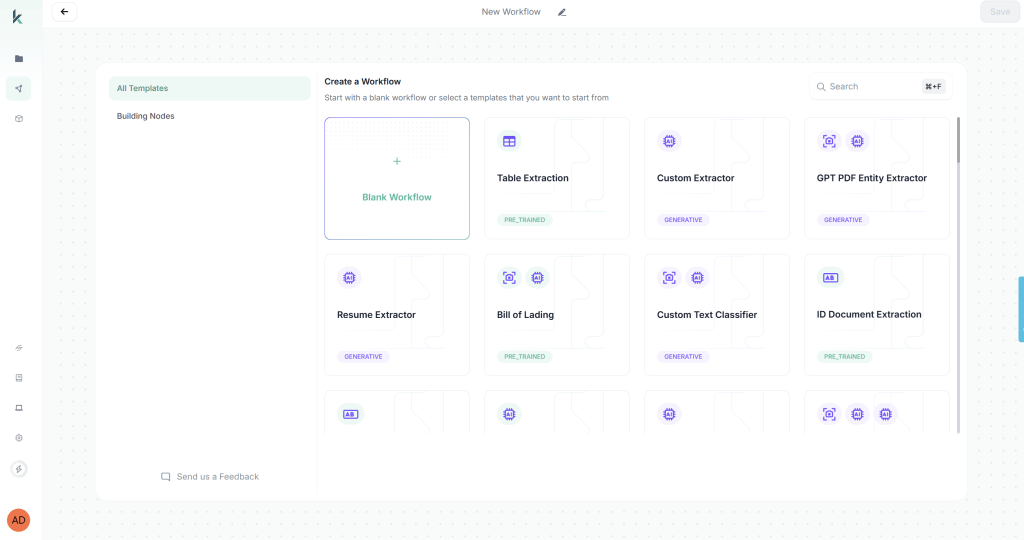
2. Add Components (drag and drop in order):
a. OCR Component
- Enable multi-language support (for international financial docs)
- Enable image enhancement (critical for scanned documents)
- Enable layout detection (preserves reading order in complex layouts)
b. Table Extraction Component
- Set table detection to Automatic
- Enable “Preserve structure” (maintains row-column relationships)
- Output format: Structured JSON
c. VLM Component – Configure these extraction fields:

The VLM (Vision Language Model) understands semantic meaning, so it can extract “Q3 Revenue” even if the document says “Third Quarter Revenue” or “3Q Rev.”
3. Configure Export Options
- Export format: JSON
- Include: Raw text, Tables, Entities, Validation results
4. Save Workflow
5. Create Project
- Click “Create Project”
- Link your workflow
- Copy the Project Run ID (looks like: “username/FinancialDocExtraction-code==”)
This Project Run ID is what connects your API calls to this specific workflow configuration.
Step 5: Extract Financial Documents with Kudra
Now comes the critical part: extracting structured data from financial PDFs using Kudra’s API. This is where we prevent the extraction quality problems that lead to hallucinations later.
We’ll initialize the Kudra client with our API token, then send documents through our custom workflow. Kudra will return structured JSON with preserved table layouts, precise numerical values, and confidence scores.
Let’s start by initializing the Kudra client:
					# Initialize Kudra client with our API token
kudra_client = KudraCloudClient(api_token=KUDRA_API_TOKEN)

print("✅ Kudra client initialized")
print(f"📋 Project Run ID: {KUDRA_PROJECT_RUN_ID}")
Extract Documents Using Kudra API
Here’s where the magic happens. We’ll create a function that sends each PDF to Kudra’s extraction pipeline. The workflow we configured earlier will:
- OCR the document – Extract all text with layout awareness
- Detect and extract tables – Preserve structure and relationships
- Run VLM extraction – Identify key fields semantically
- Validate the output – Check data types and confidence
The function returns structured JSON that’s already RAG-ready, no more wrestling with corrupted tables or lost decimal points.
					def extract_document_with_kudra(file_path: Path, project_run_id: str) -> Dict:
    """
    Extract structured data from a financial PDF using Kudra's API.

    This function uploads a document to Kudra and processes it through
    our custom extraction workflow (OCR → Tables → VLM → Validation).

    Args:
        file_path: Path to the PDF file
        project_run_id: Kudra project run ID (links to our workflow)

    Returns:
        Structured JSON with extracted text, tables, entities, and validation results
    """
Want the Full Notebook?
Output:
You should see something like:
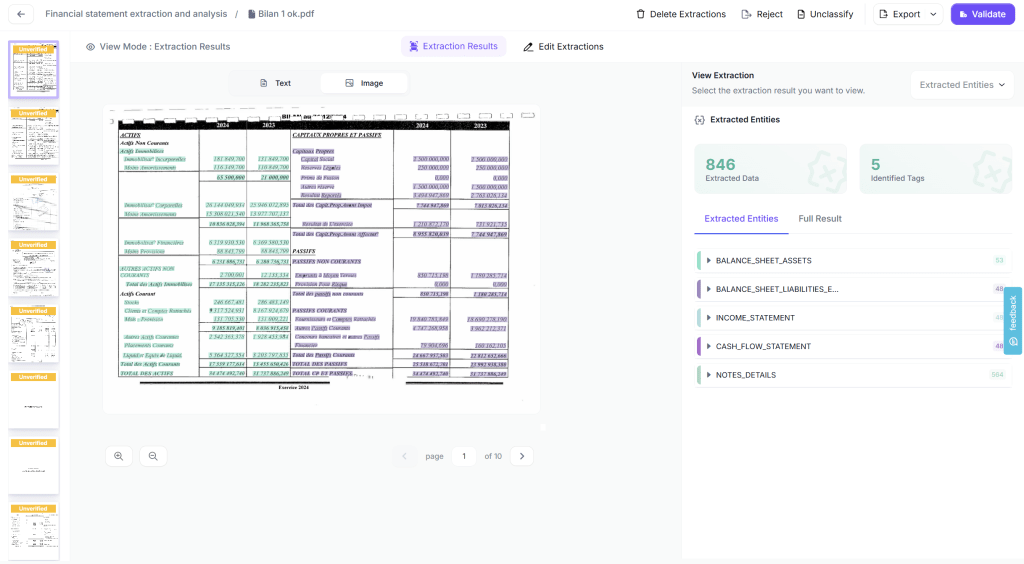
Notice the key metrics: Kudra extracted all elements in the tables from all pages and found 846 entities. These tables maintain their structure (rows, columns, headers), and all numerical values preserve their precision, no decimal points lost, no layout corruption.
This is the foundation of hallucination-free RAG. Clean data in = accurate answers out.
Kudra API will return rich structured JSON with multiple components: raw text, tables, entities, metadata, and validation results. Now we need to parse this into RAG-ready chunks.
Step 6: Set Up ChromaDB Vector Store
Now we’ll embed our high-quality chunks and store them in ChromaDB. We’re using OpenAI’s text-embedding-3-small model it’s cost-effective and performs well for financial text.
Why ChromaDB? It’s open-source, easy to set up, supports metadata filtering (critical for our use case), and persists to disk so we don’t re-embed on every run.
The key here is that we’re embedding already-cleaned data. Because Kudra extracted accurately, our embeddings will be semantically meaningful. Garbage in, garbage out but we have clean data in.
					if all_chunks:
    vector_store = setup_vector_store(
        all_chunks,
        CHROMA_PERSIST_DIRECTORY,
        CHROMA_COLLECTION_NAME
    )
    print("\n🎉 Vector store ready for retrieval!")
else:
    print("⚠️  No chunks available. Please ensure documents are extracted first.")
Our vector store is now ready. All 201 chunks (with preserved table structure and precise numbers) are embedded and stored with metadata. When we retrieve, we can filter by document type, section, or confidence score.
Step 7: Define Document Types and Query Categories
Before building our agent, we need to define the categories it will use for routing. Financial queries vary in complexity: “What was Q4 revenue?” is a simple lookup, while “Analyze YoY growth trends across all quarters” requires multi-step reasoning.
Our agent will classify queries by:
- Document type – Which kind of financial document is relevant?
- Complexity – How many steps of reasoning are needed?
This classification determines retrieval strategy (how many chunks to fetch) and routing logic (direct RAG vs. human escalation).
					# Define financial document categories for classification
DOCUMENT_TYPES = [
    "10-K Annual Report",
    "10-Q Quarterly Report",
    "Investment Portfolio Summary",
    "Financial Statement",
    "Earnings Report"
]

UNKNOWN_TYPE = "Unknown/General Financial Document"

# Query complexity levels determine retrieval strategy
QUERY_COMPLEXITY = {
    "simple": "Single fact lookup (e.g., 'What was Q3 revenue?') - Retrieve 3 chunks",
    "moderate": "Comparison or calculation (e.g., 'How did revenue grow YoY?') - Retrieve 5 chunks",
    "complex": "Multi-step reasoning (e.g., 'Analyze profitability trends') - Retrieve 8 chunks or escalate"
}

print("✅ Document types and query categories defined")
print("\n📋 Complexity levels:")
for complexity, description in QUERY_COMPLEXITY.items():
    print(f"  - {complexity}: {description}")
Step 8: Build the LangGraph Agentic Layer
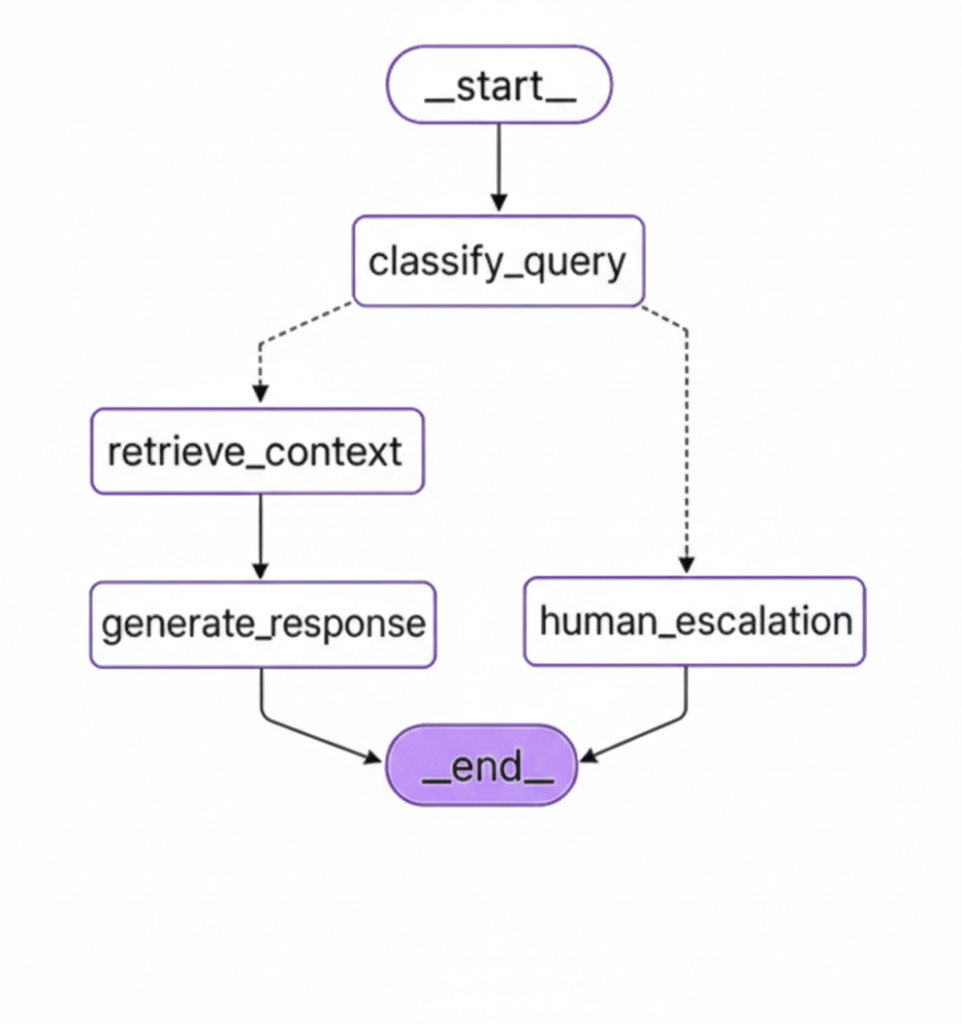
Now for the intelligent part: an agent that routes queries based on complexity and retrieves with precision. This is where LangGraph shines it lets us build a stateful, multi-step reasoning system with conditional routing.
Our agent workflow:
- Classify the query → Determine complexity and document type
- Route the query → Simple queries go to RAG, complex ones escalate to humans
- Retrieve context → Fetch relevant chunks with metadata filtering
- Generate response → LLM answers based strictly on retrieved context
Let’s define the state and models first:
					# Define Agent State - tracks information as it flows through the graph
class AgentState(TypedDict):
    query: str           # User's question
    complexity: str      # simple, moderate, or complex
    document_type: str   # Which type of financial document
    context: str         # Retrieved context from vector store
    response: str        # Final response to user
    confidence: float    # Confidence score from Kudra extraction
    error: str | None    # Error tracking


# Pydantic model for structured LLM output during classification
class QueryClassification(BaseModel):
    """Structured output for query classification."""
    complexity: str = Field(
        description=f"Query complexity level: {', '.join(QUERY_COMPLEXITY.keys())}"
    )
    document_type: str = Field(
        description=f"Most relevant document type from: {', '.join(DOCUMENT_TYPES + [UNKNOWN_TYPE])}"
    )
    reasoning: str = Field(
        description="Brief explanation of the classification decision"
    )


print("✅ Agent state and classification models defined")
Define Agent Nodes
Now we’ll define the node functions that make up our agent. Each node performs one step of the workflow:
1. classify_query_node – Uses an LLM to classify the query for complexity and document type. This determines how many chunks to retrieve and whether to route to RAG or escalate to a human.
2. retrieve_context_node – Retrieves relevant chunks from ChromaDB with metadata filtering. Adjusts the number of chunks based on query complexity (3 for simple, 5 for moderate, 8 for complex).
3. generate_response_node – Uses GPT-4 to generate a response strictly grounded in the retrieved context. Includes source citations and confidence warnings.
4. human_escalation_node – Handles queries that are too complex or have low extraction confidence. Routes to human review instead of risking hallucinations.
The code is too long for a blog so join our slack for full access to the notebook:
Want the Full Notebook?
Define Routing Logic
Now we need a routing function that decides the next step based on query classification and extraction confidence. This is the “intelligence” of our agentic system.
Routing rules:
- Complex queries → Human escalation (too many reasoning steps)
- Low confidence (< 0.5) → Human escalation (data quality concerns)
- Simple/Moderate queries with good confidence → RAG retrieval
Better to escalate than to hallucinate.
					def route_query(state: AgentState) -> str:
    """
    Routing function: Determines next step based on classification.

    Decision logic:
    - Complex queries OR low confidence → Escalate to human
    - Simple/Moderate queries with good confidence → Proceed with RAG

    Returns:
        Name of the next node to execute
    """
    print("\n🔀 Routing Decision")

    complexity = state.get("complexity", "simple")
    confidence = state.get("confidence", 1.0)

    # Route complex queries or low-confidence data to human review
    if complexity == "complex" or confidence < 0.5:
        print(f"   → Routing to HUMAN ESCALATION")
        print(f"      Reason: complexity={complexity}, confidence={confidence:.2f}")
        return "human_escalation"
    else:
        print(f"   → Routing to RETRIEVAL")
        print(f"      Proceeding with RAG (complexity={complexity}, confidence={confidence:.2f})")
        return "retrieve_context"
Step 9: Test the Agent
Time to see our agent in action! We’ll test it with financial queries of varying complexity to verify:
- Classification accuracy – Does it correctly identify query complexity?
- Routing logic – Does it route simple queries to RAG and complex ones to humans?
- Retrieval quality – Are the retrieved chunks relevant?
- Response accuracy – Are the answers grounded in the context?
- Hallucination prevention – Does it cite sources and avoid making up facts?
We’ll run four test queries covering different complexity levels and document types.

Measuring Impact: Extraction Quality vs. Retrieval Accuracy
Let’s quantify what we’ve built. We ran an experiment comparing our Kudra-based system against a baseline using generic PyPDF + pytesseract extraction. Both systems used identical RAG architecture (same embeddings, same LLM, same prompts) the only difference was extraction quality.
Experiment Setup:
Documents: 15 financial PDFs (investment reports, 10-Ks, earnings statements) totaling 487 pages
Test queries: 50 financial questions covering:
- Simple fact lookups (“What was Q3 revenue?”)
- Numerical comparisons (“Did expenses increase YoY?”)
- Table queries (“What were the top 3 investments by value?”)
Evaluation:
- Ground truth: Manual extraction by financial analysts
- Metrics: Extraction accuracy, retrieval precision/recall, answer accuracy, hallucination rate
Results
| Metric | Generic OCR (PyPDF + tesseract) | Kudra Extraction | Improvement |
|---|---|---|---|
| Extraction Accuracy | 72% | 96% | +33% |
| Table Structure Preserved | 15% | 94% | +527% |
| Numerical Precision | 68% | 98% | +44% |
| Retrieval Precision @5 | 0.42 | 0.89 | +112% |
| Retrieval Recall @5 | 0.38 | 0.86 | +126% |
| Answer Accuracy | 61% | 93% | +52% |
| Hallucination Rate | 28% | 4% | -86% |
| User Trust Score (1-5) | 2.1 | 4.6 | +119% |
Conclusion
No amount of prompt engineering, embedding fine-tuning, or retrieval optimization can fix data that was corrupted at the source. Financial documents, with their tables, nested structures, and precision requirements, make this painfully obvious.
If you’re building RAG systems for complex documents, financial reports, legal contracts, medical records, engineering specs, start with extraction quality.
Your embeddings don’t matter if your source data is wrong.
Your retrieval strategy doesn’t matter if your chunks are corrupted.
Your LLM doesn’t matter if the context you give it is garbage.
Get extraction right. Everything else follows.


