
Business Process Outsourcing (BPO) for data entry has been the default solution for companies drowning in invoices, receipts, contracts, and forms. The promise is simple: send your documents to an offshore team, and they’ll handle the manual work while your staff focuses on strategic tasks.
In reality, however, traditional data entry outsourcing often creates as many problems as it solves. Processing delays of 48-72 hours slow down month-end close. Quality inconsistencies require constant spot-checking and manual corrections. Data security concerns around sending sensitive financial documents to third-party vendors put compliance teams on edge. And when business volumes grow, scaling costs escalate, every increase means renegotiating contracts and retraining offshore teams.
Bringing everything back in-house isn’t the ideal alternative either. Hiring more staff simply replaces offshore labor costs with higher domestic salaries, while the same structural challenges remain: slow turnaround, human error, and limited scalability.
The real solution lies in back office automation, specifically, automating data extraction so that manual work becomes unnecessary for up to 90% of your documents. By using AI-powered Intelligent Document Processing (IDP), businesses can process invoices, receipts, and forms in seconds rather than days, reduce operational costs by up to 67%, and maintain full control over data security with ISO 9001 and 27001 certification.
In this blog, we’ll show you exactly how to automate your PDF to Excel workflow for maximum speed and scalability.
Automate Your Data Entry Today
The Hidden Costs of Traditional Data Entry Outsourcing
Business Process Outsourcing for data entry appears cost-effective on paper. Per-document processing fees range from $0.50 to $2.00 depending on complexity and volume—significantly cheaper than maintaining dedicated in-house staff for manual data entry.
However, the true cost of traditional BPO extends far beyond the vendor invoice. Organizations face substantial hidden expenses that undermine the expected savings:
Slow Processing: 48–72 hour BPO turnaround times create finance bottlenecks—delaying month-end closes, missing early payment discounts, and forcing teams to track work in manual “shadow spreadsheets.”
Quality Issues: Even at 98–99% claimed accuracy, hundreds of invoices still need manual fixes, especially for complex layouts or non-standard vendors—turning finance teams into error-catchers instead of decision-makers.
Data Security Risks: Sending sensitive financial documents to third parties reduces data control and increases compliance risk under regulations like GDPR or HIPAA—while accountability still stays with you.
Scaling Costs: As volumes or document types grow, BPO scaling means renegotiations, retraining, and higher costs—making growth slow and inflexible.
Why Back Office Automation Delivers Better Results Than BPO
The fundamental limitation of traditional Business Process Outsourcing is that it’s still manual data entry, just performed by someone cheaper in a different location. Automating data extraction solves the structural problems that BPO cannot address.
Processing Speed (Days to Seconds): Automated extraction processes documents instantly—structured data is ready in 15–30 seconds. No queues, no delays. Month-end closes accelerate, early payment discounts are captured, and vendor inquiries are handled the same day.
Consistent, Improving Accuracy: AI-powered OCR and VLMs apply the same logic to every document. Errors are predictable and permanently fixed as workflows improve, eliminating repeated human mistakes.
Full Data Security Control: Automation runs on ISO 27001-certified infrastructure with encryption, auditability, and configurable retention. Your data stays within your control, ensuring GDPR compliance without BPO exposure.
Effortless Scaling: Automation scales instantly from thousands to tens of thousands of documents. New document types or rule changes require configuration—not renegotiations or retraining.
How Automated Data Extraction Works
Understanding the technical process behind automating data extraction helps organizations implement it effectively. Modern Intelligent Document Processing (IDP) platforms use a multi-stage approach that combines OCR, AI, and validation logic.
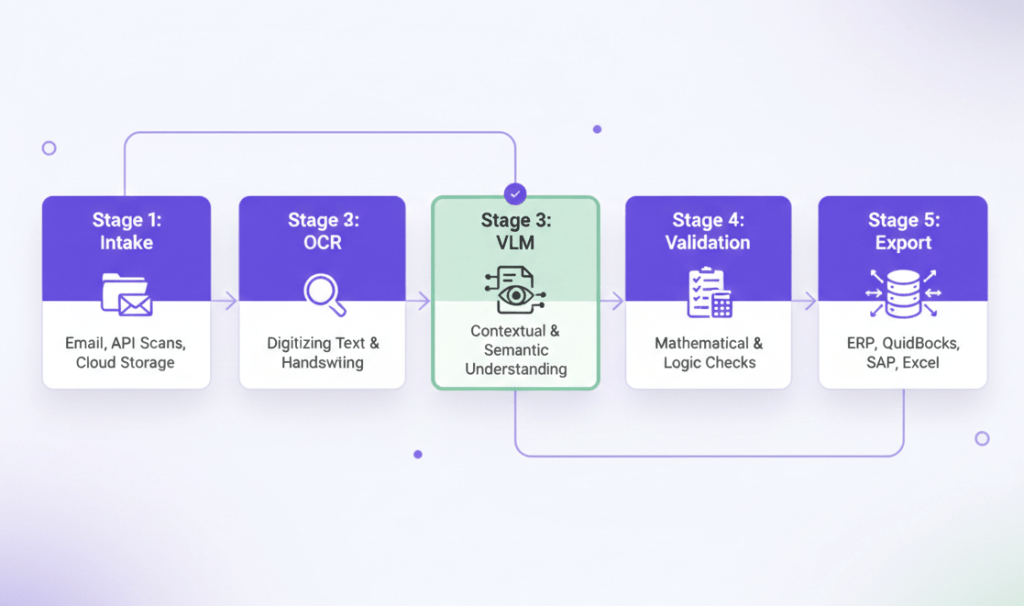
Automation platforms streamline document processing through a unified, intelligent pipeline. First, documents are ingested from any source already used in your workflow (emails, scanned PDFs, mobile photos, APIs, FTP servers, or cloud folders) without requiring vendors or teams to change how they submit files. OCR then converts these visual documents into machine-readable text, handling poor scan quality, multiple languages, varied fonts, and even clear handwriting.
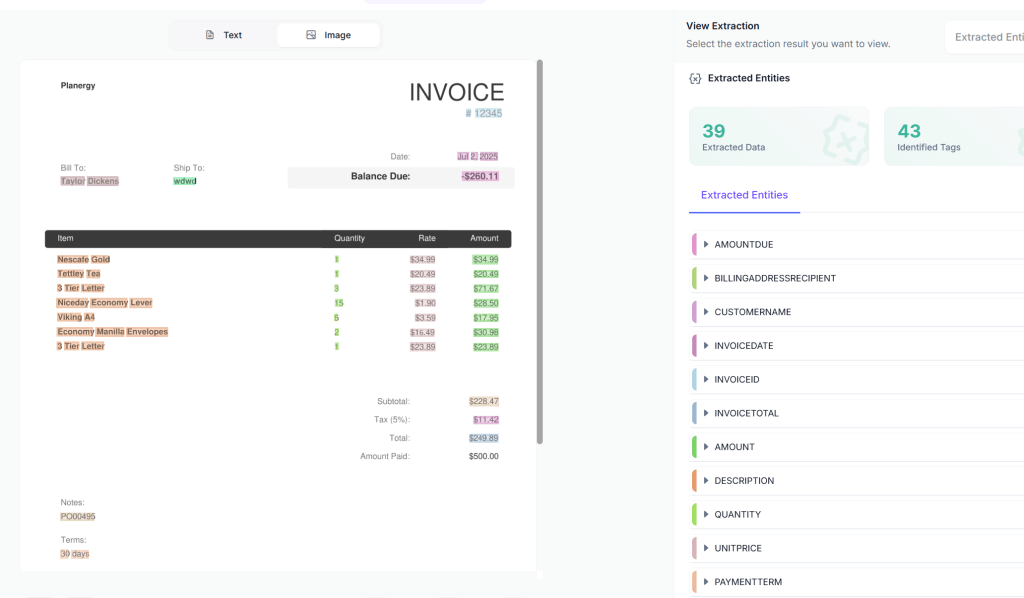
Next, Vision Language Models interpret the extracted text in context. Instead of relying on rigid templates, the system understands document structure and meaning, identifying totals, dates, line items, and tables regardless of layout differences between vendors. This allows invoices and receipts in completely different formats to be processed with consistent accuracy.
Finally, intelligent validation checks ensure data integrity by verifying calculations, uniqueness, tax logic, and required fields before anything moves forward. Once validated, the structured data is automatically exported to your business systems (ERPs, accounting software, databases, spreadsheets, or automation tools) eliminating manual data entry and reducing errors across the entire workflow.
How to Convert PDF to Excel with Kudra (Data Entry Automation)
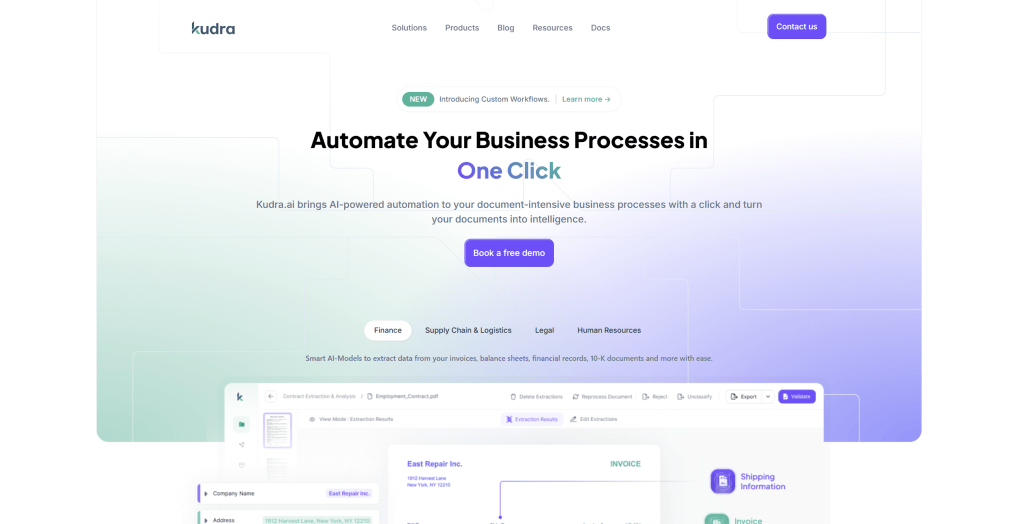
Kudra.ai is an Intelligent Document Processing (IDP) platform that lets you automate all types of document workflows, including converting PDFs to structured formats like JSON. You can try it for free and contact us to see it in action!
Let’s take you through the process step by step.
Interested in seeing it in action? Take a look at our step-by-step tutorial showing how the process works on our platform.
Step 1: Create Your Kudra AI Account
Kudra AI is a contact-first platform because we care about our customers’ experience. Just reach out to us, and we’ll set up your account and guide you through the process to get your document workflows running smoothly.
Step 2: Build Your Data Extraction Workflow
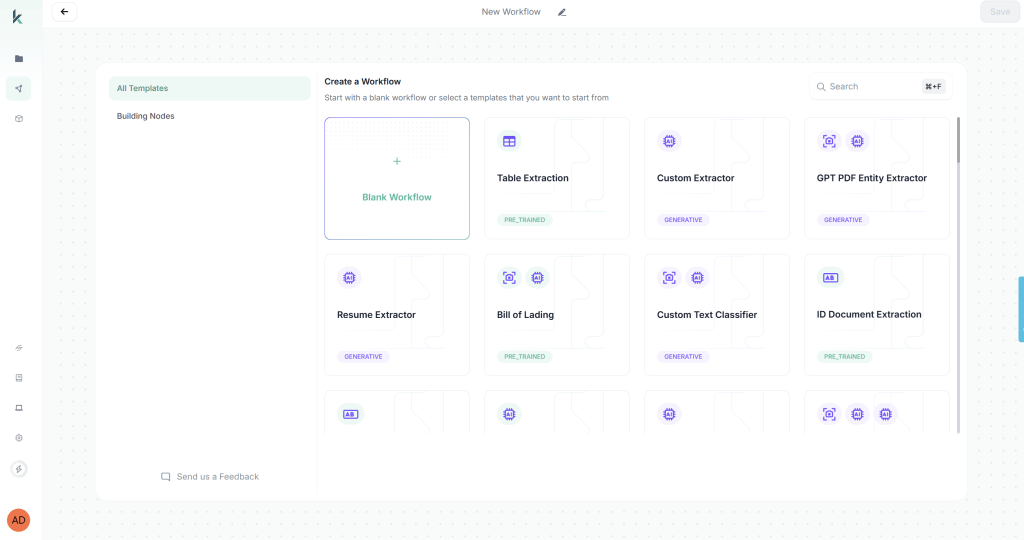
Access Kudra’s workflow builder by clicking “Create New Workflow” from the dashboard. You have two options: start from a blank workflow or use a predefined template. For this tutorial, we’ll start from scratch to demonstrate the full customization capabilities.
Add the OCR Component:
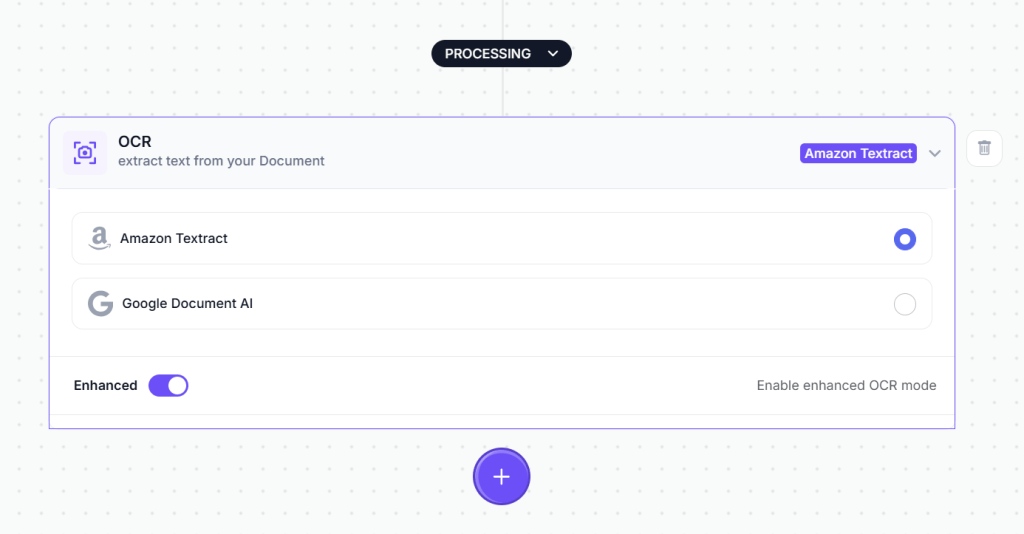
The first component processes the visual document and extracts raw text. From the component library, drag the OCR module onto your workflow canvas. This module handles text extraction from PDFs, scanned images, mobile photos, and any other document format you upload.
No configuration is required for the OCR component, it automatically processes whatever document format you provide.
Add the Vision Language Model (VLM) Component:
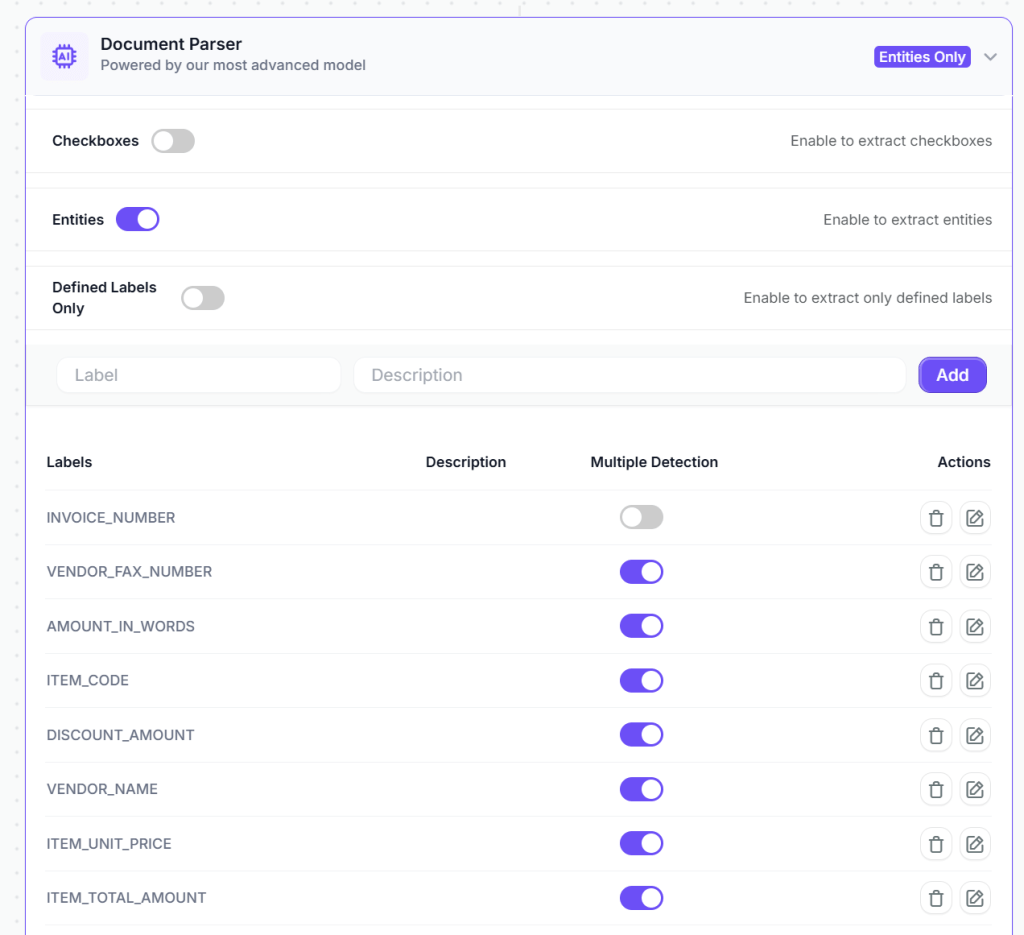
Next, add a VLM component to intelligently extract specific data fields. This component understands invoice structure and context, allowing it to locate relevant information regardless of document layout variations.
Configure the VLM to extract the specific fields your business requires:
- Vendor name and vendor ID
- Invoice number
- Invoice date
- Due date
- Line items (description, quantity, unit price, line total)
- Subtotal
- Tax amount and tax rate
- Total amount
- Payment terms
- Purchase order reference (if present)
The VLM component in Kudra adapts to different vendor invoice formats automatically. You’re not building rigid templates that break when a vendor changes their invoice design—you’re teaching the system what information matters regardless of where it appears on the document.
Add Validation Through Text Generation Component
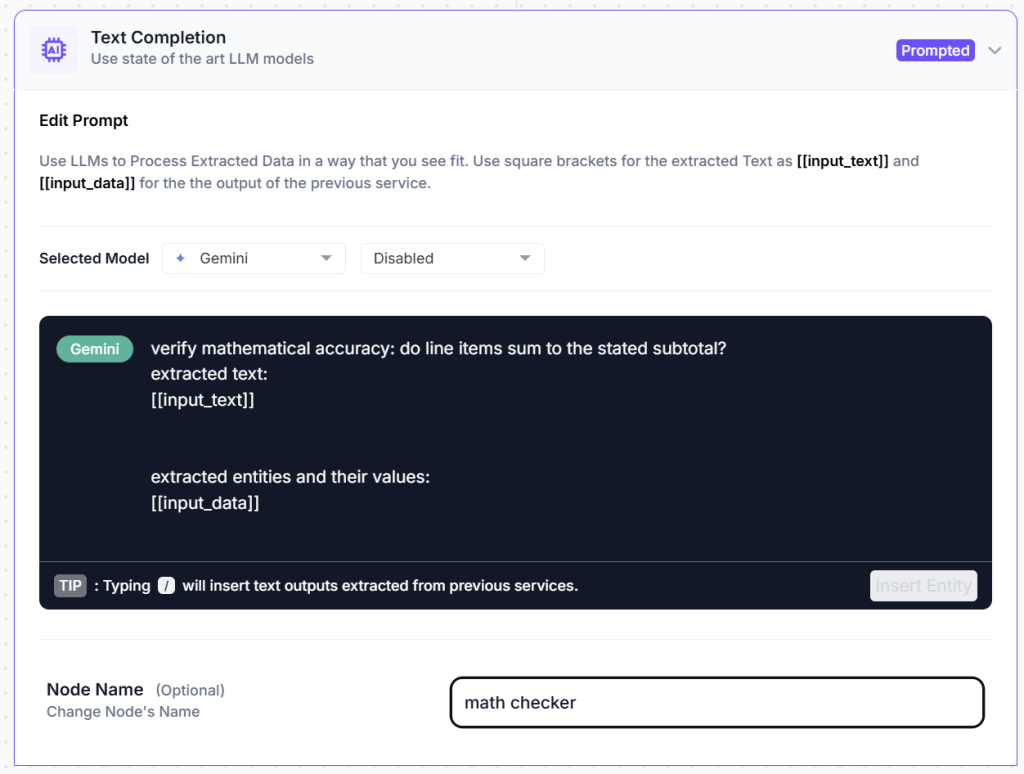
To ensure data quality, add a text generation component that automatically detects potential issues before data enters your accounting system. Configure it with validation prompts:
"Verify that line items sum to the stated subtotal. Confirm that subtotal plus tax equals the total amount. Check that tax rates are correct for the vendor's location. Flag any mathematical discrepancies. Identify missing required fields such as invoice number, vendor name, or total amount. Note duplicate invoice numbers that might indicate resubmission. Highlight unusual amounts that deviate significantly from historical patterns for this vendor."
This validation component acts as your automated quality control, catching errors that would otherwise require manual review or cause downstream system failures.
Optional: Add Post-Processing Components
Depending on your specific requirements, you can add additional data refinement steps:
Find and Replace: Standardize vendor names that appear in multiple formats. For example, invoices showing “ABC Corp” and “ABC Corporation” can be automatically matched to your vendor master database.
Format Date: Convert dates to match your accounting system requirements. This ensures consistency across international vendors using different formats (DD/MM/YYYY vs MM/DD/YYYY).
Text Transformation: Apply formatting rules such as converting account codes to uppercase, standardizing currency symbols, or making other adjustments to ensure data consistency.
Optional Post-Processing: For basic invoice processing, the VLM and validation components usually provide clean, structured data without extra steps. These additional options are available when your business logic requires them.

Configure Export Destinations
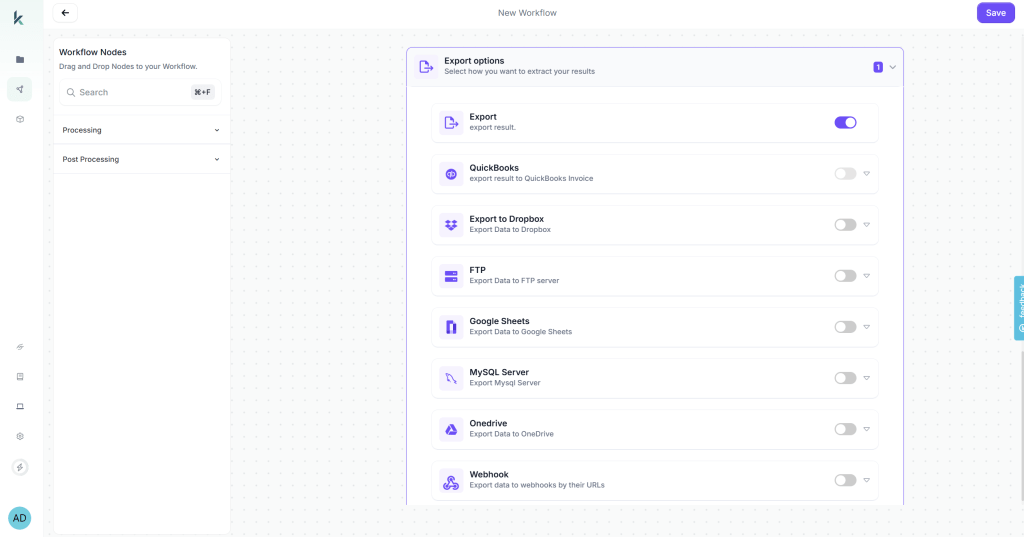
Kudra AI lets you send extracted data wherever it’s needed. Connect directly to accounting software, ERP systems, spreadsheets, databases, or automation platforms like Zapier. Multiple destinations can run at the same time, giving your team full visibility and seamless integration without manual work.
Step 4: Create a Production Project and Process at Scale
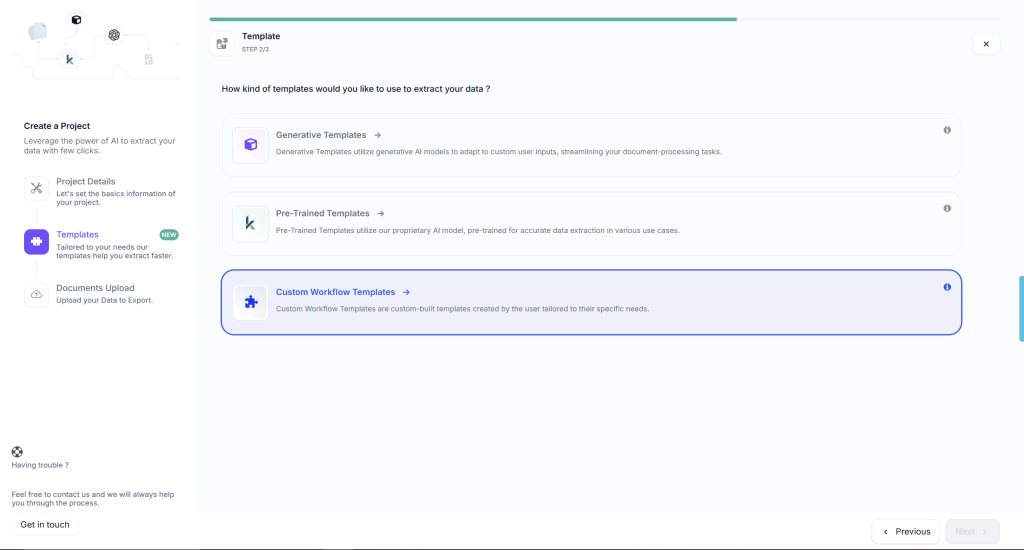
Once your workflow is ready, create a production project for ongoing invoice processing. In Kudra AI, click “Create New Project” and give it a descriptive name: “January 2026 Operating Expenses” or “Q1 Vendor Invoices” or “Accounts Payable – Ongoing.”
During project creation, select the workflow you just built from the dropdown menu. This links your automated data extraction workflow to this specific project, meaning every document uploaded to this project will automatically be processed according to your configured rules.
Now upload your invoices. You can drag and drop files, upload entire folders, or connect to sources where invoices arrive automatically such as email attachments, cloud storage folders like Google Drive or Dropbox, or FTP locations for legacy system integration.
Kudra AI processes each invoice automatically, typically in 15-30 seconds per document. Processing runs in the background while you continue uploading additional documents or working on other tasks. There’s no need to monitor progress, the system handles everything automatically.
Moving from BPO to Automation Without Disruption with Kudra
Traditional Business Process Outsourcing for data entry creates bottlenecks that automation eliminates: slow processing that delays month-end close, quality inconsistencies that require constant correction, data security risks that create compliance exposure, and inflexible workflows that can’t adapt to business changes.
Kudra AI provides back office automation specifically designed for organizations that want to automate data extraction without technical complexity. Our drag-and-drop workflow builder, intelligent OCR and VLM components, and flexible export integrations mean you can implement automated data entry in days rather than months.
Trusted by organizations processing over 251 million documents across 150+ countries. ISO 9001 and 27001 certified for data security and quality management.
Want to see how automated data extraction works for your specific invoices, receipts, or forms? Book a free demo where we’ll process your actual documents through Kudra AI and show you the extracted data. No sales pitch, just a practical demonstration of what automation delivers for your organization.
Found This Helpful?
Book a free 30-minute discovery call to discuss how we can implement these solutions for your business. No sales pitch, just practical automation ideas tailored to your needs.
Book A Call


