
In the fast-paced world of business, every second counts. Yet, countless hours are still wasted on mundane tasks that could be easily automated. The mere thought of manually inputting data from hundreds, if not thousands, of invoices is enough to make even the most diligent accountant shudder. But what if there was a way to eliminate this tedious process? Enter invoice scanning software – the game-changing solution that’s revolutionizing how businesses handle their financial documentation. In 2024, as we continue to embrace digital transformation across all sectors, the adoption of such intelligent tools has become not just a luxury, but a necessity for businesses aiming to stay competitive and efficient.
The purpose of this comprehensive guide is to shed light on the immense benefits of leveraging invoice scanning software in managing business finances more efficiently. We’ll delve deep into the world of automated invoice processing, exploring how this technology works, the value it brings to businesses of all sizes, and how cutting-edge solutions like Kudra are leading the charge in this digital revolution.
By the end of this article, you’ll have a thorough understanding of invoice scanning software, its potential to transform your financial processes, and how to choose the right solution for your business needs. So, let’s embark on this journey to streamline your invoice management and propel your business into a more efficient future.
Understanding Invoice Scanning Software

Defining Invoice Scanning Software
At its core, invoice scanning software is a sophisticated technological solution designed to automate the process of capturing, interpreting, and processing invoice data. This innovative tool bridges the gap between physical or digital invoices and your financial systems, eliminating the need for manual data entry and significantly reducing the potential for human error.
In the context of modern business, invoice scanning software has become an indispensable asset. As companies strive for greater efficiency and accuracy in their financial operations, this technology offers a streamlined approach to managing one of the most fundamental aspects of business finance – invoice processing.
The relevance of invoice scanning software in today’s business landscape cannot be overstated. With the increasing volume of transactions in our globalized economy, manually processing invoices has become not just inefficient, but practically unfeasible for many organizations. Invoice scanning software addresses this challenge head-on, offering a scalable solution that can handle growing invoice volumes without a proportional increase in time or resources.
At the heart of invoice scanning software lies a powerful technology known as Optical Character Recognition (OCR). OCR is the foundational technology that enables these systems to ‘read’ and interpret text from scanned images or PDF documents. It’s what allows the software to transform the information on an invoice – be it printed or handwritten – into machine-readable data that can be processed and integrated into your financial systems.
But modern invoice scanning software goes beyond simple OCR. Many solutions, including advanced platforms like Kudra, incorporate artificial intelligence (AI) and machine learning (ML) algorithms to enhance their capabilities. These AI-powered systems can learn from each processed invoice, continually improving their accuracy and ability to handle complex or non-standard invoice formats.
Functioning of Invoice Scanning Software
To truly appreciate the value of invoice scanning software, it’s crucial to understand how it operates. The process typically involves several key steps:
1. Capturing: The first step is to capture the invoice image. This can be done through various means – scanning physical documents, uploading digital files, or even capturing images with a smartphone camera. Advanced systems can also directly import invoices from email attachments or cloud storage services.
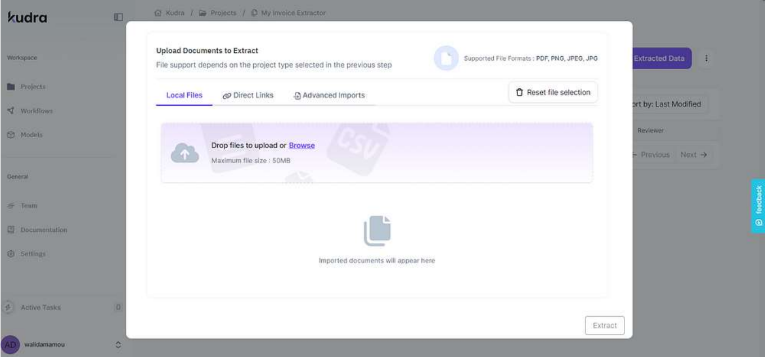
2. Reading: Once the invoice is captured, the OCR technology comes into play. It scans the document, recognizing and interpreting the text and numbers present on the invoice. This step transforms the visual information into machine-readable data.
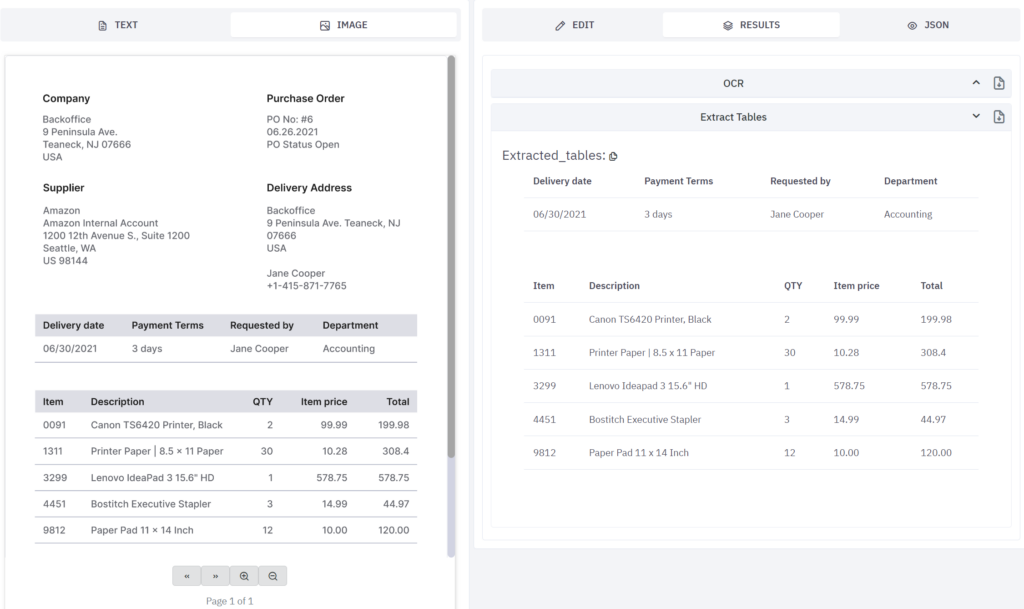
3. Extraction: With the text recognized, the software then extracts the relevant information. This includes key data points such as invoice number, date, vendor details, line items, totals, and any other pertinent information. AI-powered systems can intelligently identify and extract this data even when invoice layouts vary.

4. Validation: After extraction, the software validates the data to ensure accuracy. This might involve cross-checking against existing records, performing calculations to verify totals, or flagging any discrepancies for human review. This step is crucial in maintaining the integrity of your financial data.

5. Integration: Finally, the extracted and validated data is integrated into your existing financial systems. This could be your accounting software, Enterprise Resource Planning (ERP) system, or any other relevant business application. The seamless integration ensures that your financial records are always up-to-date without manual intervention.
Throughout this process, AI and machine learning play a significant role in enhancing accuracy and efficiency. For instance, AI can learn to recognize different invoice formats over time, improving its ability to correctly extract data even from unfamiliar layouts. It can also identify patterns and anomalies, flagging potential issues for human review.
Moreover, advanced systems like Kudra offer additional features that go beyond basic invoice scanning. These might include the ability to process-related documents like purchase orders and receipts and automate three-way matching for enhanced accuracy and fraud prevention. Some systems also offer intelligent workflow capabilities, automatically routing invoices for approval based on predefined rules.
Understanding the functioning of invoice scanning software is key to appreciating its transformative potential for businesses. Automating these complex processes, not only saves time and reduces errors but also frees up valuable human resources to focus on more strategic, value-adding activities. Now that we established the importance of this software; check How to Choose Invoice Scanning Software for SMEs
The Value of Using Invoice Scanning Software
Benefits of Digitizing Invoices
The shift from traditional, manual invoice processing to a digitized, automated system brings a multitude of benefits that can significantly impact a business’s bottom line. Let’s explore these advantages in detail:
1. Minimizing Manual Tasks: Perhaps the most immediate and obvious benefit of invoice scanning software is the dramatic reduction in manual data entry. No longer do staff members need to spend hours inputting invoice details into accounting systems. This not only saves time but also eliminates the monotony of repetitive tasks, allowing employees to focus on more meaningful work.
2. Time Savings: The time saved through automation is substantial. What might take hours or even days to process manually can be accomplished in minutes with invoice scanning software. This rapid processing allows for quicker payment cycles, potentially improving relationships with vendors and even opening up opportunities for early payment discounts.
3. Enhanced Accuracy: Human error is an inevitable part of manual data entry. Even the most diligent employees can make mistakes, especially when dealing with large volumes of invoices. Invoice scanning software, powered by OCR and AI technologies, can achieve accuracy rates that far surpass manual processing. This increased accuracy translates to fewer disputes, smoother audits, and more reliable financial reporting.
4. Cost Reduction: While there’s an initial investment in implementing invoice scanning software, the long-term cost savings are significant. Reduced labor costs, fewer errors requiring correction, and potential early payment discounts all contribute to a healthier bottom line.
5. Improved Cash Flow Management: With faster processing times and more accurate data, businesses gain better visibility into their financial situation. This improved insight allows for more effective cash flow management, helping businesses make informed decisions about when to pay invoices and how to allocate resources.
6. Enhanced Security and Compliance: Digital invoice processing provides a clear audit trail and secure storage of financial documents. This is particularly valuable for maintaining compliance with financial regulations and simplifying the audit process. Many invoice scanning solutions also offer role-based access controls, ensuring that sensitive financial information is only accessible to authorized personnel.
7. Scalability: As businesses grow, so does the volume of invoices they need to process. Invoice scanning software can easily scale to handle increased volumes without a proportional increase in resources or time. This scalability is crucial for businesses experiencing or anticipating growth.
8. Environmental Impact: By reducing the need for paper invoices and physical storage, businesses can significantly decrease their environmental footprint. This aligns with growing consumer expectations for corporate sustainability and can be a positive factor in a company’s public image.
9. Data Insights: Many advanced invoice scanning solutions offer analytics capabilities. By digitizing invoice data, businesses can more easily analyze spending patterns, identify cost-saving opportunities, and make data-driven decisions about their procurement processes.
For deeper insights, you can check our article ” How invoice scanning software can transform your business “
Impact on Business Efficiency
The adoption of invoice scanning software doesn’t just streamline a single process; it has a ripple effect that enhances overall business efficiency. Here’s how:
1. Freeing Up Human Resources: By automating the invoice processing task, employees who were previously bogged down with data entry can now focus on more strategic, value-adding activities. This could involve analyzing financial data, improving vendor relationships, or identifying cost-saving opportunities.
2. Faster Financial Close: With invoices processed more quickly and accurately, the month-end or year-end financial close process becomes much smoother. This allows for more timely financial reporting, which in turn supports better decision-making at the management level.
3. Improved Cash Flow Forecasting: The speed and accuracy of automated invoice processing provide real-time visibility into accounts payable. This allows for more accurate cash flow forecasting, helping businesses better manage their working capital.
4. Enhanced Procurement Processes: Many invoice scanning solutions can be integrated with procurement systems. This integration allows for automated three-way matching between purchase orders, receiving documents, and invoices, further streamlining the procure-to-pay cycle.
5. Better Vendor Management: With a clear digital trail of all invoices and payments, businesses can more easily track vendor performance, identify preferred suppliers, and negotiate better terms based on accurate spending data.
6. Reduced Storage Costs: Digitizing invoices eliminates the need for physical storage space, reducing costs associated with maintaining paper records. It also makes retrieving historical invoice data much faster and easier.
7. Improved Audit Readiness: With all invoice data digitized and easily searchable, businesses can respond to audit requests more quickly and confidently. This can significantly reduce the stress and disruption often associated with audits.
8. Enhanced Business Intelligence: The wealth of data captured through digital invoice processing can feed into business intelligence tools, providing valuable insights into spending patterns, supplier performance, and potential areas for cost optimization.
9. Increased Agility: In today’s fast-paced business environment, agility is key. Invoice scanning software allows businesses to quickly adapt to changing circumstances, whether that’s a sudden increase in invoice volume, a shift to remote work, or the need to quickly analyze historical spending data.
10. Competitive Advantage: In many industries, the efficiency gains from implementing invoice scanning software can translate into a significant competitive advantage. Faster processing times, better cash flow management, and more strategic use of human resources all contribute to a leaner, more responsive organization.
The impact of high-quality invoice processing on overall business productivity and efficiency cannot be overstated. By eliminating bottlenecks in the accounts payable process, businesses can operate more smoothly, make better-informed decisions, and ultimately, drive growth and profitability.
As we move further into the digital age, the adoption of technologies like invoice scanning software is becoming less of a luxury and more of a necessity for businesses looking to remain competitive. The efficiency gains and cost savings offered by these solutions provide a clear return on investment, making them an attractive option for businesses of all sizes across various industries.
Kudra': an Invoice Scanning Software
Kudra Overview
In the landscape of invoice scanning and intelligent document processing solutions, Kudra stands out as a powerful and versatile AI platform. Designed to analyze and extract information from a wide variety of documents, Kudra goes beyond simple invoice scanning to offer a comprehensive solution for businesses dealing with complex document processing needs.
Kudra’s AI platform is built on the principle of flexibility and customization. It’s not just an out-of-the-box solution, but a robust toolkit that allows businesses to create tailored workflows for their specific document processing needs. Whether you’re dealing with invoices, contracts, bank statements, or any other type of business document, Kudra provides the tools to automate and streamline your document processing tasks.
What sets Kudra apart is its ability to handle unstructured documents. While many invoice scanning solutions struggle with non-standard formats, Kudra’s AI can process a wide array of document types, including PDFs, CSVs, payslips, Word documents, and even images. This versatility makes it an ideal solution for businesses dealing with diverse document types from multiple sources.
Kudra Features as an Invoice Scanning Software
While Kudra is a versatile document-processing platform, its features make it particularly well-suited for invoice scanning and processing. Here’s how Kudra’s capabilities align with the needs of businesses looking for an advanced invoice-scanning solution:
1. Accurate Data Extraction: Kudra’s multiple OCR engines and AI-powered data extraction capabilities ensure high accuracy in reading and interpreting invoice data, even from non-standard or complex invoice formats.
2. Custom Workflows: The visual workflow builder allows businesses to create tailored invoice processing pipelines. This could include steps for data extraction, validation, categorization, and integration with accounting systems.

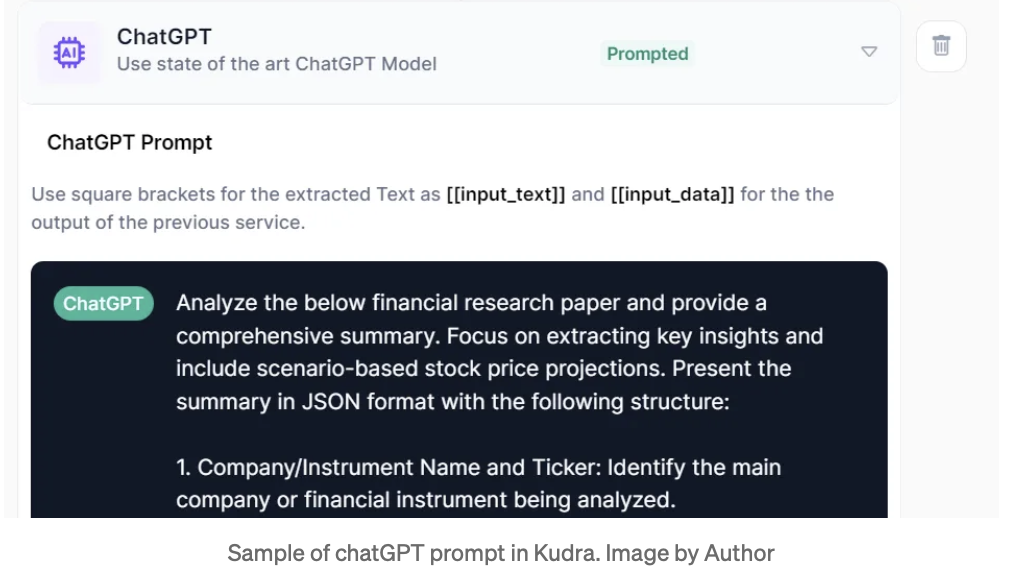
3. Intelligent Classification: The ChatGPT module can be used to automatically categorize invoices, extract key information like payment terms or discount opportunities, and even flag potential issues or discrepancies.

4. Template-Based Processing: For businesses dealing with recurring invoice formats, Kudra’s AI templates can be used to quickly set up efficient processing workflows for common invoice types.
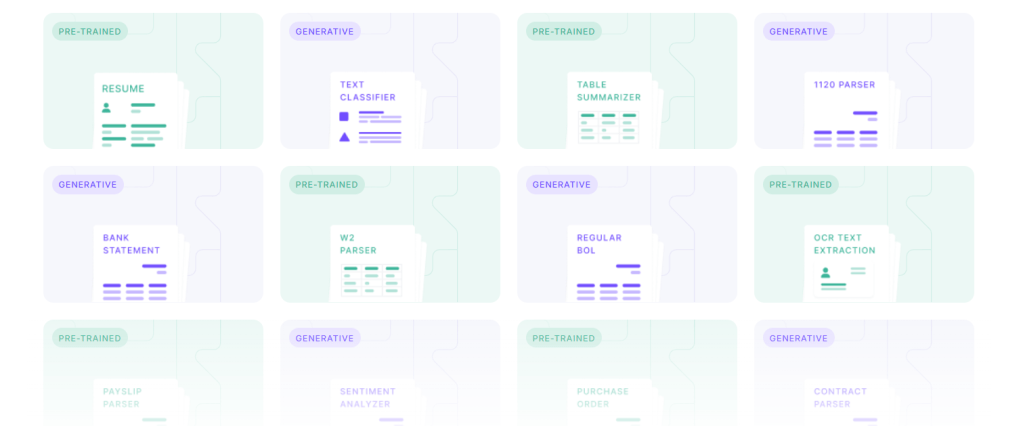
5. Advanced Analysis: Beyond basic data extraction, Kudra’s AI can perform more complex tasks like comparing invoice data with purchase orders, identifying spending patterns, or summarizing invoice contents for quick review.
6. Integration with Financial Systems: Kudra’s flexible export options ensure that processed invoice data can be seamlessly integrated into existing accounting or ERP systems.

By leveraging these powerful features, businesses can transform their invoice processing from a time-consuming, error-prone task into a streamlined, accurate, and intelligent process. Kudra’s ability to handle complex documents, learn from each processed invoice, and integrate seamlessly with existing systems makes it a compelling choice for businesses looking to revolutionize their invoice management.
Conclusion
As the demands of modern business grow, the need for an efficient and accurate invoice reconciliation process becomes more critical than ever. Traditional methods, while foundational, often fall short in managing the complexities of large-scale financial operations. This is where innovative solutions like Kudra’s intelligent document processing platform come into play. By automating key aspects of invoice reconciliation through AI, OCR, and NLP, Kudra enables businesses to streamline their processes, reduce errors, and enhance financial accuracy. As a strategic asset, Kudra not only transforms invoice reconciliation but also empowers organizations to optimize their financial operations, driving both efficiency and growth.


