AI-driven document processing solutions are essential for businesses aiming to optimize data extraction and streamline workflows. Kudra and Rossum are two leading platforms in this space, each offering unique features tailored to different business needs. This article provides a detailed comparison between Kudra and Rossum, focusing on their key features, integrations, and pricing, to help you determine which platform best suits your organization’s document processing requirements.
Kudra Overview
Kudra is a versatile document processing tool designed to offer extensive customization and integration capabilities. It is particularly well-suited for businesses that require precise data extraction, advanced document classification, and tailored workflows. With an intuitive user interface, Kudra is accessible to users with varying levels of technical expertise, making it a flexible solution for organizations across various industries. The platform supports complex document types and offers robust features that enhance efficiency and accuracy in document processing.
Rossum Overview
Rossum is an AI-powered intelligent document processing platform that focuses on automating the extraction of data from structured and semi-structured documents. It is designed to minimize manual data entry by leveraging machine learning and AI to capture and process data with high accuracy. Rossum’s key strength lies in its ability to handle a wide range of document types, including invoices, purchase orders, and receipts, with minimal setup. Its cloud-based solution integrates seamlessly with existing enterprise systems, making it ideal for businesses looking to streamline their document processing workflows.
Kudra VS Rossum
Training custom Machine Learning Models
Data Extraction Without Training
Advanced Document Classification
Seamless Integration with LLMs
Human-in-the-Loop Reviews
Error detection
Custom Workflows
Kudra
Rossum
Kudra key features
1- Advanced Document Processing
Kudra offers powerful tools for Named Entity Recognition (NER), relation extraction, and document classification, making it ideal for complex data extraction tasks. These AI-driven features help streamline workflows and improve the accuracy of document processing.

2- Customizable Workflows
Kudra enables businesses to create custom workflows tailored to specific document processing needs. These workflows can be automated without any coding, allowing for more efficient processing and reduced manual intervention.

3- Optical Character Recognition (OCR)
Kudra provides robust OCR capabilities, ensuring accurate extraction of data from various document types, including scanned images and PDFs. This feature is crucial for industries that handle large volumes of documents requiring precise data capture.

4- User-Friendly Interface
Designed with ease of use in mind, Kudra’s interface is accessible to both technical and non-technical users. This reduces the learning curve and enables teams to quickly adopt and utilize the platform.
5- Collaboration and Quality Control
Kudra supports real-time collaboration, allowing multiple users to work on document-processing projects simultaneously. Features like consensus-based labeling and review workflows ensure data accuracy and consistency.
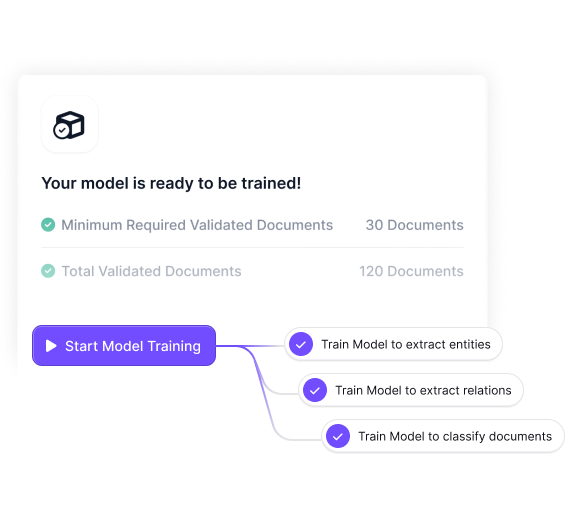
6- Custom Model Training
Kudra allows businesses to train custom machine learning models tailored to their specific document types, enhancing the platform’s ability to handle specialized data extraction tasks.
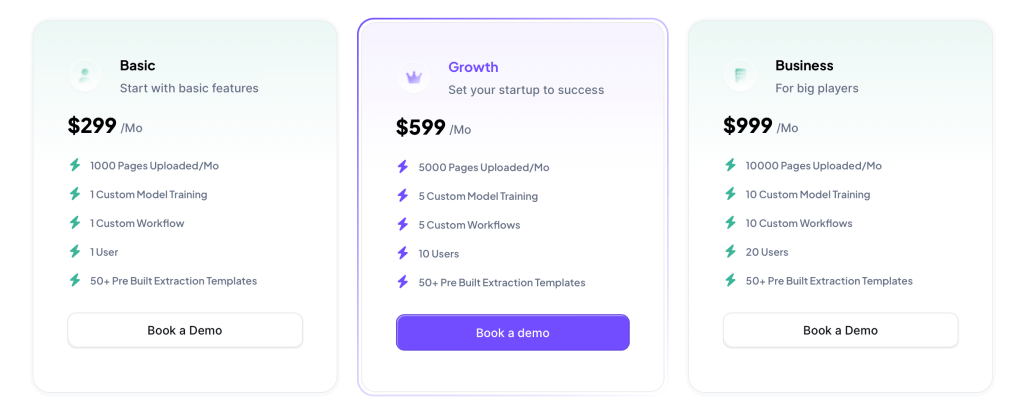
Kudra Pricing
Kudra offers a usage-based pricing model that provides flexibility for businesses to scale their document processing operations as needed. This pricing structure is particularly beneficial for organizations with varying document processing needs, as it allows them to pay only for the features they use.
Rossum Key Features
1- AI-Powered Data Capture
Rossum uses AI and machine learning to capture data from structured and semi-structured documents with high accuracy. Its self-learning technology improves over time, making it increasingly efficient at processing large volumes of documents.
2- Template-Free Processing
Unlike traditional document processing tools that rely on templates, Rossum’s AI can automatically understand the structure of documents without predefined templates. This feature makes it highly adaptable to different document formats.
3- Real-Time Collaboration
Rossum supports real-time collaboration, enabling teams to work together on document processing projects. Users can review, comment, and verify data in real-time, improving workflow efficiency.
4- Integration with Enterprise Systems
Rossum integrates seamlessly with a variety of enterprise systems, including ERP, CRM, and RPA platforms. This integration ensures that extracted data can be automatically routed to the appropriate systems for further processing or analysis.
Rossum Pricing
Rossum’s pricing is typically based on the number of documents processed, with options to scale up based on usage. This model is designed to accommodate businesses of all sizes, with pricing tiers that reflect the volume of documents processed. Rossum also offers a free trial, allowing users to test the platform before committing to a paid plan.

Conclusion
When comparing Kudra and Rossum, the decision comes down to the specific needs of your business. Kudra is ideal for organizations requiring advanced customization, robust OCR capabilities, and tailored workflows. It’s well-suited for industries that handle complex document types and need precise data extraction. Rossum, on the other hand, excels in AI-powered data capture from structured and semi-structured documents, offering template-free processing and seamless integration with enterprise systems. Its scalability and real-time collaboration features make it a strong choice for businesses looking to streamline their document processing workflows. Both platforms offer powerful tools, and understanding their unique strengths will help you choose the best solution for your organization.


